
Magento CRM Integration Guide: How to Connect Magento 2 Open Source & Adobe Commerce to Any CRM in 2026
Managing customer relationships effectively is just as important as managing inventory or orders — and that’s where Magento CRM integration comes in. By connecting your Magento 2 store to a powerful customer relationship management system, you can centralize customer data, automate marketing workflows, track sales opportunities, and deliver more personalized shopping experiences. Whether you choose a platform like Salesforce, HubSpot, Zoho CRM, or any other leading solution, integrating Magento with CRM software transforms your store into a fully connected sales and marketing engine.
In this guide, we’ll explain how Magento CRM integrations work, why they’re essential for both B2B and B2C merchants, and what options you have — from ready-made connectors to custom API solutions and all-in-one integration tools. You’ll learn how to choose the best CRM for Magento, see real-world benefits like improved customer retention and targeted upselling, and discover how our Magento CRM integration service can streamline your workflows. Whether you’re integrating CRM and Magento for the first time or upgrading an existing setup, this article will give you a clear roadmap to boost sales, improve customer engagement, and grow your business without adding operational complexity. Also, note that we highlight a method for Magento 2 CRM integration suitable for both Magento Open Source and Adobe Commerce.

Table of contents
- What is Magento CRM Integration?
- Benefits of Magento 2 CRM Integration
- Methods of Magento 2 Integration with CRM Systems
- Magento Open Source vs. Adobe Commerce CRM Integration
- Improved Import & Export — The All-in-One Solution for Magento 2 CRM Integration
- Step-by-Step: How Magento CRM Integration Works With Improved Import & Export
- Popular CRM Systems to Integrate With Magento 2
- Common Challenges in Magento Integration with CRMs & How to Solve Them
- Final Words: Streamline Your Magento CRM Integration for Adobe Commerce & Open Source in 2026
- Magento CRM Integration FAQ
What is Magento CRM Integration?
Magento CRM integration is the process of connecting your Magento 2 store with a customer relationship management (CRM) system to create a unified, data-driven sales and marketing ecosystem. From an e-commerce perspective, this connection ensures that key customer information — such as contact details, order history, support requests, marketing preferences, and engagement data — flows seamlessly between your storefront and CRM.
Thus, with CRM Magento integration in place, every new customer registration, order, or interaction on your website is automatically recorded in your CRM. This gives sales and marketing teams immediate access to accurate, up-to-date information for lead nurturing, upselling, personalized recommendations, and targeted campaigns. Likewise, updates made in the CRM — such as contact detail changes, lead qualification, or new marketing lists — sync back to Magento, keeping both systems aligned.
Benefits of Magento 2 CRM Integration
Investing in Magento CRM integrations is more than just a technical upgrade — it’s a strategic move to strengthen customer relationships, improve marketing efficiency, and boost sales performance. Here’s how CRM Magento integration can transform your business:
- Centralized customer data for a 360° view — All customer details, purchase history, and engagement metrics are stored in one system, making it easier to segment audiences, personalize campaigns, and deliver consistent service.
- Automated lead and customer management — New customer sign-ups and leads from Magento flow directly into your CRM, where they can be nurtured through automated workflows without manual data entry.
- Improved marketing personalization — Syncing Magento and your CRM enables targeted product recommendations, personalized email campaigns, and cross-selling or upselling based on previous purchases.
- Real-time sales insights — Access up-to-date order data, abandoned cart details, and customer interactions to help your sales team follow up quickly and effectively.
- Faster and more accurate reporting — Consolidated data from both platforms allows for better analysis of customer behavior, marketing ROI, and sales trends.
- Streamlined customer support — Support agents can view order history, preferences, and communication logs directly in the CRM, speeding up response times and improving satisfaction.
- Higher customer retention — Use CRM insights to identify at-risk customers, launch re-engagement campaigns, and reward loyal buyers with targeted offers.
- Scalable workflows for growth — As your business expands into new markets or adds sales channels, Magento CRM integration ensures your data infrastructure can scale without creating silos.
Methods of Magento 2 Integration with CRM Systems
When planning a Magento CRM integration, the connection method you choose is just as important as selecting the right CRM platform. The integration approach determines your level of customization, the complexity of setup, and how easily you can scale in the future. Below are the three main ways to connect Magento 2 with CRM systems — each with its own advantages and potential drawbacks.
1. Using Magento CRM Integration Extensions

The most straightforward option for many merchants is to install a Magento CRM integration module — a ready-made connector that links Magento directly to your CRM. These extensions typically support two-way synchronization of customer profiles, order history, and marketing data, all manageable from the Magento Admin.
Pros:
- Quick deployment with minimal technical skills required.
- Centralized control in the Magento admin panel.
- Often includes features like attribute mapping, automated scheduling, and multi-store support.
Cons:
- Usually limited to specific CRM systems — multiple connectors may be needed if you work with more than one.
- Feature set depends on the extension developer, which can limit customization. Some tools provide one-direction data flows only.
2. Custom API Integration
For businesses with in-house developers or agency partners, CRM Magento API integration offers maximum flexibility. This method uses Magento’s REST or GraphQL APIs together with the CRM’s API to create a tailored, direct connection.
Pros:
- Full control over integration logic, field mapping, and automation rules.
- Works with any CRM that provides an API — from enterprise-grade platforms like Salesforce to specialized niche solutions.
- Easy to adapt and evolve alongside your business needs.
Cons:
- Requires development resources and ongoing maintenance.
- Higher upfront costs and longer implementation timelines compared to extensions.
- Responsibility for updating the code when either Magento or the CRM changes its API.
3. Middleware & iPaaS Platforms
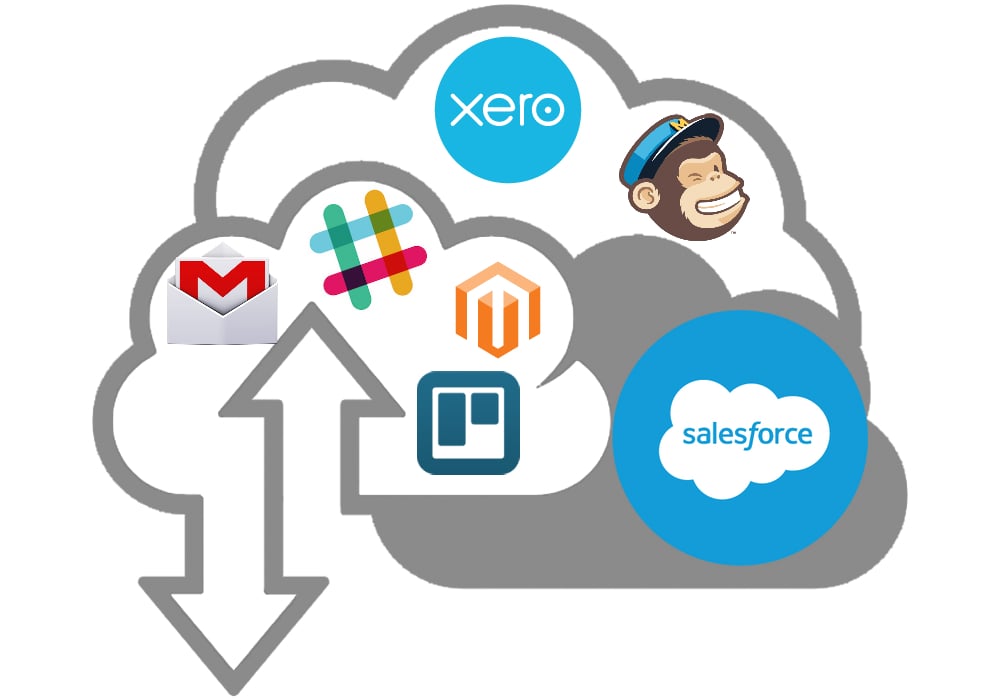
Middleware or integration platforms — such as Zapier, MuleSoft, or Celigo — act as hubs between Magento and one or more CRMs. Instead of a direct one-to-one connection, Magento is linked to the middleware, which then routes and transforms data for the CRM (and potentially other systems like ERP or marketing automation tools).
Pros:
- One connection point for multiple systems beyond just CRM.
- Advanced data transformation, filtering, and automation capabilities.
- Simplifies managing integrations across a large tech stack.
Cons:
- Additional subscription costs for the middleware platform.
- Adds an extra layer that can slightly delay real-time synchronization.
- Steeper learning curve for configuration and management.
Choosing the right Magento CRM integration service depends on your technical capacity, the CRM platform’s capabilities, and your business goals. Smaller merchants may benefit from a ready-made module, while larger enterprises often prefer custom APIs or middleware for broader connectivity and control. However, there is a solution that combines the features of these three integration methods. But before going any further, let’s see if there are any differences between Adobe Commerce CRM integration and Magento Open Source CRM integration.
Magento Open Source vs. Adobe Commerce CRM Integration
Both Magento Open Source and Adobe Commerce can integrate with external CRM platforms to synchronize customer and ecommerce data. The underlying Commerce Web API framework supports integrations with CRM systems and provides REST, GraphQL, and SOAP capabilities.
The main difference is not the ability to connect Magento to a CRM, but the amount and type of customer data and business processes that need to be synchronized. Adobe Commerce adds enterprise customer-management and B2B capabilities that can create more sophisticated CRM integration requirements.
Magento Open Source CRM Integration
Magento Open Source provides the core functionality required to connect an ecommerce store with a CRM. A typical integration can synchronize customer accounts, addresses, orders, products, customer groups, and other information between Magento and platforms such as Salesforce, HubSpot, Microsoft Dynamics, or other CRM solutions.
Common Magento Open Source CRM integration scenarios include:
- Synchronizing customer accounts and contact information
- Sending new customers to the CRM
- Updating customer records between systems
- Transferring order history and purchase information
- Synchronizing customer addresses
- Connecting customer groups with CRM records
- Sending product and catalog information to the CRM
- Using CRM data to support sales and customer service workflows
- Importing customer information from an external CRM into Magento
Magento Open Source can use REST and GraphQL APIs, third-party extensions, middleware, or custom integrations to establish these data flows. The platform’s Web API framework is specifically designed to allow external applications to communicate with Commerce and can be used for CRM and ERP integrations.
For a relatively straightforward B2C store, this approach may be sufficient. For example, a merchant might send every newly registered Magento customer to a CRM, transfer order history, and use the CRM to manage sales and customer communications.
Adobe Commerce CRM Integration
Adobe Commerce provides the same core integration foundation while adding enterprise capabilities that can expand the scope of CRM synchronization. Its customer-management functionality includes advanced features that are not available in Magento Open Source.
One important example is Customer Segments. Adobe Commerce can dynamically assign customers to segments based on attributes such as address, order history, and shopping cart contents. These segments can then be used for targeted content and promotions. Customer Segments are an Adobe Commerce-exclusive feature.
Adobe Commerce also provides B2B customer functionality that can introduce additional CRM data structures. Company users, for example, are customers associated with a company and can have additional attributes such as company ID, job title, status, telephone, roles, and teams.
Consequently, an Adobe Commerce CRM integration may need to synchronize more than basic customer records. Depending on the business model, the integration can include:
- Customer accounts and contact details
- Customer addresses and order history
- Customer groups and customer segments
- Company accounts and company users
- B2B customer roles and organizational structures
- Customer-specific purchasing information
- Quotes and purchasing activity
- Marketing and personalization data
- Customer lifetime value and order-related information
- Multiple websites, stores, and customer scopes
This makes Adobe Commerce particularly relevant for merchants that use a CRM as a central system for sales, account management, marketing, and customer service.
Key Differences Between Magento Open Source and Adobe Commerce CRM Integration
| Integration aspect | Magento Open Source | Adobe Commerce |
| Customer accounts | Supported | Supported |
| Customer addresses and order history | Supported | Supported |
| REST and GraphQL APIs | Supported | Supported |
| Basic CRM synchronization | Supported | Supported |
| Customer groups | Supported | Supported |
| Customer Segments | Not available as a native feature | Available |
| Advanced customer targeting | Requires extensions or external systems | Native Customer Segments can support targeted experiences |
| B2B company structures | Require additional solutions | Supported through Adobe Commerce B2B capabilities |
| Company users | Not part of the standard Open Source feature set | Supported |
| Customer roles and organizational data | More limited | More extensive for B2B use cases |
| CRM integration complexity | Usually lower for standard B2C scenarios | Often higher for B2B and enterprise scenarios |
| Integration architecture | APIs, extensions, middleware, custom development | Same options, with additional Commerce-specific data and workflows |
What Does This Mean for CRM Integration?
The difference between Magento Open Source and Adobe Commerce CRM integration is primarily about the depth of customer data and business processes involved.
A Magento Open Source store may only need to synchronize customer profiles, orders, and contact information with its CRM. This can create a relatively straightforward integration in which Magento acts as the ecommerce system while the CRM manages sales and customer relationships.
An Adobe Commerce implementation can require a more comprehensive customer data model. For example, a B2B merchant may need to connect company accounts, company users, customer roles, purchasing activity, and customer segments with corresponding CRM records. Customer segmentation can also provide an additional layer for personalization and targeted marketing.
Therefore, merchants should define the data ownership, synchronization direction, mapping rules, and update frequency before implementing an Adobe Commerce CRM integration. The CRM may be the source of truth for contacts and sales activities, while Adobe Commerce remains the source of truth for storefront accounts, orders, and ecommerce behavior.
For both platforms, Firebear Improved Import & Export can simplify customer data exchange by providing configurable import/export jobs, field mapping, transformations, scheduled synchronization, and support for multiple data sources and formats. This can be useful when standard CRM connectors do not provide the flexibility required by a particular Magento or Adobe Commerce implementation. Let’s look at more details.
Improved Import & Export — The All-in-One Solution for Magento 2 CRM Integration
While each Magento CRM integration method — extensions, custom APIs, and middleware — has clear advantages, merchants often face trade-offs. Extensions are quick to deploy but may be limited in scope. APIs offer unmatched flexibility but require development resources. Middleware can connect multiple systems, but adds subscription costs and operational complexity.
The Improved Import & Export extension bridges these gaps, delivering a unified approach that captures the strengths of all three methods while reducing their drawbacks.
As Easy as a Magento CRM Integration Extension
- No-code setup — Installs directly into Magento 2 and is configured entirely from the admin panel, making it accessible to non-technical users.
- Prebuilt CRM connectors — Offers ready-made integrations for popular platforms like Salesforce, HubSpot, Zoho CRM, Microsoft Dynamics 365, and others.
- User-friendly mapping tools — Match Magento attributes to CRM fields visually, without writing code.
As Flexible as a Custom API Integration
- Native API support — Works with Magento REST and GraphQL APIs, as well as CRM APIs, for secure, real-time synchronization.
- Custom workflows — Build tailored import/export rules to fit unique sales, marketing, and customer support processes.
- Developer-friendly — Supports complex configurations, conditional logic, and advanced data transformations for evolving business needs.
As Scalable as Middleware Solutions
- Multi-system integration — Connect Magento not only to CRMs but also to ERPs, PIMs, marketing automation platforms, and more — all from one backend.
- Automated scheduling — Keep customer profiles, orders, leads, and marketing lists synced on your preferred schedule.
- Bulk operations — Handle high-volume customer imports or large-scale contact list updates without slowing down your store.
How It Solves the Disadvantages of Other Methods
- No single-CRM limitation — Unlike standalone connectors, it supports multiple CRMs in one tool, making it future-proof for business changes.
- No heavy coding requirements — Offers API-level flexibility via an intuitive interface.
- No extra middleware fees — Runs entirely within Magento, avoiding third-party subscription costs and latency.
- Always CRM-ready — Receives regular updates to stay compatible with the latest Magento and CRM API changes.
Additional Flexibility & Enhancements
Beyond replicating the benefits of the three traditional methods, Improved Import & Export adds advanced capabilities for Magento CRM integrations:
- Advanced data mapping — Align Magento fields with CRM requirements in just a few clicks.
- Data transformation on import/export — Adjust customer details, segment data, or normalize values in real time.
- Multiple formats & sources — Supports CSV, XML, JSON, Google Sheets, FTP/SFTP, Dropbox, direct API connections, and more.
- Two-way synchronization — Not just sending data to CRMs — also importing updates like new leads, updated contact info, or closed deals back into Magento.
Bottom line: Improved Import & Export isn’t just another Magento CRM integration service — it’s an all-in-one solution that merges the speed of extensions, the customization of APIs, and the scalability of middleware into one powerful package, enabling merchants to automate workflows, improve data accuracy, and grow without operational bottlenecks.
Step-by-Step: How Magento CRM Integration Works With Improved Import & Export
Connecting Magento 2 Open Source or Adobe Commerce with a CRM system using Improved Import & Export is a straightforward process that lets you automate customer data synchronization, keep marketing and sales records up-to-date, and enable real-time updates — all without leaving your Magento admin panel. Below is a typical Magento CRM integration workflow, from initial setup to going live.
Step 1: Create Dedicated Export Jobs for CRM Data
To send customer and order data from Magento to your CRM, you’ll first set up export jobs that produce files or direct API outputs in the correct format.
- Navigate to System → Improved Import / Export → Export Jobs in the Magento Admin.
- Click Add New Job and choose the entity type (Customers, Orders, Newsletter Subscribers, etc.).
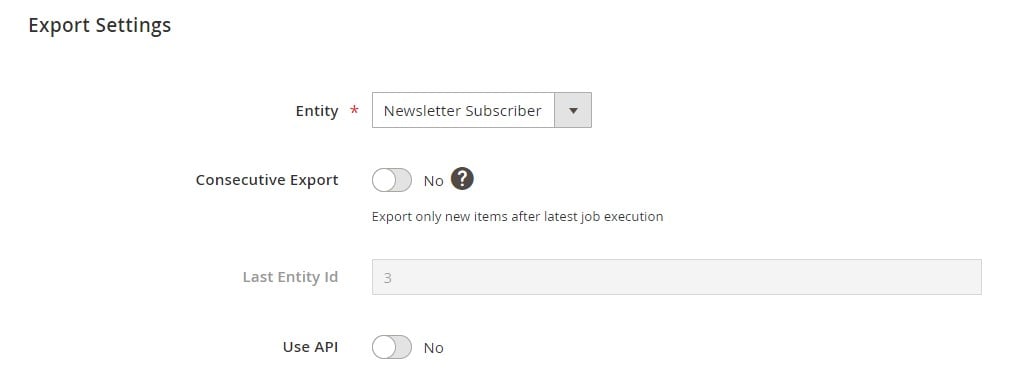
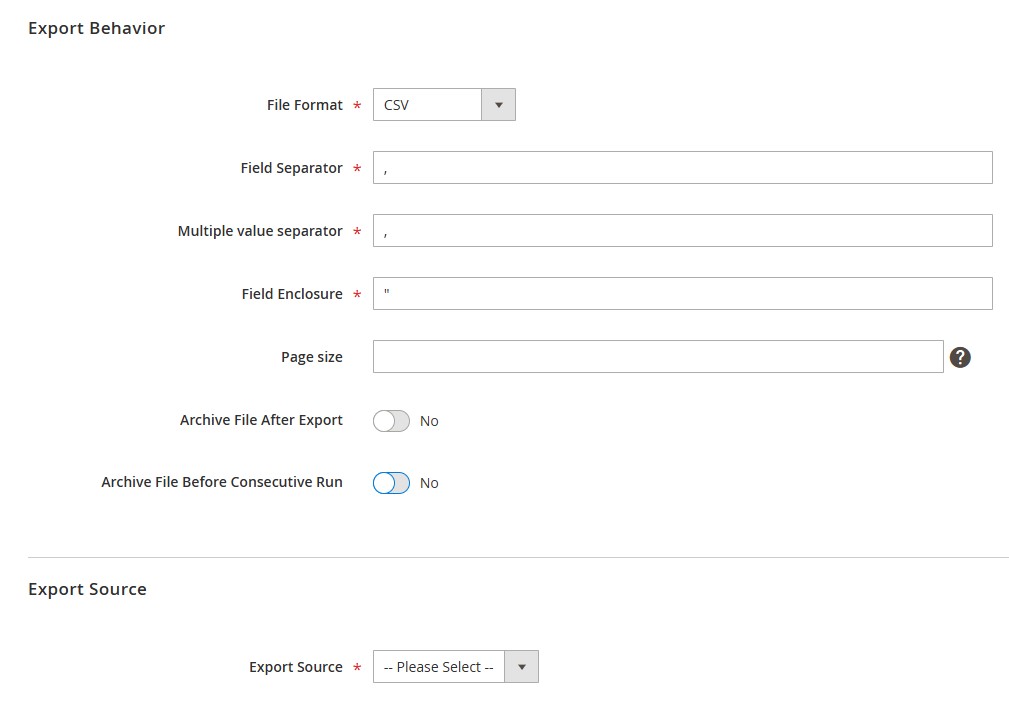
- Configure export settings:
- Scheduling — Hourly, daily, or custom intervals to keep CRM records up to date.
- File format — CSV, XML, JSON, or direct API output, depending on CRM requirements.
- Export source — Local file, FTP/SFTP, Google Drive, Dropbox, or API endpoint.
- Apply filters to send only relevant records — for example, customers from specific regions or orders with certain statuses.

- Use consecutive export to transfer only the latest updates from Magento 2 to CRM.
Step 2: Configure Attribute Mapping and Data Formatting for Any Magento 2 CRM Integration
CRMs often require specific field names or formats.
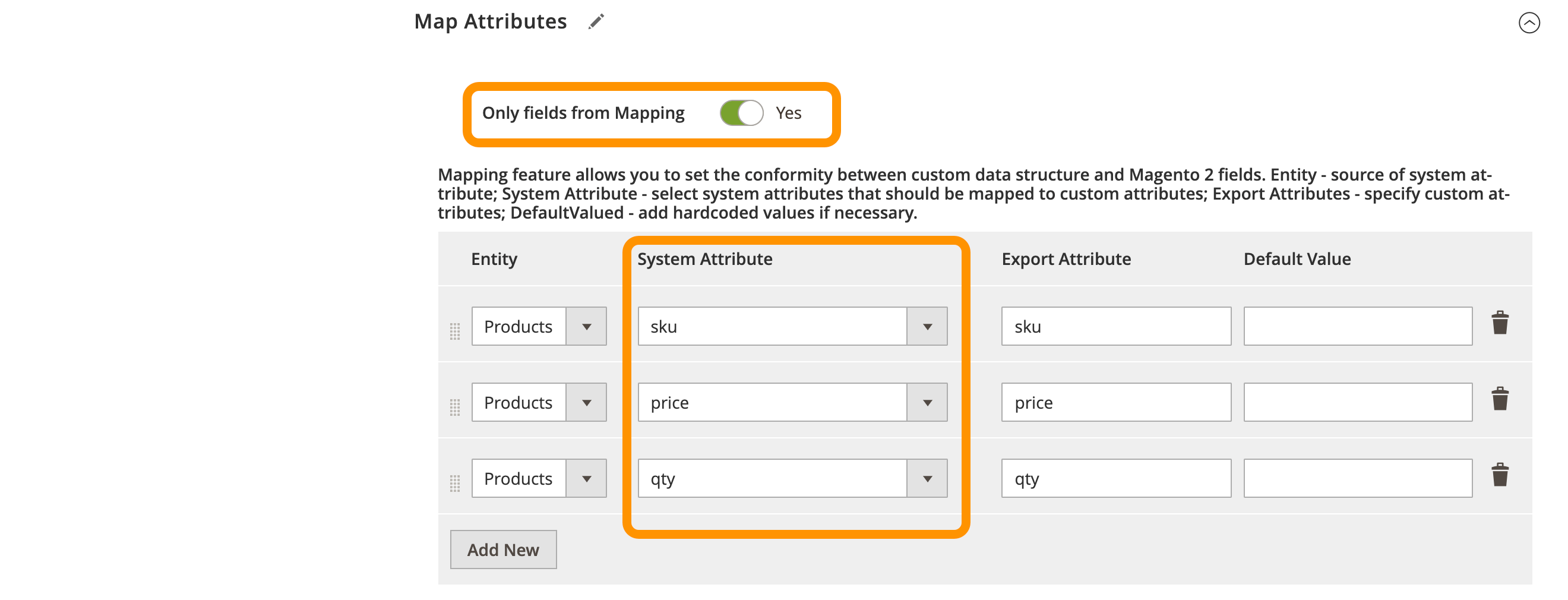
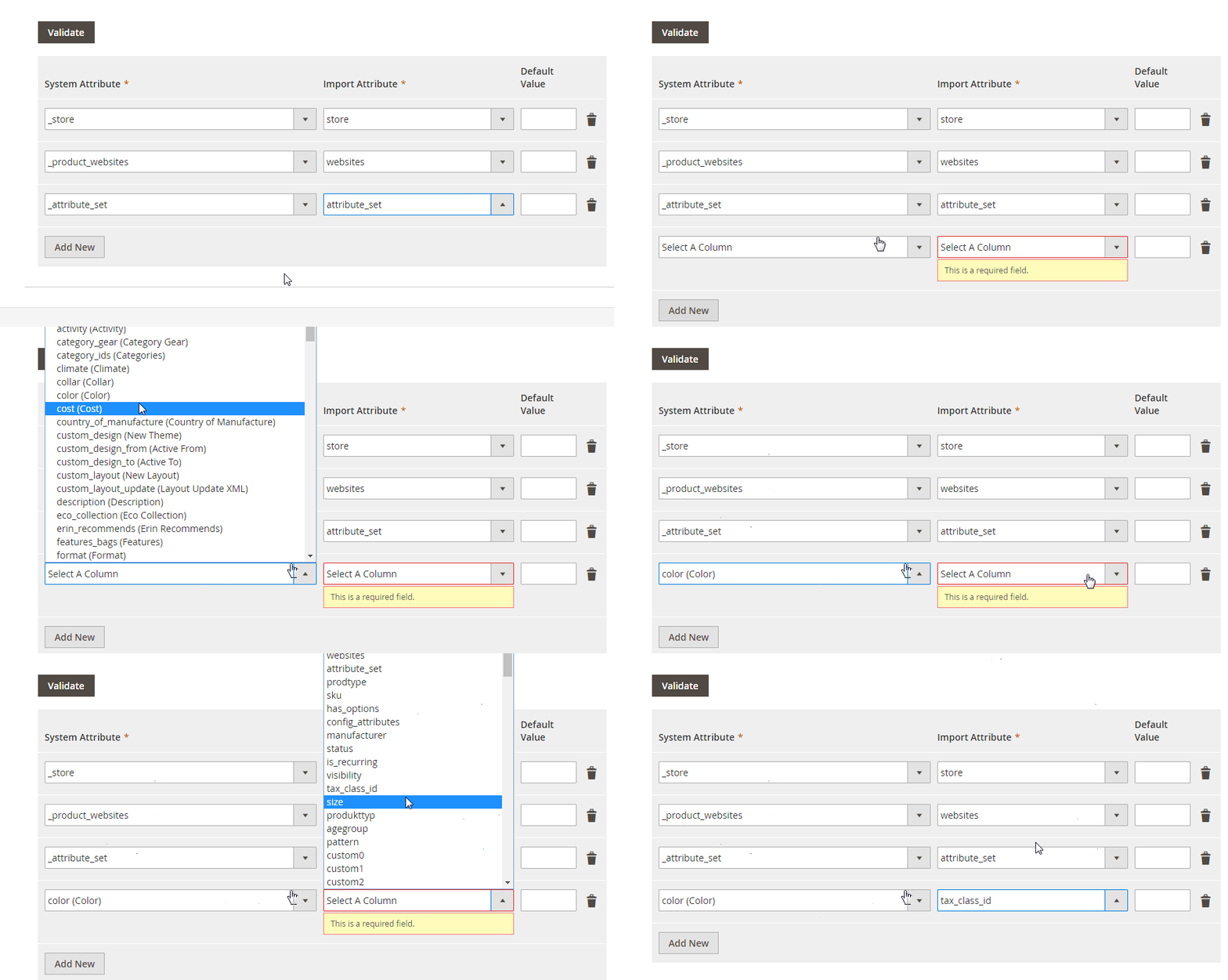
- Attribute mapping — Align Magento attributes (e.g., customer email, phone, order total) with CRM-required fields.
- Data transformation — Adjust formats on the fly, such as normalizing phone numbers, formatting dates, or mapping custom customer tags.
Step 3: Create Import Jobs to Bring CRM Data Into Magento
If your CRM holds lead, contact, or marketing list updates, set up import jobs to sync them into Magento.
- Go to System → Improved Import / Export → Import Jobs.
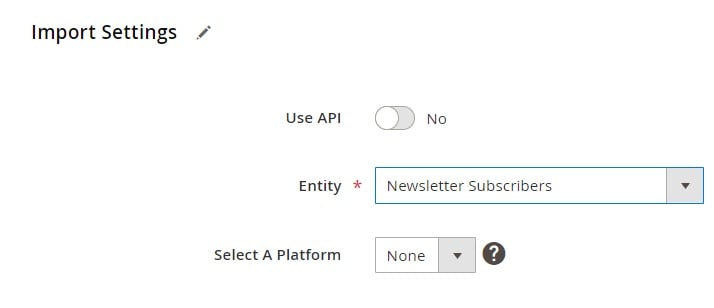
- Click Add New Job and select the entity type (Customers, Newsletter Subscribers, etc.).
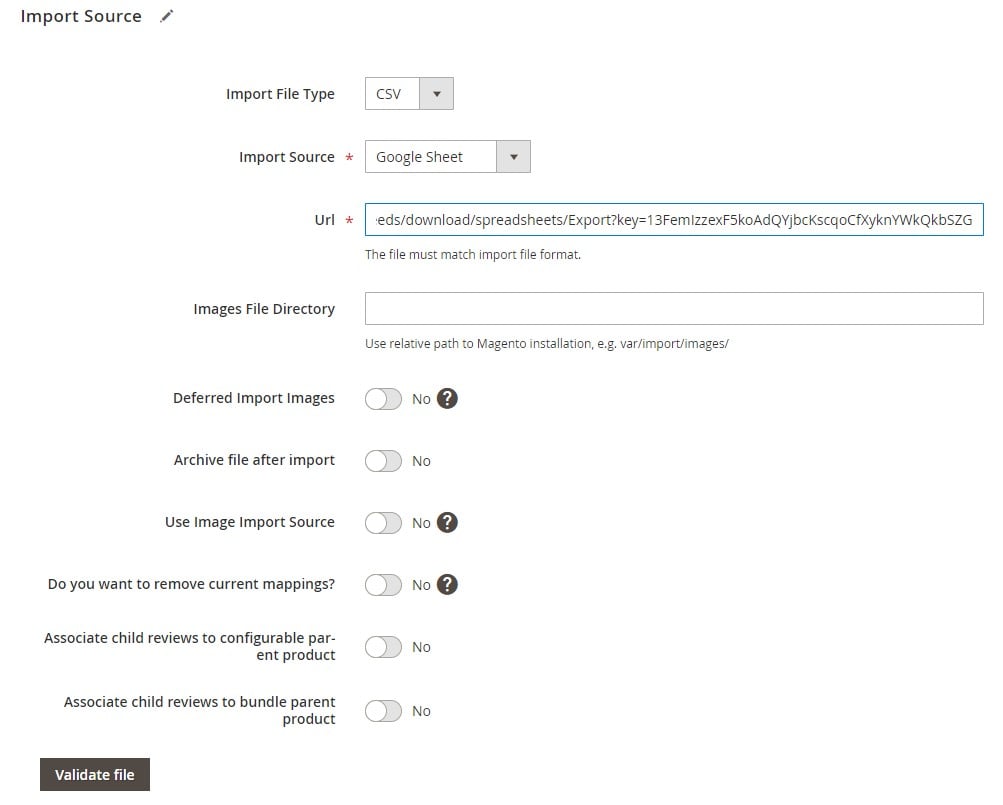
- Choose the source — API, FTP/SFTP, or cloud storage.
- Map CRM fields (contact ID, email, lead score, segment) to Magento attributes.
- Enable automated scheduling for continuous synchronization.
Step 4: Enable Two-Way Synchronization
To avoid inconsistencies between systems:
- Customer sync — New sign-ups or profile edits in Magento are exported to the CRM, while CRM contact updates sync back.
- Order sync — Orders in Magento can be sent to the CRM for sales tracking, while CRM opportunity statuses update Magento records.
- Real-time API updates — When API integration is active, changes can sync instantly rather than relying only on schedules.
Step 5: Test Your Magento 2 CRM Connection
Before going live:
- Export a small batch of customer records to verify mapping and formatting.
- Import test data from the CRM’s sandbox environment, if available.
- Confirm that both systems display identical contact and order information.
Step 6: Go Live and Monitor The Performance of Your Magento 2 CRM Integration
Once tests pass:
- Activate your scheduled jobs for ongoing synchronization.
- Monitor logs in the extension’s dashboard to catch mapping or formatting issues early.
- Fine-tune schedules, filters, and mapping rules for optimal data quality and speed.
With this workflow, Magento CRM integrations become effortless — whether you’re connecting to enterprise solutions like Salesforce and Microsoft Dynamics 365 or popular cloud CRMs like HubSpot, Zoho CRM, or Pipedrive. You can ensure customer data, marketing lists, and sales records stay synchronized automatically, without the manual work and risks of data silos.
Popular CRM Systems to Integrate With Magento 2
Choosing the right CRM for your Magento 2 store depends on your business size, sales process complexity, and marketing automation needs. Below is a curated list of popular CRM platforms to choose from:
| CRM System | Description | Integration Guide |
| One of the most widely used CRM platforms globally, trusted by enterprises and SMBs alike. Offers advanced lead and opportunity management, AI-powered analytics, omnichannel communication, and deep marketing automation. A perfect fit for Magento merchants looking for scalable customer engagement tools and sales insights. | Everything You Need To Know About Magento 2 Salesforce Integration | |
| A flexible, customizable CRM platform designed to streamline sales, marketing, and support processes. Features powerful reporting, workflow automation, and integrations for omnichannel engagement. Ideal for Magento 2 stores that require adaptable, mid-to-enterprise-level CRM functionality. | Exploring Magento 2 SugarCRM Integration | |
| A scalable CRM solution catering to multiple industries, from retail to banking. Known for AI-assisted workflows, lead management, and advanced sales pipeline tracking. A solid option for Magento merchants seeking automation-driven customer engagement. | Magento 2 CRMNEXT Integration | |
| An enterprise-grade CRM with industry-specific modules, predictive analytics, and advanced case management. Helps Magento merchants in sectors like finance, healthcare, and telecom to manage complex sales and customer service processes. | Magento 2 Pega Integration | |
| A workflow automation powerhouse with CRM capabilities that unify customer service, IT operations, and field management. Perfect for Magento stores that prioritize automated customer service workflows and SLA-driven support. | Magento 2 ServiceNow Integration | |
| Specializes in AI-powered customer engagement, offering tools like knowledge bases, virtual assistants, and omnichannel support. Well-suited for Magento merchants looking to enhance service efficiency while reducing costs. | Magento 2 eGain Integration | |
| A user-friendly CRM with built-in telephony, email, and AI-powered lead scoring. Offers sales pipeline visualization and automated follow-ups, making it a great choice for Magento merchants who want a straightforward yet powerful sales CRM. | Magento 2 Freshsales Integration | |
| Designed for speed and agility, Bpm’online automates sales, marketing, and service processes in a single platform. A strong fit for Magento 2 merchants seeking adaptable workflows and fast deployment. | Magento 2 Bpm’online Integration | |
| A customer engagement platform focused on analytics, automation, and workforce optimization. Helps Magento merchants improve service quality, track interactions, and optimize team productivity. | Magento 2 Verint Integration | |
| A high-end CRM that integrates seamlessly with SAP’s ERP ecosystem. Offers extensive tools for sales, marketing, and service management, making it ideal for large Magento operations. | Magento 2 SAP CRM Integration | |
| Combines CRM with marketing automation, email campaigns, and customer experience tools. Great for Magento 2 stores focused on personalized marketing and customer retention. | Magento 2 ActiveCampaign Integration | |
| A versatile CRM from Microsoft with deep integration into Office 365 and Power BI. Suitable for Magento merchants who want enterprise-grade sales automation, analytics, and marketing tools in a single platform. | Magento 2 Microsoft Dynamics CRM Integration | |
| A cloud-based CRM that supports sales automation, service management, and partner relationship tools. A robust choice for Magento 2 merchants with global operations. | Magento 2 Oracle On Demand CRM Integration | |
| A popular free-to-start CRM with a smooth upgrade path to enterprise features. Includes marketing automation, sales pipelines, and reporting tools. Perfect for Magento stores scaling their customer base. | Magento 2 HubSpot Integration | |
| A sales-focused CRM built for minimal admin work and maximum output. Offers intuitive pipelines and automation, making it a favorite for Magento merchants who prioritize deal tracking. | Magento 2 Pipedrive Integration | |
| A modern CRM with project management features, helping Magento businesses manage both sales and post-sale customer projects in one platform. | Magento 2 Insightly Integration | |
| A flexible CRM for small to enterprise businesses, offering sales automation, AI insights, and multi-channel customer communication. Highly cost-effective for Magento stores. | Magento 2 Zoho CRM Integration | |
| A relationship-focused CRM that integrates social media data into customer profiles. Ideal for Magento merchants using social selling strategies. | Magento 2 Nimble Integration | |
| Combines sales pipeline management with automation tools to boost team productivity. Works well for Magento 2 stores needing a clear, customizable sales workflow. | Magento 2 PipelineDeals Integration | |
| Easy-to-use yet feature-rich CRM offering reporting, automation, and team collaboration tools. Well-suited for Magento merchants seeking simplicity without losing power. | Magento 2 Nutshell Integration | |
| A communication-first CRM that unifies multiple messaging and email platforms into one dashboard. Great for Magento stores managing high support volumes. | Magento 2 Adsoup Integration | |
| A streamlined, intelligent CRM from Salesforce designed for small teams. Automatically captures data from emails and calendars to simplify sales tracking. | Magento 2 SalesforceIQ Integration | |
| A budget-friendly CRM built for small businesses, offering straightforward contact and pipeline management. | Magento 2 Less Annoying CRM Integration | |
| A cloud CRM with integrated invoicing, project management, and sales tracking. Flexible enough for Magento merchants managing diverse workflows. | Magento 2 Apptivo Integration | |
| A sales acceleration CRM focusing on pipeline visibility, analytics, and mobile access. | Magento 2 Base CRM Integration | |
| A messenger-based CRM built for conversational sales and real-time lead engagement. | Magento 2 AmoCRM Integration | |
| Designed for service-based businesses, combining CRM, project tracking, billing, and reporting. | Magento 2 Accelo Integration | |
| A Google Workspace-native CRM with strong automation and pipeline management. Ideal for Magento merchants using Google tools. | Magento 2 Copper CRM Integration | |
| Combines CRM with client portal, online scheduling, and payment collection — ideal for service-oriented Magento sellers. | Magento 2 vCita Integration | |
| An all-in-one CRM and collaboration suite with sales tracking, chat, project management, and marketing automation. | Magento 2 Bitrix24 CRM Integration | |
| A simple yet effective CRM for managing contacts, sales pipelines, and tasks. Good for smaller Magento operations. | Magento 2 Capsule CRM Integration | |
| An open-source CRM that combines sales, marketing, and service automation in one system. | Magento 2 vtiger Integration |
Common Challenges in Magento Integration with CRMs & How to Solve Them
Even with a well-planned setup, Magento CRM integration can face technical and operational hurdles that affect data accuracy, workflow efficiency, and customer experience. If left unresolved, these issues can lead to missed sales opportunities, marketing inefficiencies, and inconsistent customer records. Below are the most common challenges in Magento CRM integrations and proven strategies to overcome them.
1. Data Mapping & Field Mismatch Issues
The challenge: Magento and your CRM often use different naming conventions, data formats, or required fields. Without proper mapping, customer profiles, order histories, or lead data may import incorrectly or fail to sync entirely.
The solution:
- Use an integration tool that supports attribute mapping to align Magento fields with CRM requirements.
- Create and maintain mapping templates for key entities like customers, orders, and leads.
- Test mapping rules with small data batches before running a full synchronization.
2. Duplicate & Inconsistent Customer Records
The challenge: Without a robust deduplication process, Magento CRM integration can create duplicate contacts or mismatched customer profiles across platforms.
The solution:
- Enable deduplication rules in your CRM based on unique identifiers like email addresses or customer IDs.
- Use integration logic that updates existing records instead of creating new ones when matches are found.
- Run periodic audits to identify and merge duplicate profiles.
3. API Rate Limits & Performance Bottlenecks
The challenge: Many CRMs and Magento’s API limit the number of requests per minute or hour. Large-scale data syncs — especially during peak sales seasons — can hit these limits, causing delays or failed updates.
The solution:
- Schedule high-volume jobs during off-peak hours to avoid hitting rate caps.
- Use incremental (delta) updates instead of full dataset exports to reduce load.
- Where possible, group multiple updates into a single API call.
4. Synchronization Delays & Outdated Data
The challenge: Slow or infrequent data syncs can result in outdated customer information, delayed lead follow-ups, and inaccurate marketing segmentation.
The solution:
- Implement two-way synchronization with automated schedules tailored to your sales and marketing cadence.
- For time-sensitive data — such as new orders or lead status changes — use API-based real-time sync rather than file-based transfers.
- Increase sync frequency during promotions, seasonal peaks, or new campaign launches.
5. Integration Breaks After Platform Updates
The challenge: When Magento or your CRM updates their API, database structure, or security protocols, the integration may break if it’s not updated accordingly.
The solution:
- Monitor release notes for both Magento and your CRM.
- Test integrations in a staging environment before applying platform updates to production.
- Use an integration tool that receives regular updates to maintain compatibility with the latest Magento 2 and CRM versions.
6. Incomplete Data Transfer for Marketing & Sales
The challenge: Some Magento CRM integrations only sync basic customer details, leaving out valuable behavioral, transactional, or engagement data that sales and marketing teams need.
The solution:
- Choose a solution that supports advanced entity synchronization, including order history, abandoned cart data, and marketing preferences.
- Ensure your integration maps all necessary custom attributes for segmentation and personalization.
- Regularly review synced data to confirm completeness and accuracy.
By proactively addressing these common CRM Magento integration challenges, you can ensure accurate customer data, faster response times, and more effective marketing campaigns. Tools like Improved Import & Export simplify these processes by offering flexible mapping, real-time API connections, automated scheduling, and built-in validation to keep your Magento CRM integration running smoothly.
Final Words: Streamline Your Magento CRM Integration for Adobe Commerce & Open Source in 2026
No matter whether you use Adobe Commerce or Magento Open Source, a well-executed Magento CRM integration can transform how your business connects with customers, manages sales, and executes marketing campaigns. By uniting your Magento 2 store with a powerful CRM system, you centralize customer data, automate workflows, and ensure every department — from sales to support — works with the same accurate, real-time information.
Whether you run a high-volume B2C store, a B2B wholesale operation, or a multi-channel e-commerce brand, Magento CRM integrations help you personalize communications, improve lead nurturing, and make data-driven decisions faster. From selecting the best CRM for Magento to implementing a reliable integration method, your approach will define how efficiently your business scales and how satisfied your customers remain.
The Improved Import & Export extension makes this process easier than ever. With flexible data mapping, two-way synchronization, automated scheduling, and compatibility with leading CRM systems like Salesforce, HubSpot, Zoho CRM, and Microsoft Dynamics 365, it eliminates the complexity of managing separate platforms. You can import customer and order data, update leads in real time, and keep both systems perfectly aligned — all from your Magento admin.
📦 Explore the Improved Import & Export Extension to see how it can power your CRM and Magento integration.
📩 Contact the Firebear Team for personalized guidance on building a seamless, automated CRM connection for your Magento store.
Not sure how to integrate your specific CRM? We can help — from ready-made connectors to fully customized setups tailored to your business workflows.
Not sure how to import specific data types into Magento 2? Our guide covers everything — from products and customers to CMS pages and B2B entities.
👉 Browse all Magento 2 import topics
Magento CRM Integration FAQ
What is Magento CRM integration?
Magento CRM integration connects your Magento 2 store with a customer relationship management system to synchronize customers, orders, leads, marketing preferences, and engagement data — ensuring both platforms share accurate, real-time records for sales, marketing, and support.
Can I integrate Magento 2 with multiple CRMs at once?
Yes. With the right connector or API setup, you can run several Magento CRM integrations in parallel and manage mappings, schedules, and sync rules for each CRM from the Magento admin.
What is the best CRM for Magento?
It depends on your needs — Salesforce and Microsoft Dynamics 365 suit complex B2B workflows, HubSpot and Zoho CRM excel at marketing automation, and Pipedrive is great for sales pipelines. Choose based on features, budget, and required integrations.
Does Magento include a built-in CRM?
No. Magento 2 does not ship with a native CRM. You’ll need a third-party connector, custom API build, or iPaaS/middleware to enable CRM Magento integration.
How do I synchronize customer data between Magento and my CRM?
Configure two-way sync with attribute mapping. New registrations, profile edits, orders, and subscriptions from Magento update the CRM — while contact changes, segments, and lifecycle stages from the CRM sync back to Magento.
How do I avoid duplicates during Magento CRM integration?
Use deduplication rules based on unique keys (email, customer ID) and set updates to merge into existing records. Run periodic audits and enable strict matching in your integration jobs.
Can Magento CRM integration handle large volumes of data?
Yes. Use incremental (delta) syncs, batching, and off-peak schedules to respect API rate limits. For promotions or peak seasons, temporarily increase frequency for time-sensitive entities like orders and leads.
Is Magento CRM integration secure?
Secure integrations use TLS-encrypted APIs, OAuth or token-based authentication, role-based access, and audit logs. Keep Magento, your CRM, and connectors updated to maintain compliance and security.
What does Magento CRM integration cost?
Costs vary by CRM license, connector or middleware fees, and customization scope. Prebuilt connectors are most affordable; custom API or iPaaS implementations cost more but offer greater flexibility.
Where can I get help with Magento CRM integration?
For planning, setup, and optimization — including mapping, automation, and troubleshooting — contact the Firebear team for a tailored Magento CRM integration service.
Can Adobe Commerce integrate with Salesforce and other CRM platforms?
Yes. Adobe Commerce can integrate with Salesforce, HubSpot, Microsoft Dynamics, and other CRM platforms through APIs, third-party extensions, middleware, or custom development. The integration can synchronize customer accounts, orders, contact information, and other ecommerce data with the CRM.
What Adobe Commerce customer data can be synchronized with a CRM?
An Adobe Commerce CRM integration can synchronize customer profiles, contact details, addresses, orders, customer groups, customer segments, and purchasing activity. For B2B stores, the integration can also involve company accounts, company users, roles, and other organizational data supported by Adobe Commerce.
Can Adobe Commerce customer segments be used with CRM integrations?
Yes. Adobe Commerce Customer Segments can classify customers dynamically according to attributes and shopping behavior, such as customer information, order history, and cart contents. Segment information and related customer data can be incorporated into a broader CRM workflow to support customer targeting, personalization, and marketing activities.
How does Adobe Commerce B2B affect CRM integration?
Adobe Commerce B2B introduces additional customer structures that can make CRM integration more advanced. Instead of synchronizing only individual customer accounts, merchants may need to exchange company accounts, company users, roles, teams, purchasing activity, and other B2B information between Adobe Commerce and the CRM. This is especially important when the CRM is used for account management and sales operations.
What is the best way to integrate Adobe Commerce with a CRM?
The best approach depends on the CRM platform, data volume, synchronization requirements, and whether the Adobe Commerce store uses B2B features. Prebuilt connectors can work well for standard requirements, while APIs, middleware, or custom integrations provide greater flexibility for complex workflows. Merchants should define data mapping, synchronization direction, update frequency, and the system responsible for each type of customer data before implementation.
Related posts
 How to Import Customers & Customer Addresses to Magento 2 in 2026: Complete Tutorial & CSV Samples for Adobe Commerce & Magento Open Source
 Magento 2 B2B Company Explained: A Complete Guide to Setup, Structure, Management & Import for Adobe Commerce
 Magento 2 Release Notes: Adobe Commerce & Open Source Updates
 How to Import Advanced Pricing in Shopware 6 with Product Updates
 Magento 2 System Requirements: Complete Guide for Adobe Commerce and Open Source
 How to Email Customers on Shopify: A Step-by-Step Guide for 2026
 Best AI Tools for 2026: Ultimate Guide to Paid & Free AI Tools for Copywriting, SEO & Marketing
 SaleHoo Dropshipping Review 2026: Is SaleHoo Worth It for Your Shopify Store?