
Adobe Commerce B2B Features: Complete List and How to Enable Them
According to studies, more and more B2B buyers prefer online purchases. And it doesn’t seem unrealistic because digital buying offers so many benefits over traditional buying. Such benefits are especially tangible when it comes to Adobe Commerce B2B features.
Below, we explore the Magento B2B features list and explain what each capability brings to an online business. You will learn where these features are located in the Adobe Commerce Admin and how to enable them. The guide covers Company Accounts, Shared Catalogs, Negotiable Quotes, Purchase Orders and approval rules, Quick Order, Requisition Lists, and the supporting B2B payment and shipping settings.

Table of contents
Complete Magento B2B Features List: 17 Adobe Commerce B2B Features to Pay Attention to in 2026
B2B buying has moved well beyond traditional sales channels. Modern business buyers expect the same convenience they experience in B2C commerce: easy product discovery, self-service account management, transparent pricing, fast ordering, and digital access to the information they need. The numbers reflect this shift. According to , two-thirds of surveyed B2B organizations now offer e-commerce, and roughly one-third of their revenue comes through digital channels.
But B2B commerce cannot simply copy the B2C model. Companies often have multiple buyers, purchasing roles, approval rules, negotiated prices, custom product assortments, credit limits, and recurring orders. An effective B2B storefront therefore needs to combine the convenience of online shopping with the controls and workflows required by business customers.
This is where Adobe Commerce B2B features come into play. In 2026, Adobe Commerce provides an integrated set of capabilities for managing company accounts and their users, creating customer-specific catalogs and pricing, negotiating quotes, controlling purchasing through approval workflows, placing orders by SKU, and simplifying repeat purchases. Company Accounts serve as the foundation for several other capabilities, including Shared Catalogs and B2B Quotes, while Quick Order and Requisition Lists can be enabled independently. Here is the full list of B2B features available in Magento 2 (Adobe Commerce):
- Company Accounts — This Adobe Commerce B2B feature lets businesses create corporate accounts with multiple buyers, company administrators, roles, permissions, and organizational structures. Company Accounts are the foundation for most other Adobe Commerce B2B features.
- Company Management — It enables merchants to manage complex B2B organizations through company hierarchies, including parent companies and subsidiaries.
- Company Hierarchy — This Magento 2 B2B feature allows related companies to be organized under a parent company so administrators can view and manage multiple company accounts as a group.
- Shared Catalogs — It creates company-specific product assortments and custom pricing levels, allowing different businesses to see negotiated prices and selected products.
- Shared Catalog Direct Product Price Assignment — This Adobe Commerce B2B feature optimizes pricing indexes by storing only products assigned to a shared catalog, which can improve performance for merchants managing many shared catalogs.
- Negotiable Quotes (B2B Quotes) — This Magento 2 B2B feature lets authorized buyers and sellers negotiate product prices, quantities, discounts, and other quote details before placing an order.
- Purchase Orders (POs) — It allows company buyers to create purchase orders instead of placing standard orders immediately. POs can then move through company-specific approval workflows.
- Purchase Order Approval Rules — This one gives company administrators control over which purchases require approval and allows approval workflows to be based on company users’ roles and purchasing permissions.
- Quick Order — This Adobe Commerce B2B feature lets logged-in customers and guests quickly add products to the cart by entering product names or SKUs instead of browsing the catalog manually.
- Requisition Lists — It allows customers to save frequently purchased products in reusable lists and add those products to the cart directly, making repeat ordering faster.
- Payment on Account — This MAgento 2 B2B feature lets eligible companies purchase against an assigned credit limit and pay according to their established account terms rather than paying at checkout immediately.
- B2B Payment Methods — It allows merchants to control which payment methods are available to B2B buyers, including options such as Payment on Account, stored accounts, and stored cards.
- B2B Shipping Methods — This one lets merchants define which shipping methods are available for B2B orders separately from the general storefront configuration.
- Company Credit Management — This Adobe Commerce B2B feature provides company-level credit controls, including allocating credit limits and managing credit changes, reimbursements, refunds, and related notifications.
- Company User Roles and Permissions — It enables company administrators to assign different roles and purchasing permissions to members, controlling activities such as ordering, quoting, purchasing, and access to company information.
- Company Registration and Approval — This one supports company registration requests and related status workflows, including notifications for pending, active, rejected, and blocked company accounts.
- B2B Company Email Notifications — This Adobe Commerce B2B feature provides configurable notifications for company registration, sales-representative assignments, company status changes, company-admin changes, and credit updates.
Core Magento 2 B2B Explained
Below, we highlight the most frequently leveraged B2B aspects of Magento 2 Commerce (Adobe Commerce Cloud).
Custom pricing & shared catalogs
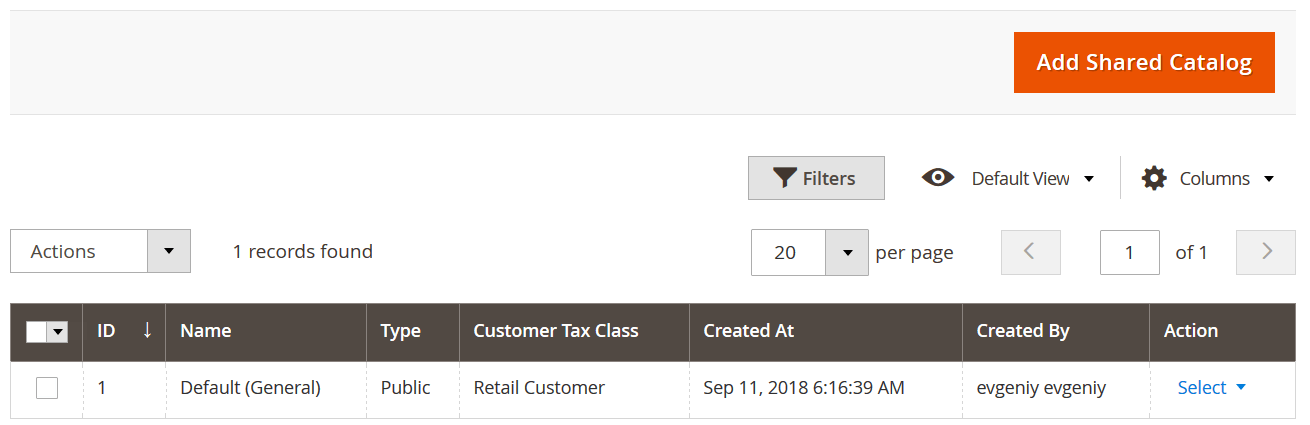
One of the most useful B2B features introduced in Magento 2 Commerce is custom pricing and shared catalogs. The platform lets you build strong B2B relationships with your partners, assigning custom prices to specific companies. You can create numerous specific price lists aimed at different buyers. At the same time, the platform lets you show default public pricing on the frontend for guest users.
Also, note that Adobe Commerce Cloud lets you limit the visibility of products or even entire categories in specific pricing schemes. At the same time, you can set up prices based on a percentage discount as well as a custom value.
For further information, read these articles:
- Exploring Magento 2 B2B Features: Shared Catalogs
- How to Import and Export Magento 2 Shared Catalogs.
Credit Limit
Can you imagine an average B2B deal without credits? Yes, of course! But chances are, some of your partners won’t work with you if you don’t offer loans. However, Magento 2 Commerce provides the necessary functionality by default. The platform allows companies to finish checkout with postponed payments. Credit limits are connected to merchant credibility. As for credit limits, they are based on the purchase and payment history.
The account model stores all payment and purchase transactions for each company. As a result, the checkout page offers an additional payment method – “Payment on account.” It automatically decreases the limit.
Also, note that credit limits are fully synchronizable with ERP. If you don’t know how to connect your e-commerce website to an enterprise resource planning system, check the Improved Import & Export Magento 2 Extension.
Company structure
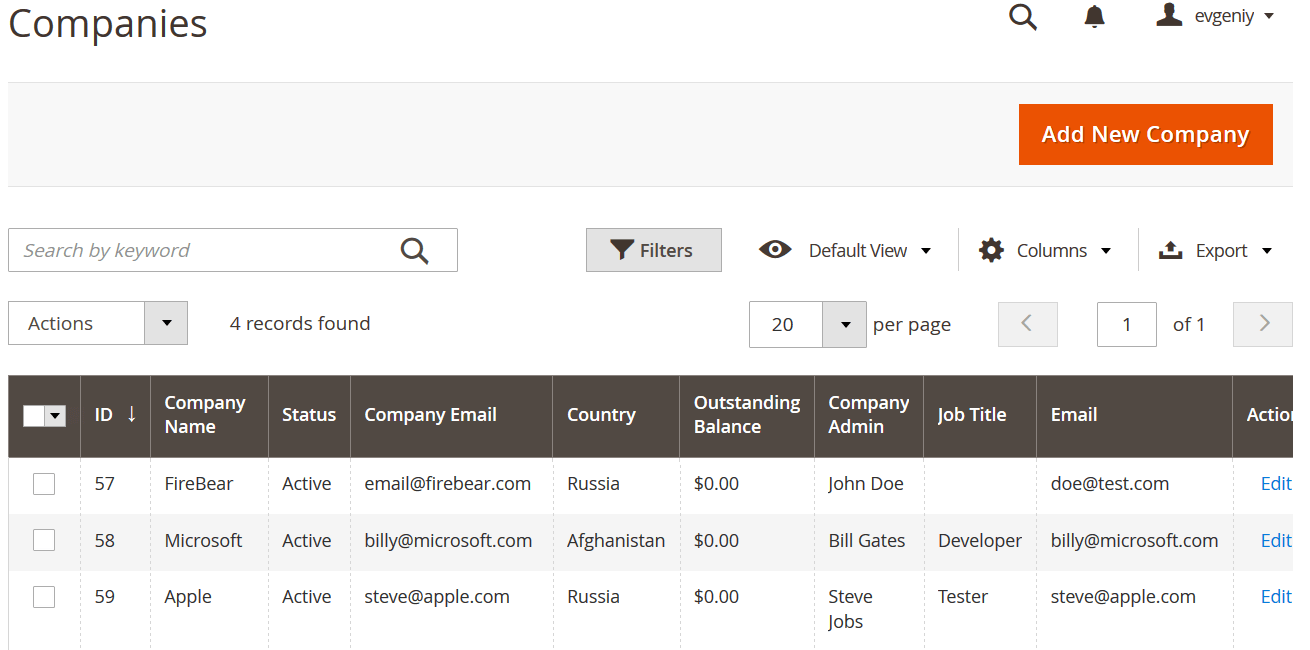
As we’ve already mentioned above, Magento 2 Commerce/Cloud provides the ability to leverage company accounts for your B2B needs. It is possible to assign numerous customers to each company account, mapping your client account structure. Also, note that your B2B partners are able to assign client reps to specific roles, creating role-based permissions on particular views and actions.
Furthermore, you can effortlessly transfer companies between different Magento 2 websites. Follow this link to find more information: How to Import and Export B2B Companies in Magento 2.
For further information, read these articles:
Negotiation quotes
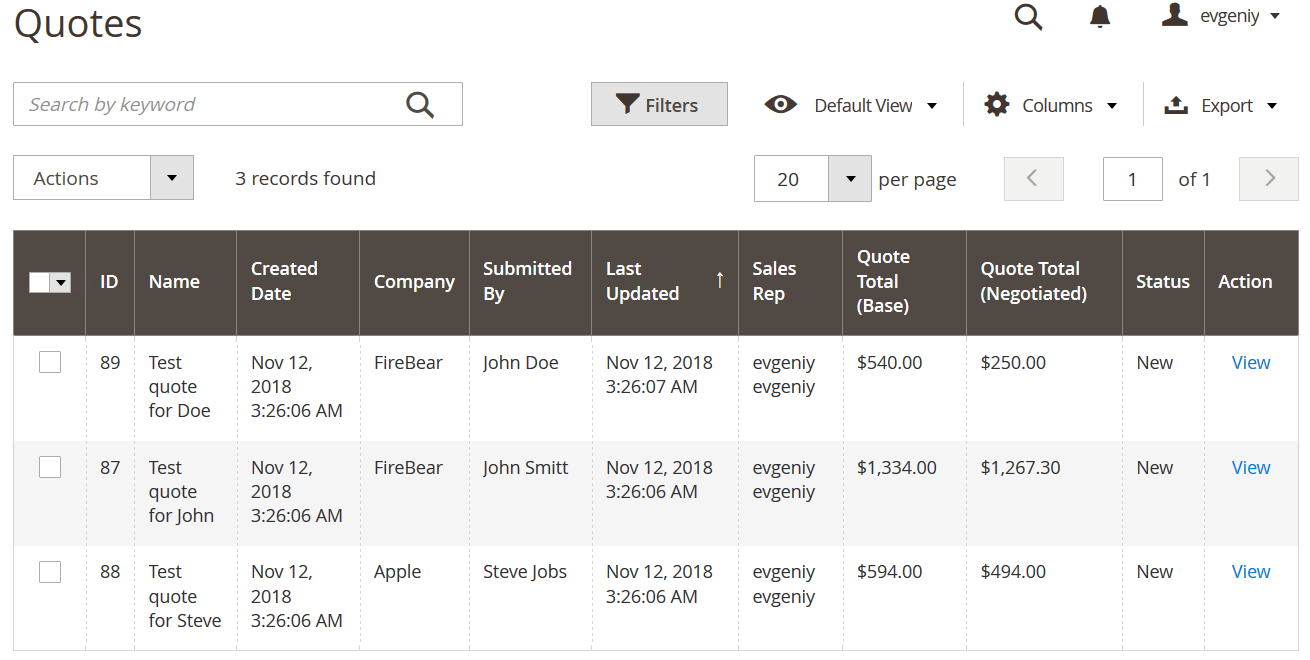
We’ve already mentioned that a reliable Quotation engine is a part of the latest Magento 2 Commerce (Adobe Commerce Cloud) version. Thus, the platform lets B2B buyers convert their carts to quotes instead of sending an order. As a store owner, you can submit your reply, set prices, and add comments.
The process is based on two-way communication. B2B clients reach you from their user accounts on the frontend. As a store administrator, you find all the necessary tools in the admin panel.
You can find more information about the feature here:
- Exploring Magento 2 B2B Features: Quotes
- How to Import and Export B2B Negotiation Quotes in Magento 2
Requisition lists
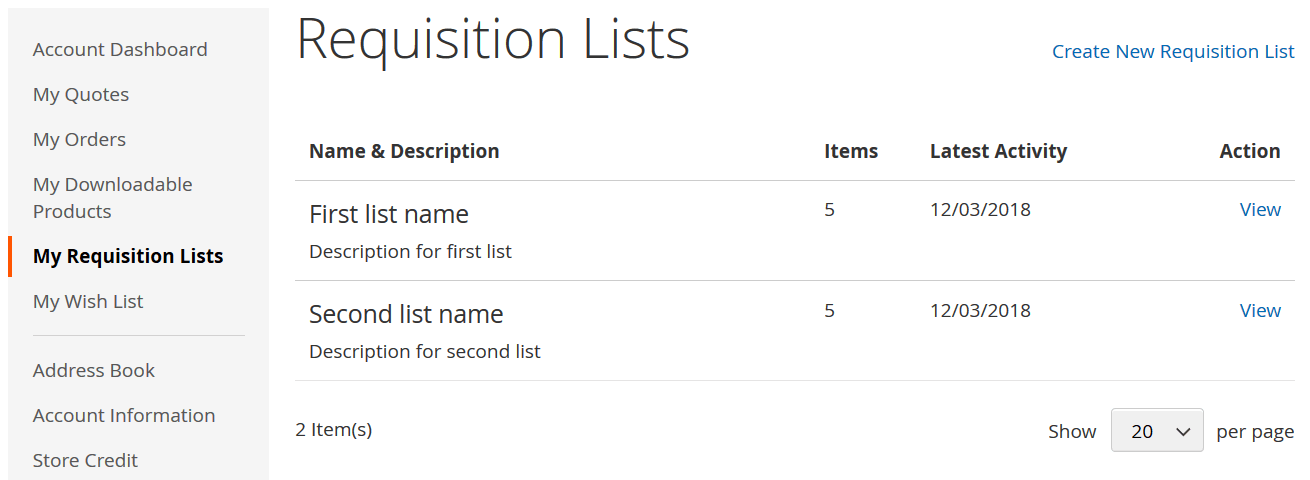
Requisition lists provide store visitors with the ability to combine frequently purchased items. Next, customers use these lists for order placement, streamlining the dramatically improved buying experience.
Unlike wishlists, requisition lists are not purged after a customer sends items to the shopping cart. Thus, they can be leveraged for placing multiple orders. For further information about requisition lists, follow this link: How to Import and Export Magento 2 Requisition Lists.
Quick order
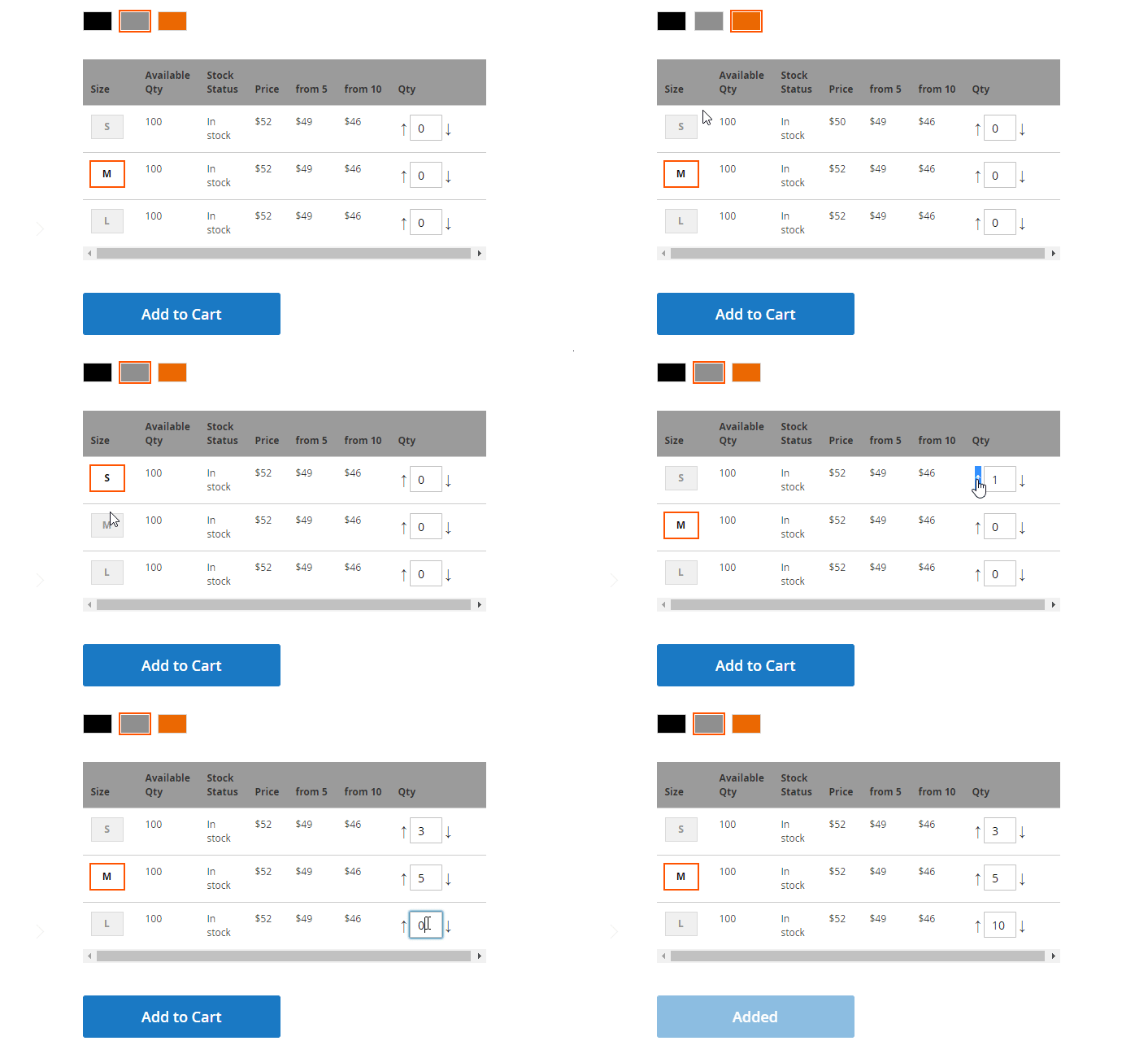
Of course, we should also draw your attention to quick orders in Magento 2. Your B2B users usually know what they need for sure. With the information about the SKUs of the desired items, B2B clients don’t need to browse the entire catalog. It is only necessary to upload multiple SKUs simultaneously to create an order. Thus, the buying experience becomes more user-friendly. However, we know of an alternative way, which is often more intuitive: a product matrix grid introduced in Improved Configurable Product. You can see it below:
How to import and export companies, requisition lists, shared catalogs and negotiable quotes.
How to Enable Adobe Commerce B2B Features
Adobe Commerce ships with its B2B functionality disabled by default. The first step is therefore to enable the B2B features at the website level. From there, you can activate individual capabilities such as Quick Order, Requisition Lists, Purchase Orders, and Payment on Account, while several other features become available automatically when company accounts are enabled.
Before changing the configuration, make sure your Adobe Commerce project has the Adobe Commerce B2B extension installed. The B2B configuration options are available only when the extension is present.
Enable Company Accounts and Core B2B Features
Company Accounts are the foundation of Adobe Commerce B2B. They connect multiple buyers to one corporate account and let the company administrator define organizational structures, users, roles, permissions, purchasing capabilities, and access to company information. Several other B2B features depend on this functionality.
To enable company accounts:
- Go to Stores > Settings > Configuration in the Admin.
- In the left panel, open General > B2B Features.
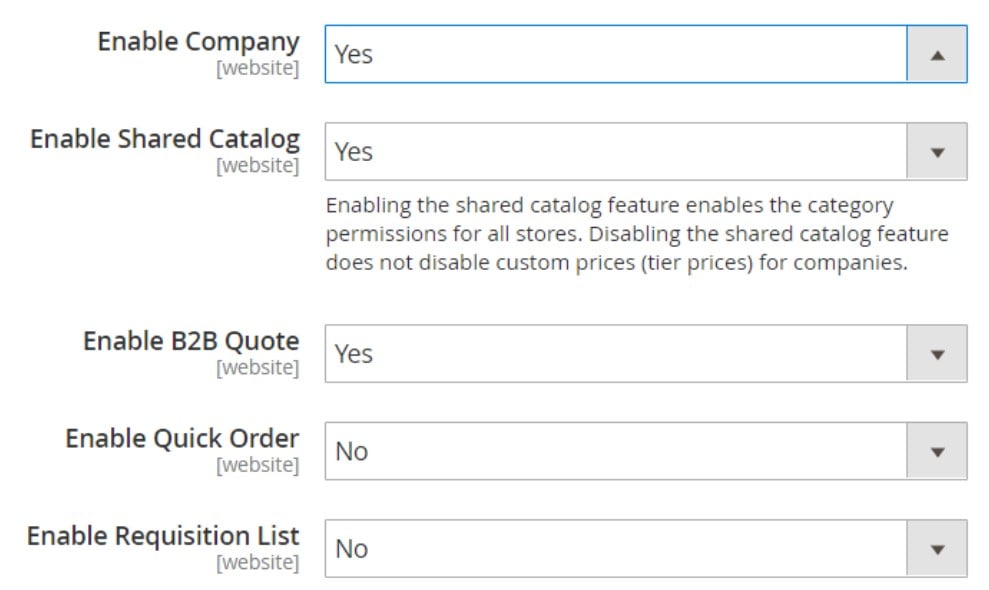
- Set Enable Company to Yes.
- If you operate multiple websites, select the appropriate website from the Store View selector before saving the configuration.
- Click Save Config.
Enabling company support automatically enables Shared Catalogs, B2B Quotes, B2B Payment Methods, and B2B Shipping Methods. This is important when planning your configuration: you do not have to activate each of these core capabilities separately at the initial stage.
Enable Quick Order
Quick Order is designed for buyers who already know which products they need. Instead of navigating through categories and product pages, customers can enter a product name or SKU and add the item directly to the cart. This makes the feature particularly useful for repeat and high-volume purchasing.
To enable it:
- Go to Stores > Settings > Configuration.
- Open General > B2B Features.
- Set Enable Quick Order to Yes.
- Click Save Config.
Unlike several company-dependent B2B capabilities, Quick Order can be enabled independently and does not require Company Accounts to be activated. Adobe Commerce also supports Quick Order for guests.
Enable Requisition Lists
Requisition Lists allow customers to save products they purchase frequently and add them to the cart again without rebuilding the order from scratch. A customer can maintain multiple lists for different teams, suppliers, projects, or purchasing needs.
To enable Requisition Lists:
- Open Stores > Settings > Configuration.
- Go to General > B2B Features.
- Set Enable Requisition List to Yes.
- Save the configuration.
You can also configure the maximum number of requisition lists that a customer can maintain. Like Quick Order, Requisition Lists can be enabled or disabled independently of Company Accounts.
Configure B2B Payment Methods
Once Company Accounts are enabled, Adobe Commerce provides a separate Default B2B Payment Methods configuration. It determines which payment methods can be used for B2B orders rather than automatically exposing every payment method configured for the storefront.
Go to Stores > Settings > Configuration > General > B2B Features, expand Default B2B Payment Methods, and choose one of the following:
- All Payment Methods — makes all currently enabled payment methods available to B2B customers.
- Selected Payment Methods — lets you choose specific payment methods from the available list.
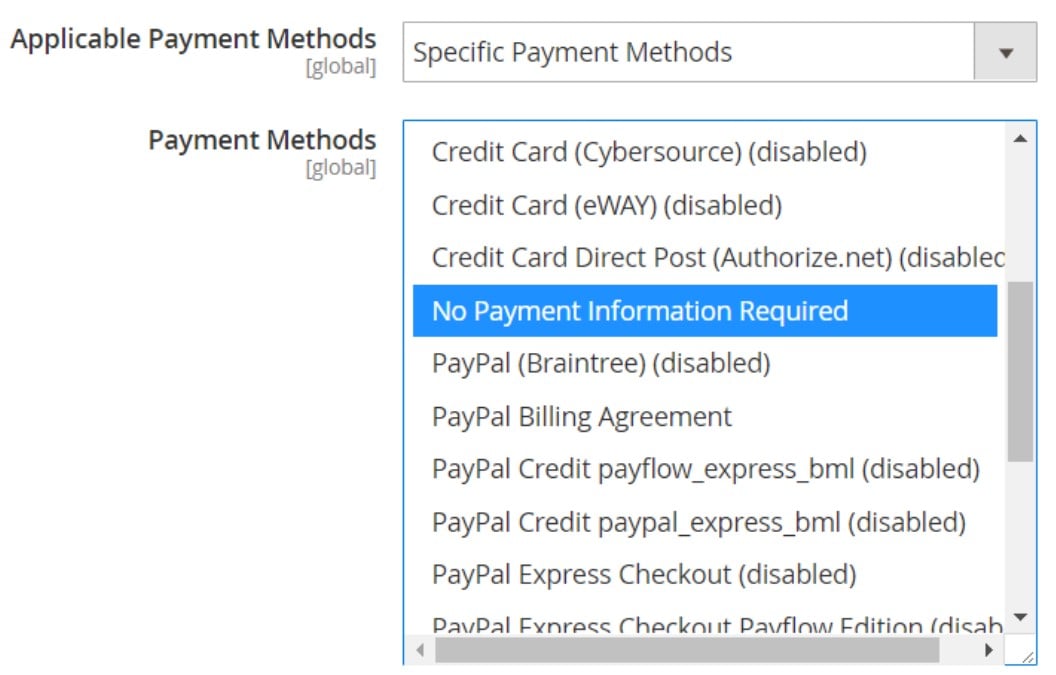
The list can include standard payment methods as well as B2B-specific options such as Payment on Account, Stored Accounts, and Stored Cards. After making your selection, click Save Config.
Configure B2B Shipping Methods
Adobe Commerce also lets you control which shipping methods are available for B2B buyers.
In Stores > Settings > Configuration > General > B2B Features, expand Default B2B Shipping Methods and select either:
- All Shipping Methods
- Selected Shipping Methods
With the second option, you can select the shipping methods that should be available for B2B orders. Save the configuration when finished.
This setting is useful when B2B customers have different fulfillment requirements from regular shoppers, for example, when certain carriers or delivery services should be reserved for business orders.
Enable Purchase Orders and Approval Workflows
Purchase Orders (POs) let company buyers create orders that can go through an internal approval process before they are finalized. Adobe Commerce can apply approval rules according to company users’ roles and purchasing permissions.
Purchase Orders require two levels of configuration.
First, enable the functionality at the website level:
- Go to Stores > Settings > Configuration.
- Open General > B2B Features.
- Expand Order Approval Configuration.
- Set Enable Purchase Orders to Yes.
- Click Save Config.
Then activate POs for the individual company:
- Go to Customers > Companies.
- Find the company and click Edit.
- Expand Advanced Settings.
- Set Enable Purchase Orders to Yes.
- Save the company.
After activation, the company administrator can access Approval Rules from the storefront account dashboard. Purchase Order access is also controlled through company user role permissions, so simply enabling the feature does not automatically give every company member the ability to create or manage POs.
Enable Payment on Account
Payment on Account is an offline payment method that allows eligible companies to place orders against a predefined credit limit instead of paying immediately at checkout. Adobe Commerce lets merchants enable it globally and configure it for individual companies.
To enable the payment method globally:
- Go to Stores > Settings > Configuration.
- Open Sales > Payment Methods.
- Expand Payment on Account.
- If necessary, clear Use system value.
- Set Enabled to Yes.
- Configure the title, new order status, applicable countries, minimum and maximum order totals, and sort order.
- Click Save Config.
The company must also have the appropriate credit settings for the method to be useful. Payment on Account is not available for orders using multiple shipping addresses.
Configure Company Email Notifications
Adobe Commerce includes a dedicated Company Configuration area for B2B email notifications. These settings control messages related to company registration, company status changes, company administrators, sales representatives, and company credit changes.
Go to Stores > Settings > Configuration > Customers > Company Configuration and configure the relevant sections.
For Company Registration, you can specify the notification recipient, add recipients for copies, choose between BCC and separate emails, and select a custom registration email template.
The Customer-Related Emails section lets you customize templates for events such as:
- Sales representative assignment
- Company assignment to a customer
- Company administrator assignment
- Company administrator becoming inactive
- Company administrator changing to a company member
- Customer status becoming active or inactive
You can also configure notifications for Company Status Changes and Company Credit Changes, including the sender, copy recipients, and email templates.
Configure Shared Catalogs and B2B Quotes
Shared Catalogs and Negotiable Quotes are not activated through separate top-level switches when Company Accounts are enabled. Adobe Commerce automatically enables their B2B support when you turn on company functionality.
Shared Catalogs let merchants create customer-specific product assortments and pricing levels, while Negotiable Quotes allow authorized buyers and sellers to negotiate prices, quantities, discounts, and other quote details before an order is placed.
After enabling Company Accounts, these features still require their operational configuration. For example, you need to create shared catalogs and assign products and pricing, while quote functionality depends on the relevant company and user permissions.
To configure quotes, follow these steps:
- Go to the Admin sidebar -> Stores -> Settings -> Configuration -> Sales -> Quotes.
- In the General section, configure the following parameters:
- Minimum Amount: enter the amount that must be met to submit a quote request;
- Minimum Amount Message: type a message that will appear when the shopping cart total doesn’t match the previous condition.
- Default Expiration Period: specify a period — days, weeks, or months — when a quote is valid.
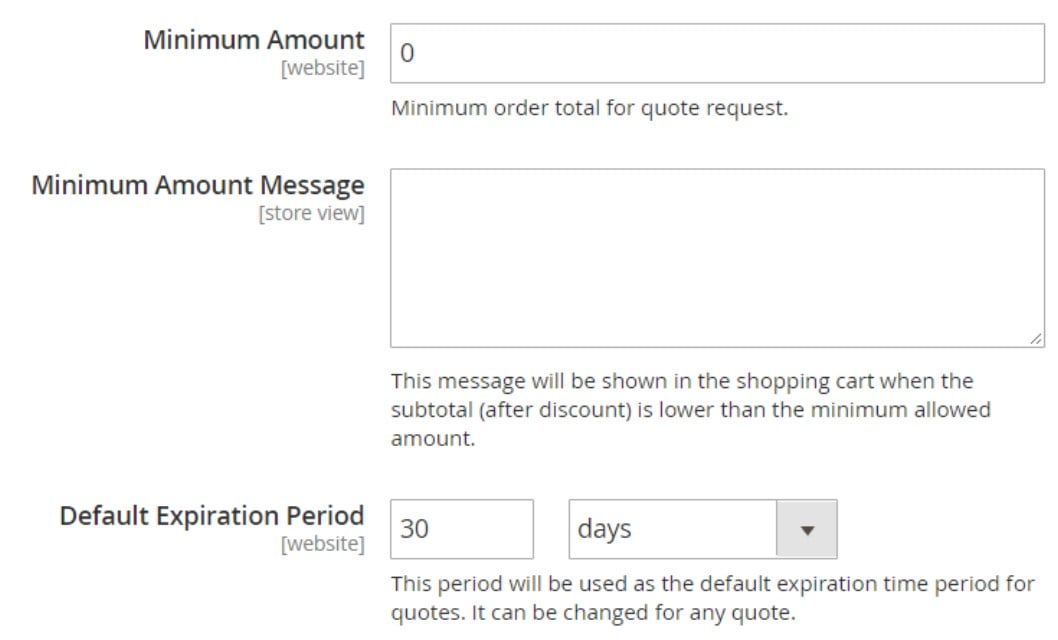
- In the Attached files section, do the following:
- File formats for upload field: enter file suffixes in lowercase, separated by a comma. Doc, docx, xls, xlsx, pdf, txt, jpg, png, jpeg are supported by default.
- Maximum file size: specify the maximum size of an attached file (megabytes), but note that your server setting might override the entered value.
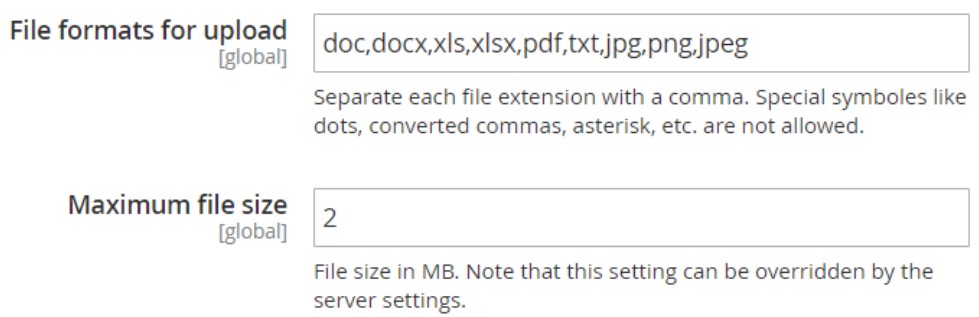
Don’t forget to tap Save Config when complete.
You can find additional configurations here: .
Enable Direct Product Price Assignment for Shared Catalogs
Adobe Commerce also provides Shared Catalog direct product price assignment, which is primarily a performance-oriented setting. When enabled, only products assigned to a shared catalog are stored in the price index for that catalog. Adobe recommends this approach for merchants managing many shared catalogs with custom pricing.
This setting is therefore less about adding a new customer-facing feature and more about making a large B2B catalog structure more efficient.
A Practical B2B Configuration Sequence
For most Adobe Commerce B2B stores, it makes sense to configure the features in this order:
- Enable Company Accounts — activates the foundation for company-based B2B commerce.
- Configure Company Management — define company structures, users, roles, and permissions.
- Configure Shared Catalogs — create customer-specific assortments and pricing.
- Configure B2B Quotes — establish the quote workflow for negotiated purchases.
- Enable Purchase Orders — activate POs globally and then for the relevant companies.
- Configure B2B Payment and Shipping Methods — determine which checkout options B2B buyers can use.
- Configure Payment on Account — establish credit-based purchasing where applicable.
- Enable Quick Order — simplify SKU- or product-name-based purchasing.
- Enable Requisition Lists — make repeat purchasing faster.
- Configure B2B email notifications — ensure company administrators and internal teams receive the appropriate updates.
This distinction between enabling a feature and configuring how that feature works is important. Adobe Commerce can turn on the underlying B2B capability with a few settings, but building a usable B2B storefront still requires configuring company structures, permissions, catalogs, pricing, credit, approval rules, and customer-specific workflows.
For merchants managing hundreds or thousands of company records, products, pricing rules, customer assignments, or other B2B data, this is also where a dedicated data-management solution can become useful. Read how our Improved Import & Export extension can complement the native Adobe Commerce B2B functionality by helping merchants manage large datasets without making manual data maintenance the focus of their day-to-day administration.
B2B Benefits of Adobe Commerce
Now that you are familiar with the core Adobe Commerce B2B features and how to enable them, let’s look at the broader benefits the platform offers to B2B businesses.
- Intuitive self-service tools. Adobe Commerce provides a range of tools that simplify everyday B2B operations. Businesses can manage company accounts, buyers, orders, quotes, credit, and other purchasing activities from a centralized environment.
- Multiple buyers per company. A single company account can include multiple buyers, each with their own role and permissions. This structure allows businesses to reflect real-world purchasing hierarchies and control what individual employees can access and manage.
- Flexible payment options. Adobe Commerce supports B2B payment workflows such as Payment on Account, allowing eligible companies to purchase against an established credit limit and pay according to their agreed terms.
- Custom catalogs and pricing. Merchants can create shared catalogs with company-specific product selections and pricing. This makes it easier to accommodate negotiated prices, contractual agreements, and different product assortments for individual business customers.
- Negotiable quotes. Built-in B2B quoting capabilities allow buyers and sellers to negotiate prices, quantities, discounts, and other terms online. This creates a structured workflow for moving from an initial quote request to a finalized order.
- Quick ordering. B2B buyers can place orders faster by entering product names or SKUs instead of browsing the entire catalog. This is particularly useful for customers who already know exactly what they need and regularly purchase the same products.
- Fast reordering and restocking. Requisition Lists allow customers to save frequently purchased products and quickly add them to a new order. Combined with access to previous orders, this makes recurring purchases and restocking much more efficient.
- Assisted customer service. Adobe Commerce gives administrators and sales representatives tools for managing customer accounts and creating orders on behalf of customers. This makes it easier to support buyers who need assistance with product selection, ordering, or account-related issues.
- High-volume ordering. Adobe Commerce is designed to support demanding B2B purchasing scenarios, including orders containing large numbers of products and quantities. Features such as Quick Order and requisition lists further simplify high-volume purchasing.
- B2B reporting and analytics. Adobe Commerce provides reporting capabilities that help merchants analyze sales and customer activity. These insights can support better decisions around product performance, purchasing behavior, customer accounts, and overall B2B operations.
Business-ready B2B platform
Adobe Commerce provides a broad set of capabilities for running a B2B storefront without requiring third-party extensions for fundamental workflows. Company accounts, multiple buyers, roles and permissions, shared catalogs, negotiable quotes, purchase orders, requisition lists, and B2B payment options can work together as part of a single commerce environment.
This allows merchants to support complex organizational structures while maintaining a convenient buying experience for customers. Buyers can manage their company accounts, access customer-specific products and prices, submit or negotiate quotes, review order history, and handle recurring purchases from the storefront.
Third-party extensions can still be useful when a business requires functionality beyond the native B2B feature set or needs to connect Adobe Commerce with external business systems.
Individualized B2B customer experience
B2B buyers rarely have identical requirements. Different companies may purchase different products, receive different prices, follow different approval processes, or use different payment terms.
Adobe Commerce addresses these requirements with shared catalogs, custom pricing, company accounts, roles and permissions, and configurable payment options. Merchants can create customer-specific purchasing environments while maintaining a single storefront and centralized administration.
This approach combines the convenience of modern B2C commerce with the account structures and purchasing controls expected in B2B.
Smarter ordering and inventory management
Adobe Commerce brings B2B ordering workflows into a single platform, helping merchants manage customer orders while supporting complex purchasing requirements. Buyers can use several methods to speed up their purchasing process, including:
- Entering multiple SKUs through Quick Order;
- Selecting products from requisition lists;
- Reordering frequently purchased products;
- Submitting and negotiating quotes;
- Creating purchase orders subject to company approval rules.
Administrators can also create orders on behalf of customers when assisted purchasing is required. Combined with centralized catalog, customer, and order management, these capabilities can reduce manual work and make recurring B2B operations more predictable.
For businesses that need to exchange large volumes of product, customer, order, or pricing data with ERP, CRM, PIM, or other external systems, an integration solution can further streamline these processes.
Seamless B2B management and integrations
Adobe Commerce provides a centralized environment for managing products, customers, companies, orders, pricing, and other commerce operations. Its integration capabilities also make it possible to connect the platform with external business systems and data sources.
For merchants working with large or frequently changing datasets, Improved Import & Export can complement the native Adobe Commerce B2B functionality. The extension helps automate data transfers between Adobe Commerce and external systems, reducing the amount of manual data maintenance required and making it easier to keep commerce data synchronized as the business grows. All the B2B entities introduced in Magento 2 can be imported or exported with the help of the B2B add-on for Improved Import and Export.
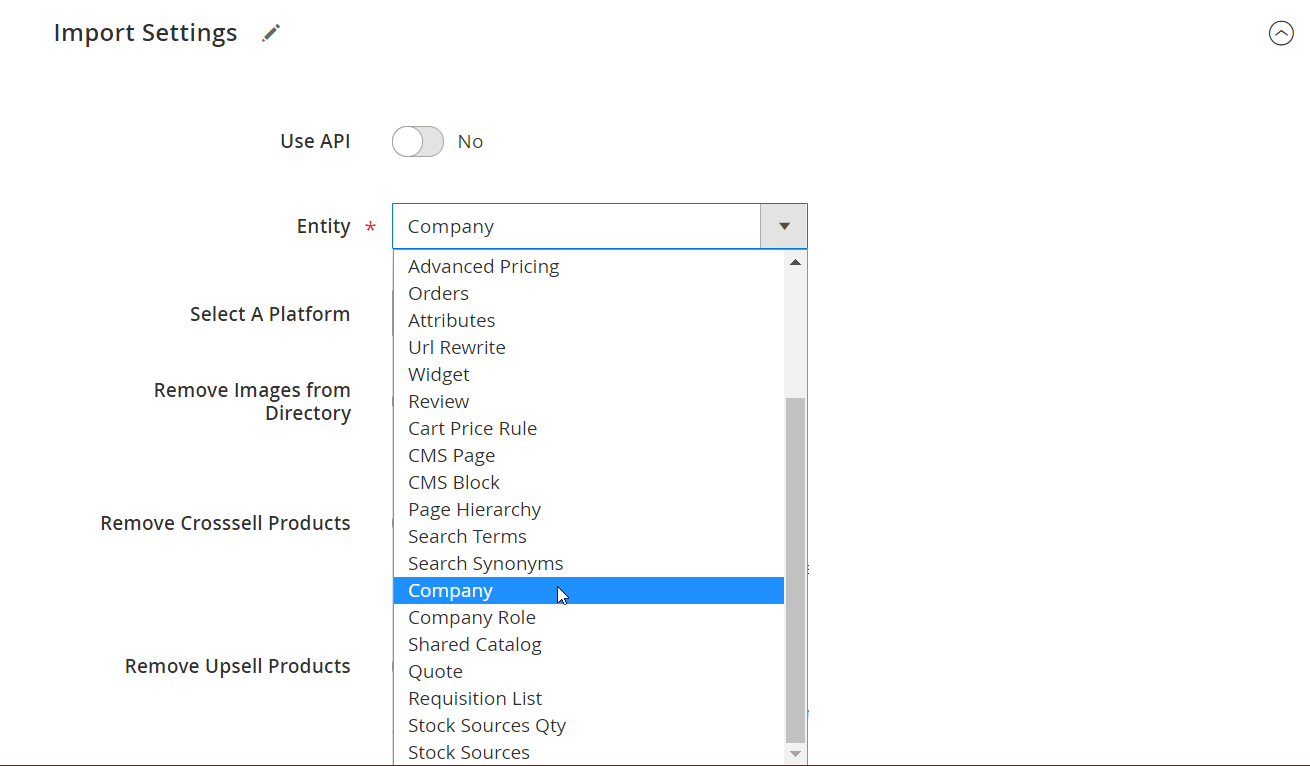
You can read more about Magento 2 B2B import and export here: Adobe Commerce B2B Import & Export Guide.
Ultimately, the value of Adobe Commerce B2B is not limited to an individual feature. The platform brings company management, personalized catalogs and pricing, purchasing workflows, self-service tools, and integrations together in one ecosystem, giving merchants a foundation for building a scalable B2B commerce operation.
Final Words: Get More from Adobe Commerce B2B
Adobe Commerce provides a strong foundation for B2B e-commerce, combining company accounts, shared catalogs, custom pricing, negotiable quotes, purchase orders, requisition lists, Quick Order, and flexible payment options in one platform. When these capabilities are configured together, merchants can create a buying experience that is convenient for customers while still supporting the complex structures and purchasing rules of B2B organizations.
However, managing a growing B2B operation involves more than configuring features in the Admin. Companies often need to move large volumes of B2B entities and related data between Adobe Commerce and external systems. Company accounts, company users, shared catalogs, customer-specific pricing, credit information, and other B2B data may need to be transferred, updated, or synchronized as the business evolves.
This is where Improved Import & Export by Firebear can complement the native Adobe Commerce B2B capabilities. Instead of maintaining large datasets manually, you can use the extension to streamline the transfer of B2B-related data and connect Adobe Commerce with external business systems and data sources.
If you are planning an Adobe Commerce B2B migration, integration, data synchronization project, or need to automate the import and export of B2B entities, the Firebear team can help you determine the most suitable approach for your specific setup.
Need to move B2B data between Adobe Commerce and another system? Contact Firebear to discuss your Adobe Commerce B2B import and export requirements.
Frequently Asked Questions About Adobe Commerce B2B
What are the main Adobe Commerce B2B features?
The main Adobe Commerce B2B features include Company Accounts, company users and roles, Shared Catalogs, custom pricing, Negotiable Quotes, Purchase Orders and approval rules, Quick Order, Requisition Lists, Payment on Account, and B2B-specific payment and shipping options. Together, these features support complex purchasing structures and self-service B2B buying.
Is B2B functionality available in Magento Open Source?
No. The native Adobe Commerce B2B feature set is not included in Magento Open Source. Features such as Company Accounts, Shared Catalogs, Negotiable Quotes, Purchase Orders, and Requisition Lists require Adobe Commerce. Magento Open Source merchants can add comparable functionality through third-party extensions.
How do I enable B2B features in Adobe Commerce?
Go to Stores > Settings > Configuration > General > B2B Features in the Admin. Enable Company to activate the core company-based B2B functionality. You can then enable independent features such as Quick Order and Requisition Lists and configure additional settings for payments, shipping, purchase orders, and other B2B workflows.
What are Company Accounts in Adobe Commerce?
Company Accounts allow a business customer to operate as an organization rather than as a single individual customer. A company can have multiple buyers, administrators, roles, permissions, and organizational structures. Company Accounts also provide the foundation for several other Adobe Commerce B2B features.
What is a Shared Catalog in Adobe Commerce B2B?
A Shared Catalog is a customized product catalog created for a specific group of B2B customers. Merchants can control which products a company can purchase and assign custom prices to those products. This is useful for negotiated pricing, contractual assortments, wholesale customers, and different pricing tiers.
How do Negotiable Quotes work in Adobe Commerce?
Negotiable Quotes allow eligible B2B buyers and sellers to negotiate order terms before completing a purchase. A buyer can request a quote, after which the seller can adjust prices, quantities, discounts, and other terms. The negotiation can continue until both parties agree and the quote is converted into an order.
What are Purchase Orders and approval rules in Adobe Commerce?
Purchase Orders allow company buyers to submit orders for approval instead of completing them immediately. Company administrators can create approval rules based on purchasing conditions and user permissions. This helps businesses introduce internal purchasing controls without taking the entire approval process outside the e-commerce platform.
What is the difference between Quick Order and Requisition Lists?
Quick Order is designed for fast one-time or repeat purchasing when customers already know the products or SKUs they need. Requisition Lists are reusable collections of frequently purchased products that customers can return to whenever they need to reorder. Both features reduce the need to browse the catalog manually.
Can Adobe Commerce B2B customers pay on account?
Yes. Adobe Commerce supports Payment on Account, which allows eligible companies to place orders against an assigned credit limit instead of paying immediately at checkout. Merchants can configure the payment method and manage credit settings for individual company accounts.
Can I import and export Adobe Commerce B2B entities?
Yes, B2B data can be transferred between Adobe Commerce and external systems, but the available options depend on the entity and data structure involved. For businesses handling large volumes of company accounts, company users, shared catalogs, pricing, and other B2B data, Improved Import & Export by Firebear can simplify data transfers and integrations. If you need to automate or customize the import and export of Adobe Commerce B2B entities, contact Firebear to discuss your requirements.
Related posts
 Magento 2 System Requirements: Complete Guide for Adobe Commerce and Open Source
 Magento 2 B2B Company Explained: A Complete Guide to Setup, Structure, Management & Import for Adobe Commerce
 Magento 2 (Adobe Commerce) Pricing Explained
 How to Import & Export Products in Magento 2 & Adobe Commerce : The Complete Guide for 2026 (CSV, Images, MSI, Configurable Products & More)
 Export Products from Magento 1 to Magento 2 Easily: Full Migration Tutorial for 2026
 How to Import Advanced Pricing in Shopware 6 with Product Updates
 Magento SEO Checklist 2026: 50+ Tips to Boost Rankings & Sales
 Magento to Shopify Product Migration: Complete 2026 Guide to Import & Export