
Magento 2 REST API Import: Guide for Adobe Commerce & Magento Open Source
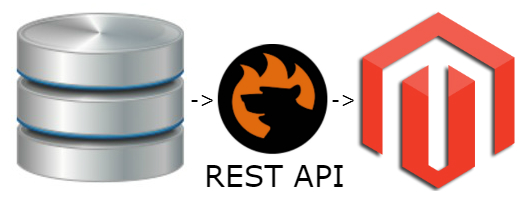
Magento 2 REST API provides a standard way to connect your store with external systems and exchange data through API requests. It can be used to integrate Magento 2 with ERP, CRM, PIM, supplier, marketplace, and other third-party platforms. Adobe Commerce and Magento Open Source use the REST API framework to expose a wide range of endpoints for working with store data.
However, using the Magento REST API to import data from an external system is not the same as sending an individual API request. When you need to retrieve product, customer, order, category, inventory, or other data regularly, you also need to handle authentication, data formats, attribute mapping, transformations, and import scheduling.
This is where the Improved Import & Export extension for Magento 2 comes in. It lets you connect Magento 2 to external REST API sources and import data in JSON or XML format. You can configure API requests, map external fields to Magento attributes, transform data, and automate recurring imports.
In this guide, we explain how the Magento 2 REST API works, how to configure REST API data import with Improved Import & Export in 2026, and which features can make API-based data synchronization easier in both Magento Open Source and Adobe Commerce.

Table of contents
- Magento 2 REST API: What You Need to Know
- How to Import Data via REST API into Magento 2 Open Source & Adobe Commerce
- Additional Features for Magento 2 REST API Import
- Magento 2 REST API Import vs Native Magento Import
- Magento REST API Import and Export Use Cases
- Final Words: Simplify Magento 2 REST API Data Integration
- Magento 2 REST API Import & Export FAQ
Magento 2 REST API: What You Need to Know
The Magento 2 REST API enables external applications and services to communicate with your store and work with Magento data. Instead of accessing the database directly, an external system sends an HTTP request to a specific API endpoint, and Magento returns the requested data or performs the requested operation.
The Magento REST API is useful for both one-time integrations and ongoing data synchronization. For example, an ERP can provide product and inventory data to Magento, while a CRM can exchange customer information with the store. When used together with an import solution such as Improved Import & Export, the REST API can also serve as a source for automated data imports.
What Is the Magento 2 REST API?
REST (Representational State Transfer) is an architectural approach for exchanging data between applications over HTTP. Magento 2 (both Adobe Commerce and Magento Open Source) implements REST web APIs that expose resources through predefined endpoints. Depending on the resource and operation, you can use HTTP methods such as GET, POST, PUT, and DELETE to retrieve, create, update, or delete data.
Most Magento REST API requests use JSON to send and receive structured data. For example, an external application can request product information from a Magento endpoint or send product data to Magento for processing.
The basic workflow looks like this:
External system → API request → Magento REST API → Magento data → API response
Magento 2 REST API endpoints follow a structured URL pattern. A typical endpoint for a Magento installation may look like:
https://example.com/rest/default/V1/products
Here, default identifies the store view, while V1/products identifies the API resource and version.
How Does Magento REST API Authentication Work?
Magento REST API requires authentication for most operations involving store data. The authentication method depends on the type of integration and Magento deployment.
For Magento Open Source and Adobe Commerce, API integrations can use access tokens associated with an integration, administrator, or customer account. The token is then passed with the API request to authorize access to the requested resources.
When configuring an external API import, you therefore need to know not only the API URL but also:
- the required authentication method;
- API credentials or access token;
- the HTTP request method;
- required headers;
- request parameters or body;
- the expected response format.
For automated integrations, it is important to use appropriate integration credentials and grant only the permissions required for the data transfer.
Magento REST API vs Adobe Commerce REST API
You may encounter the terms Magento REST API, Magento 2 REST API, and Adobe Commerce REST API when researching API integrations. In most cases, they refer to the same thing — REST web APIs used to interact with Magento-based commerce platforms.
Magento Open Source and Adobe Commerce provide REST APIs for working with store resources. Adobe maintains the current REST API documentation and reference for these platforms, including available endpoints, authentication, request parameters, and responses.
There is also a separate API environment for Adobe Commerce as a Cloud Service. Its authentication and endpoint structure differ from traditional Adobe Commerce and Magento Open Source deployments, so the API documentation and integration approach should match your Commerce environment.
What Data Can You Access Through the Magento REST API?
The Magento REST API provides endpoints for many areas of the store. Depending on your Magento edition, version, permissions, and available APIs, REST can be used to work with data such as:
- Products — catalog information, attributes, prices, and other product data.
- Categories — category information and catalog structure.
- Customers — customer accounts and related information.
- Orders — orders, invoices, shipments, and related data.
- Inventory — stock and inventory information.
- Carts and checkout — cart and purchasing operations.
- CMS data — supported content management resources.
- B2B data — supported company and B2B resources in Adobe Commerce.
The exact resources and operations available depend on your Magento or Adobe Commerce version and API permissions. The official REST API reference should be used to verify the endpoint you need.
For data import, however, knowing the available Magento REST API endpoints is only part of the process. You also need a way to retrieve data from an external API, convert it into a Magento-compatible structure, map the fields, and run the import. The Improved Import & Export extension handles these tasks as part of its REST API import workflow.
How REST API Requests Work in Magento 2
A REST API request typically contains an endpoint, HTTP method, authentication information, and, when required, request parameters or a JSON payload. Magento then processes the request and returns a response with an HTTP status code and data, usually in JSON format.
For example, a request to retrieve products can look like this:
GET https://example.com/rest/default/V1/products
Authorization: Bearer <access-token>
Accept: application/json
A request to create or update data can include a JSON payload:
POST https://example.com/rest/default/V1/products
Authorization: Bearer <access-token>
Content-Type: application/json
|
1 2 3 4 5 6 7 |
{ "product": { "sku": "example-product", "name": "Example Product", "price": 49.99 } } |
The exact endpoint, method, parameters, and payload depend on the Magento resource you are working with. Authentication is also required for most operations, with the appropriate access token and API permissions determining what the integration can access.
For REST API import, the process works in the opposite direction from a typical API request made by an external application. Let’s explore it.
How to Import Data via REST API into Magento 2 Open Source & Adobe Commerce
Importing data from an external REST API into Magento 2 becomes much easier with the Improved Import & Export extension by Firebear Studio. The extension connects your store to external API sources and lets you retrieve data in JSON or XML, map it to Magento attributes, transform values when necessary, and automate recurring imports.
This approach is useful when your products, customers, orders, inventory, prices, or other store data are maintained in an external ERP, PIM, CRM, supplier system, marketplace, or another application. Instead of manually preparing files for every update, you can configure an API-based import and let Magento retrieve the latest data according to your schedule.
Below, we show how to configure a Magento 2 REST API import with Improved Import & Export and explain the additional features available for automating and managing API-based data transfers.
Please Note: Connecting to a complex third-party API may require custom development on top of Improved Import & Export. Our solution is 100% open source, so our team can advise you on adding the required functionality. We can also provide a quote for a custom integration —.
How to Configure REST API Import in Magento 2
After installing Improved Import & Export, you can configure REST API connections from the extension’s import profile settings.

- Select the import data format. Choose XML or JSON, depending on the format returned by the external API.
- Select REST as the source type. The extension supports both REST and SOAP API connections.
- Enter the API call URL. Specify the endpoint from which the extension should retrieve the data.
- Select the request method. Depending on the API, use GET or POST and configure the required request parameters.
- Configure authentication and request data. If the API requires authentication, provide the credentials, token, headers, or other parameters required by the service.
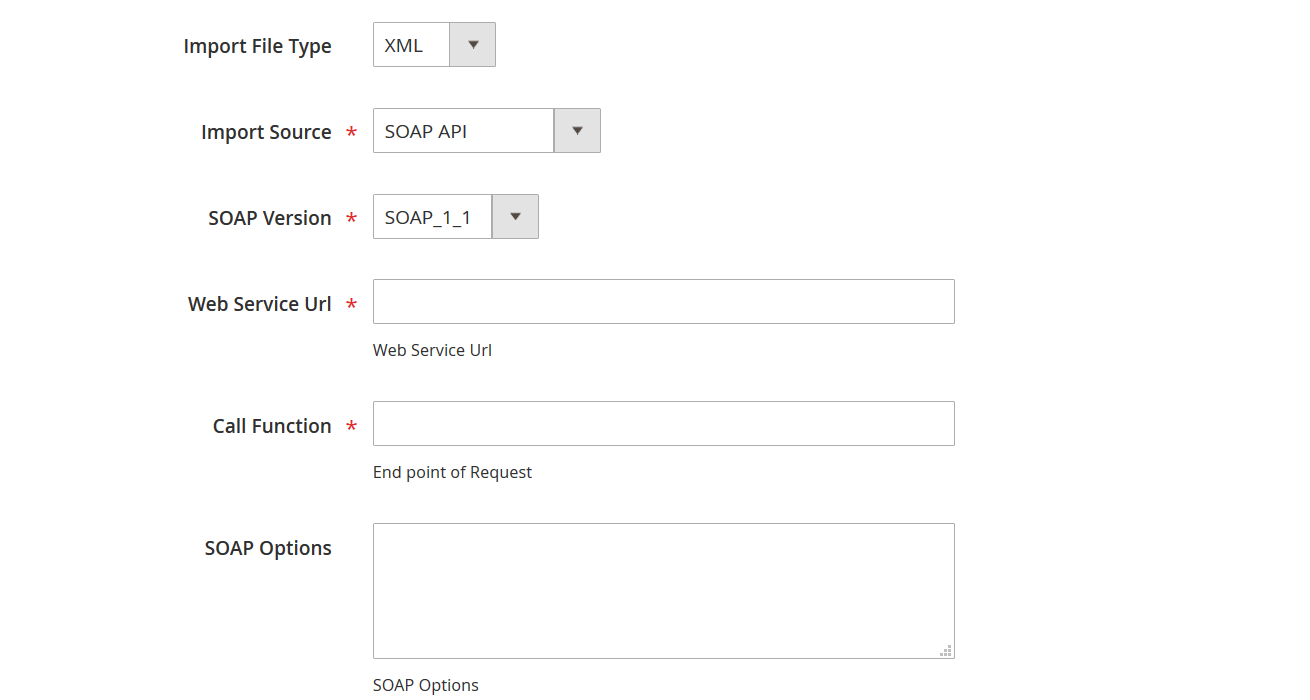
For example, an API that uses basic authentication may require credentials in the request:
{
“username”: “username for endpoint”,
“password”: “password for endpoint”
}
If the API does not require authentication or additional request parameters, you can leave the corresponding fields empty.
The exact configuration depends on the API you are connecting to. Always follow the authentication and request requirements provided by the API vendor.
For custom XML data, you can also use XSLT transformations to convert the source structure into a format suitable for Magento 2. Learn more in our XSLT documentation.
You can also review sample files for the supported formats:
If you need help connecting Magento 2 to a specific REST or SOAP API, Firebear Studio can assist with the integration and required configuration.
Additional Features for Magento 2 REST API Import
Connecting Magento 2 to a REST API is only the first step. In real-world integrations, external data often needs to be transformed, mapped, filtered, and imported on a recurring basis. Improved Import & Export provides additional tools to handle these tasks from the Magento 2 Admin.
Automated REST API Imports
You can schedule REST API imports to run automatically instead of launching each import manually. This is useful for keeping frequently changing data, such as inventory, prices, and product information, synchronized with an external system.
Import profiles can be executed according to a custom schedule or through Magento cron, depending on your integration requirements.
Data Mapping and Transformation
External APIs rarely use the same attribute names and values as Magento 2. Improved Import & Export lets you map source fields to Magento attributes and modify data during the import process.
For example, an external API may provide:
product_name → name
product_code → sku
product_price → price
stock_quantity → qty
You can create mapping rules to match these fields with the corresponding Magento attributes without changing the source API.
The extension also supports data transformations, allowing you to modify values, combine or replace fields, and prepare external data for Magento before it is imported.
Import Filters
Not every record returned by an API needs to be imported. Import filters let you define conditions for selecting the data that should be processed.
For example, you can import only products that:
- belong to a particular category;
- have a specific status;
- exceed a certain stock level;
- were updated after a particular date.
This can help reduce unnecessary processing when an external API returns a large dataset.
Import Logs and Monitoring
Improved Import & Export keeps import information available for troubleshooting and monitoring. Logs can help you identify connection problems, invalid source data, mapping issues, and other errors that may prevent records from being imported correctly.
This is especially useful for scheduled REST API integrations, where imports may run without manual supervision.
Manual and Automated Workflows
You can run an import manually when you need to update Magento immediately or automate it when regular synchronization is required. This makes the same REST API connection suitable for both occasional data transfers and ongoing integrations.
Magento 2 REST API Import vs Native Magento Import
Magento 2 includes native import functionality for bringing certain types of data into the store. However, the standard import workflow is primarily designed around files such as CSV rather than retrieving data directly from an external REST API.
This difference becomes important when your catalog or other store data is maintained in another system. With a file-based workflow, you typically need to obtain the data, prepare it in a Magento-compatible format, upload the file, and run the import. If the external system is updated regularly, repeating these steps can quickly become time-consuming.
Improved Import & Export extends the standard Magento import workflow with REST API connectivity. Instead of preparing every update manually, you can configure an API source, map the received data to Magento attributes, transform values when necessary, and schedule recurring imports.
| Feature | Native Magento Import | Improved Import & Export |
| CSV file import | ✓ | ✓ |
| REST API as an import source | — | ✓ |
| JSON and XML API data | — | ✓ |
| External API authentication | — | ✓ |
| Attribute mapping | Basic | Advanced |
| Data transformation | Limited | ✓ |
| Import filters | Limited | ✓ |
| Scheduled imports | Limited by edition and workflow | ✓ |
| Automated recurring imports | — | ✓ |
| Import logs and monitoring | ✓ | ✓ |
The key difference is therefore not simply the file format. Improved Import & Export provides an integration layer between Magento 2 and external data sources. This makes it possible to turn a REST API connection into a repeatable import process rather than relying on manual file preparation and uploads.
For merchants who need to synchronize Magento 2 with an ERP, PIM, CRM, supplier platform, or another external service, this approach can significantly simplify recurring data transfers.
Magento REST API Import and Export Use Cases
REST API integrations are not limited to bringing external data into Magento 2. With Improved Import & Export, you can also use REST API connections to transfer Magento data to external systems. This makes the extension useful for both importing data from third-party APIs and exporting Magento data through APIs for further processing or synchronization.
The direction of the data transfer depends on your integration scenario:
External system → REST API → Magento 2
or
Magento 2 → REST API → External system
ERP to Magento 2 and Magento 2 to ERP
An ERP can act as a central source for product, price, inventory, customer, and other business data. You can import this information into Magento through the ERP’s REST API.
The integration can also work in the opposite direction. For example, you can export Magento orders, products, customers, or other supported data through a REST API so that the ERP can process it.
PIM to Magento 2
A PIM system can provide product names, descriptions, attributes, categories, and other catalog information through a REST API. Improved Import & Export can retrieve this data and import it into Magento.
You can also export Magento catalog data to an external PIM or another system when Magento is the source that needs to provide product information.
Supplier API to Magento 2
Supplier APIs can provide product catalogs, prices, stock levels, and other data for import into Magento. Scheduled REST API imports can help keep this information up to date without repeatedly downloading and preparing supplier files.
Magento 2 to CRM
The data flow can also start in Magento. You can export supported customer and other store data through a REST API and transfer it to a CRM or another business system for further processing.
Magento 2 to Marketplace or External Platform
REST API export can be useful when another platform needs data from your Magento store. Depending on the integration, you can export products, prices, inventory, orders, customers, and other supported entities through an API.
This can be particularly useful for integrations where the external platform expects data in a specific API format rather than a downloadable CSV or XML file.
The exact entities, API methods, authentication requirements, and data transformations depend on the systems being connected. For complex third-party APIs, additional customization may be required.
Final Words: Simplify Magento 2 REST API Data Integration
The Magento 2 REST API provides a flexible way to connect your store with external systems and exchange data. However, building a reliable API-based workflow involves more than connecting to an endpoint. You may also need to handle authentication, data mapping, transformations, filtering, scheduling, and recurring synchronization.
Improved Import & Export makes these tasks easier by extending Magento’s standard data transfer capabilities with REST API import and export. You can retrieve JSON or XML data from external APIs and import it into Magento 2, or export Magento data to external systems through API connections. Mapping, transformation, filtering, and scheduling tools help you adapt the data flow to your specific integration requirements.
Whether you are looking for a Magento REST API integration, need to import data through the Magento 2 REST API, or want to connect Adobe Commerce REST API data with an external system, Improved Import & Export can provide the tools needed to automate the process.
Get Improved Import & Export for Magento 2 and simplify your REST API integrations.
If your integration involves a complex third-party API or requires custom data processing, contact Firebear Studio. Our team can help you determine the best approach and provide custom development when necessary.
Magento 2 REST API Import & Export FAQ
What is the Magento 2 REST API?
The Magento 2 REST API is a web API that allows external applications and services to communicate with a Magento store over HTTP. It provides endpoints for working with supported Magento resources, including products, customers, orders, categories, inventory, and other store data. External systems can use HTTP methods such as GET, POST, PUT, and DELETE to retrieve or modify data.
What is the difference between Magento REST API and Adobe Commerce REST API?
Magento 2 REST API is a commonly used term for the REST web APIs available in Adobe Commerce and Magento Open Source. They share the same REST API framework for their respective deployments, although the available resources can vary by edition and version. Adobe Commerce as a Cloud Service, in turn, has its own API environment and authentication requirements.
Can I import data into Magento 2 via REST API?
Yes. You can import data from an external REST API into Magento 2 with Improved Import & Export. The extension can retrieve data from an API endpoint, process JSON or XML responses, map external fields to Magento attributes, transform values, and import the result into your store.
What data can I import through the Magento REST API?
The exact data available depends on the external API and the Magento resources involved. With Improved Import & Export, REST API imports can be used for supported entities such as products, categories, customers, orders, inventory, prices, and CMS data. The source API must provide the required information in a format that can be processed by the import profile.
Can I import JSON data through the Magento 2 REST API?
Yes. Improved Import & Export supports REST API sources that provide data in JSON format. You can configure the API endpoint and request parameters, retrieve the JSON data, and map its fields to the corresponding Magento 2 attributes before importing it.
Can I import XML data from a REST API into Magento 2?
Yes. You can use a REST API that returns XML as an import source. Improved Import & Export can process the XML data and map it to Magento attributes. For more complex XML structures, XSLT transformations can be used to convert the source data into a Magento-compatible structure.
Can I export Magento 2 data through a REST API?
Yes. Improved Import & Export supports REST API exports as well as imports. You can configure Magento data to be exported through an API connection to an external ERP, PIM, CRM, marketplace, or another system. The exact export workflow depends on the requirements of the destination API.
Can I schedule Magento REST API imports and exports?
Yes. Improved Import & Export supports automated and scheduled data transfers. You can configure import or export profiles to run regularly, which is useful for synchronizing frequently changing information such as products, prices, inventory, and orders.
How do I map external REST API data to Magento 2 attributes?
Improved Import & Export provides mapping tools that let you connect fields from an external API with Magento 2 attributes. For example, an API field such as product_name can be mapped to the Magento name attribute. You can also use transformations to modify values during the import when the source and Magento structures do not match.
Can Improved Import & Export connect Magento 2 to any REST API?
Improved Import & Export can connect to REST API sources and destinations that meet the extension’s supported connection and data requirements. However, complex third-party APIs may require additional configuration or custom development, especially when they use unusual authentication methods, custom request logic, pagination, or highly specific data structures. Firebear Studio can assist with complex REST API integrations when additional development is required.