"E-Commerce"

Reviewing Magento 2 Out of Stock Notification by Amasty

- E-Commerce, Magento 2

magento 2 out of stock notification module review

Managing stock levels in a Magento 2 store can be daunting, especially when products go out of stock unexpectedly. This creates frustration for customers and missed sales opportunities for store owners. However, Magento 2 Out of Stock Notification by Amasty offers a practical solution to this problem.

It allows merchants to notify customers when out-of-stock items become available again. This helps retain potential buyers and provides valuable insights into customer preferences, allowing merchants to restock highly demanded products on time.

Below, we explore Amasty’s Out of Stock Notification for Magento 2, which allows store visitors to subscribe to stock and price alerts. You will learn its core features, how to manage the module in the admin area, and what happens on the customer side. Continue Reading


Reviewing Magento 2 Customer Group Catalog by Amasty

- E-Commerce, Magento 2

reviewing Magento 2 Customer Group Catalog by Amasty

Although Magento 2 provides basic customer group functionality, it cannot control catalog visibility and pricing for specific groups. That’s where the Magento 2 Customer Group Catalog by Amasty joins the game.

The platform’s default limitation can hinder a store’s ability to create personalized experiences for various customer types, such as wholesalers, VIPs, or guest users. Amasty’s Customer Group Catalog for Magento 2, however, solves this problem.

The extension offers advanced catalog and pricing management tools. As a store owner, you can use these instruments to tailor your offerings to different customer groups, hide or display products, and customize prices for specific segments.

Below, we review the Magento Customer Group Catalog extension and its core features to unveil how it can help you build more targeted, personalized experiences. You will learn what the Magento 2 Customer Group Catalog by Amasty is, discover its core features, and see how it works from the perspective of both store administrators and customers. Continue Reading

Reviewing Magento 2 Surcharge & Extra Fee Extension by Mirasvit

- E-Commerce, Magento 2

Reviewing Magento 2 extra fee extension by Mirasvit

Running a Magento 2 store often comes with the challenge of balancing competitive pricing and managing additional costs for non-standard orders. Customers often pay for expensive shipping or payment options they don’t use, which can drive up abandonment rates at checkout. The Magento 2 Surcharge & Extra Fee Extension by Mirasvit offers a powerful solution to this problem, allowing merchants to maintain lower base prices while applying surcharges only to customers who opt for premium services. This Magento surcharge extension guarantees that extra fees are applied based on flexible rules, ensuring that customers who choose costly options like expedited shipping or non-standard payment methods pay their share. Targeting specific customer groups and store views allows merchants to make their pricing more attractive while covering additional processing costs.

Today, we’ll be exploring Mirasvit’s Surcharge & Extra Fee. This Magento 2 extra fee extension provides the flexibility to add extra fees either per order or per product, with customizable surcharge rules based on cart or product data. It also supports various types of surcharges, giving you full control over how additional fees are applied. Let’s see what this Magento 2 payment fee module is and then dive into the key features of this extension.
Continue Reading

Magento 2 AI Content Generator by Mirasvit: Automate Content Creation & Translations

- AI, E-Commerce, Magento 2

GPT AI Assistant & Content Generator for Magento 2 Review

In today’s e-commerce landscape, generating unique, high-quality content for products and categories is essential to maintaining competitive Magento SEO and engaging customers. However, manual content creation is time-consuming, especially for large catalogs and multilingual stores. This is where the Magento 2 AI Content Generator by Mirasvit comes in. Powered by ChatGPT and seamlessly integrated into Magento, this AI and ecommerce extension automates content generation, helping merchants streamline tasks, from product descriptions to blog posts, while improving SEO and enhancing customer interaction. By addressing the challenges of content creation and offering a fully customizable AI-powered solution, this Magento AI extension enables stores to scale their content strategies effortlessly.

The following post reviews a GPT AI Assistant & Content Generator plugin for Magento 2. We explain what this AI assistant is and what key features it offers. Also, you will learn about the extension’s functionality and see what other people think about the module. Let’s get started

Continue Reading

Magento 2 Backend Exploration: CMS Pages

magento 2 cms pages add edit import export

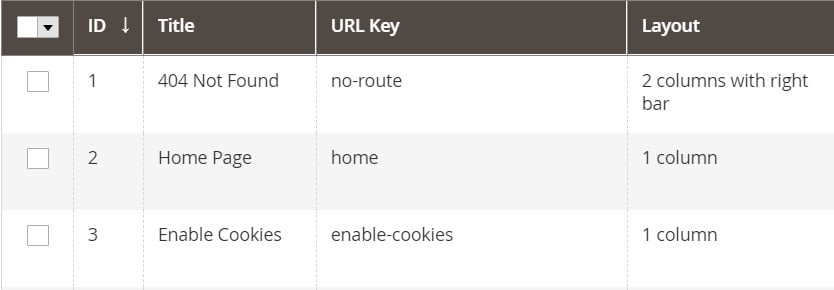
Below, we dive deep under the hood of Magento 2 backend, exploring its Content section. In this article, we describe Pages – a screen where all CMS pages, such as “About Us” or “Meet the Team“, are stored. Below, you can discover how the appropriate grid looks. Besides, we explain how to manage its content. The article also touches upon such aspects as the creation of new CMS pages. If you are wondering how to transfer them to your e-commerce store, you can also find the answer below. Continue Reading

The Ultimate BigCommerce Import Guide

- BigCommerce, E-Commerce

BigCommerce Import: products, customers, orders

The management of your store’s products, inventories, clients, and other entities can be streamlined with the help of import and export processes. By default, BigCommerce offers tools for moving data to and from your e-commerce website. You can use BigCommerce import to update customers and product catalogs and BigCommerce export to apply bulk adjustments to them. In the following article, we focus on the import side of these processes. We briefly explore the default capabilities and then proceed to a more in-depth analysis of each particular opportunity associated with the BigCommerce import. 

Although the platform’s only file format for importing data is CSV, it still supports a few more import entities. Thus, BigCommerce product import and BigCommerce customer import are at your disposal. Also, you can transfer related entities, such as product options and images, as well as customer passwords to your e-commerce website. Below, we’ll discuss the many data types that can be imported, including those not supported by default, such as BigCommerce order import, BigCommerce category import, and BigCommerce customer review import. You will learn how to transfer products, product options, product images, customers, customer passwords, 301 redirects, orders, categories, and customer reviews to your website. For additional information on the topic, go to the corresponding BigCommerce Export Guide. Continue Reading

Shopware 6 CLI: General Recommendations & Important Commands

- E-Commerce, Shopware

You can dramatically simplify your interaction with Shopware via the console by applying Shopware 6 CLI commands. The platform provides the ability to execute numerous functions with the help of commands. In some situations, such as the necessity to process large amounts of data, their use is the only suitable option.

In this Shopware CLI guide, we provide general recommendations on how to use the command-line interface with the platform. You will find a list of the most important Shopware 6 CLI commands explained and divided into groups. Other Shopware 6 tutorials and guides are available in our cookbook. Continue Reading

Firebear Improved Import, Export & Mass Actions for Shopware 6

- E-Commerce, Our extensions

shopware import export plugin by FirebearBelow, we’d like to introduce you to our Shopware import plugin. Meet the Improved Import, Export & Mass Actions for Shopware 6. It is one of the ecosystem’s most fully featured and powerful data transfer solutions that offers lots of enhancements to the default import and export processes. Our Shopware import export plugin provides a straightforward way to connect your e-commerce website with different external platforms within and around the ecosystem, automating various routine processes. It introduces numerous integrations with other e-commerce platforms, tools, and service providers, including ERPs, CRMs, accounting, etc.

In the article below, we briefly describe the plugin’s key features. We explore import and export jobs, data transfer automation, mapping, and extended connectivity options of our Shopware 6 import & export plugin. After that, you will find a small description of the existing import & export solutions available in the Shopware marketplace along with the default data transfer capabilities of the platform.

Continue Reading

Shopware SAP Integration: SAP Business One Shopware 6 Connector by Firebear

Shopware sap business one connector

What do you know about the Shopware SAP integration? Probably, you are familiar with the fact that you cannot just take your Shopware 6 website and connect it to a random SAP product. However, we know the most user-friendly and intuitive way to create the SAP Business One Shopware integration.  

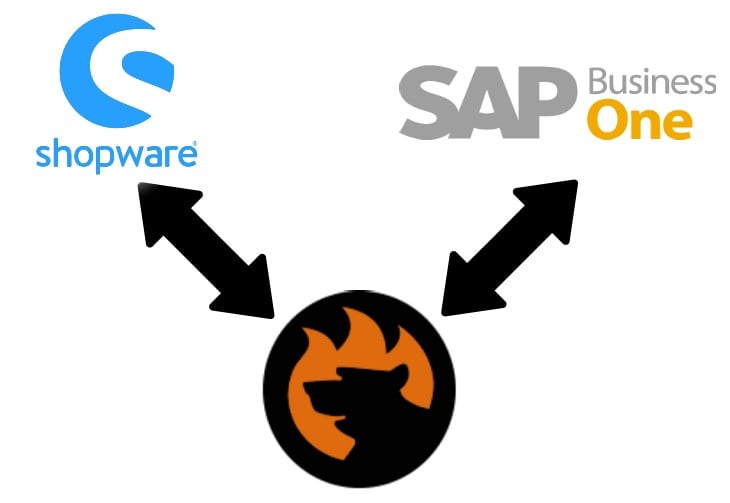
The Shopware 6 ecosystem of apps and tools is gradually expanding, introducing such handy solutions as SAP Business One Integration for Shopware 6 by Firebear Studio. In the following article, you will learn how to leverage the SAP Business One Shopware tandem with the help of this plugin. We are going to introduce you to the basic principles and features the SAP Shopware connector incorporates and illustrate its functionality. After that, we will focus on several common use cases for the SAP B1  Shopware 6 integration.  

Continue Reading

Shopify Sap Business One Integration Defined

Below, we’d like to draw your attention to the Shopify SAP integration. These days, many useful tools can help you simplify e-commerce duties, including various ERP systems, CRM platforms, accounting tools, etc. SAP Business One, of course, is on the list of the most powerful solutions. The Shopify SAP Business One integration, however, is not built into your admin by default. Therefore, you need to look for a reliable third-party solution. 

In this article, we are going to introduce you to one of the possible Shopify SAP B1 integrations, so that you can achieve your goals of connecting the data of these two platforms and improving the performance of your business operations. With the Firebear team and its Import & Export Tool for Shopify, you can carry out this process quickly and painlessly. Let’s go over all the integration features (both implemented and planned). 

Continue Reading