
Magento 2 Editions in 2027: Magento Open Source, Adobe Commerce & Legacy Alternatives
Magento editions used to be simple. You could choose between Magento Community Edition and Magento Enterprise Edition based on your budget and business needs. However, things have changed considerably. Adobe acquired Magento, introduced new branding, and expanded its ecommerce portfolio with different hosting and deployment models. As a result, understanding the available Magento 2 editions is no longer as straightforward as it once was.
Today, Magento Open Source exists alongside several Adobe Commerce editions, while independent projects continue developing the Magento codebase. Even Magento 1 has survived through community-driven alternatives.
So, what happened to the original Magento editions, which versions are available in 2027, and how do they differ? Let’s explore the complete Magento ecosystem, from open-source solutions to enterprise platforms and legacy alternatives.

Table of contents
- Magento 2 Editions Available in 2027
- Magento Editions: Magento Open Source as The Only Free Official Option
- Adobe Commerce Editions: Enterprise-Grade Features In All Possible Forms
- Legacy Magento Editions: How The Platform Looked Back In The Days
- Alternative Editions of Magento 1 For Those Merchants Who Still Don’t Want To Upgrade
- All Magento Editions in 2027: Complete Comparison
- Final Words: Choosing the Right Magento Edition in 2027
- Magento 2 Editions FAQ
Magento 2 Editions Available in 2027
If we consider Magento strictly as a brand, there is only one official edition: Magento Open Source. However, Magento 2 is more than a product name. Its underlying technology also powers Adobe Commerce, which is available through several deployment models.
The distinction emerged as Adobe gradually separated its commercial ecommerce products from the Magento Open Source brand. In 2021, Magento Commerce was officially rebranded as Adobe Commerce, while the free edition retained the Magento name.
As we approach 2027, the Magento 2 ecosystem includes the following solutions:
| Magento 2 Edition | Description |
| Magento Open Source | The free, open-source edition of Magento 2. Merchants manage hosting, development, maintenance, and integrations independently. |
| Adobe Commerce on-premises | A licensed enterprise ecommerce platform based on the Magento codebase. Merchants host and manage the application on their own infrastructure or through a hosting provider. |
| Adobe Commerce on Cloud Infrastructure (PaaS) | A licensed Adobe Commerce deployment with Adobe-managed cloud infrastructure, development environments, and deployment tools. Merchants retain application-level responsibilities. |
| Adobe Commerce as a Cloud Service (SaaS) | A fully managed, cloud-native Adobe Commerce offering. Adobe handles infrastructure, core application updates, and platform maintenance, while merchants extend functionality through supported APIs and services. |
These are the four principal offerings in the official Magento and Adobe Commerce lineup. Adobe confirms the three Commerce deployment models: on-premises, PaaS, and SaaS.
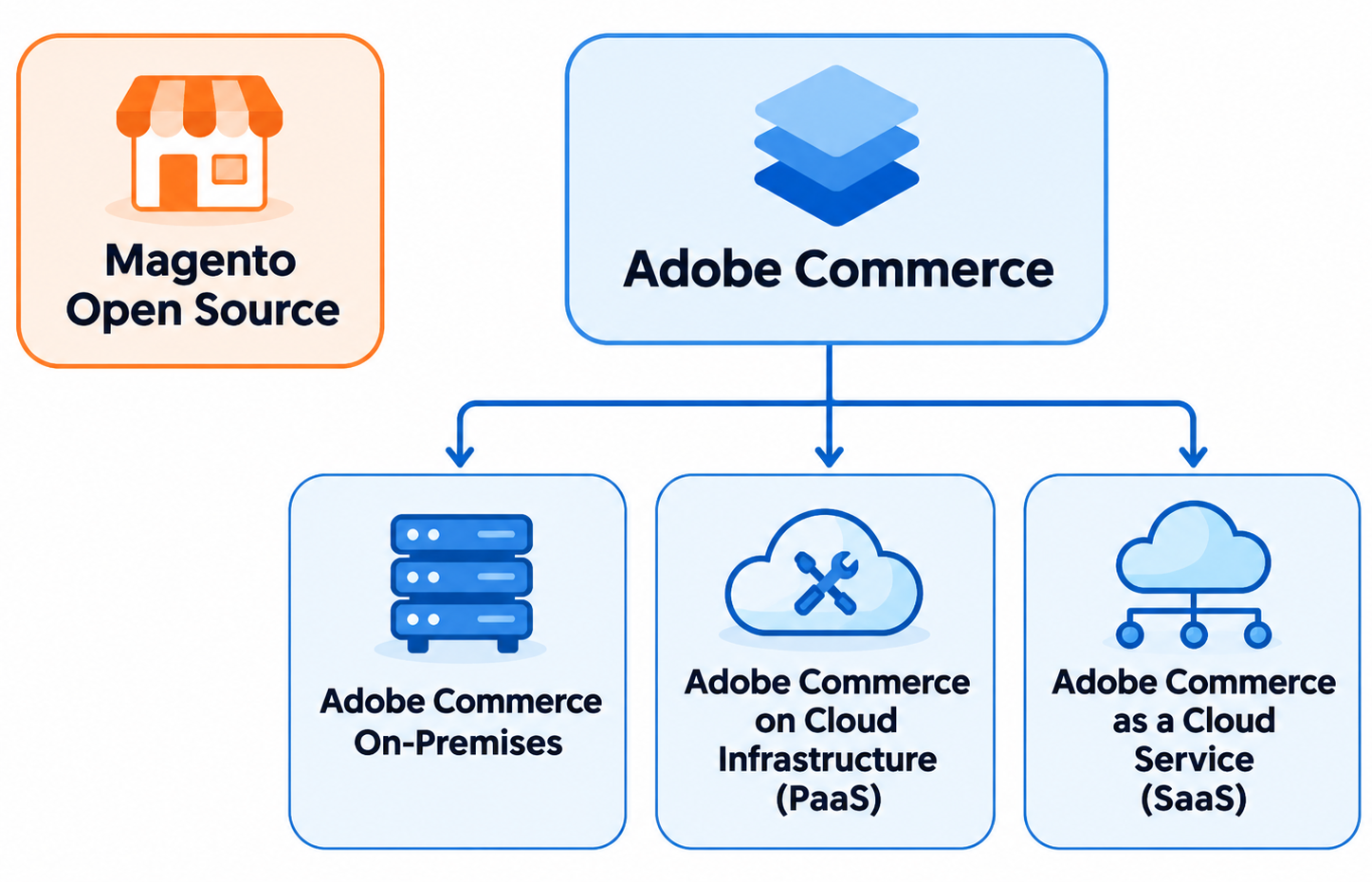
There is also Mage-OS, an independent, community-owned distribution built on Magento Open Source. It is not an official Adobe Commerce edition, but it belongs in the broader Magento 2 ecosystem. For instance, Mage-OS 4.0.0, released on October 30, 2026, is based on Magento Open Source 2.4.9.
One clarification matters before we continue: Adobe Commerce on-premises and PaaS share essentially the same application foundation, but differ in infrastructure and deployment responsibilities. Adobe Commerce as a Cloud Service uses a different SaaS operating and extensibility model. This distinction affects hosting, upgrades, customizations, and third-party extension compatibility..
Magento Editions: Magento Open Source as The Only Free Official Option
Magento Open Source is the direct successor to Magento Community Edition. It retains the familiar Magento architecture and provides merchants with a flexible, self-hosted ecommerce platform.
Magento Open Source is free to download and use, although running a store still involves hosting, development, security, maintenance, and potentially extension licensing costs.
The platform includes the essential features required to build and manage an ecommerce website:
- Product and catalog management. Work with configurable, bundled, grouped, virtual, and downloadable products, custom attributes, and complex category structures.
- Multi-store capabilities. Manage multiple websites, stores, and store views from one Magento installation.
- Inventory management. Track quantities across multiple inventory sources with Multi-Source Inventory (MSI).
- Content management. Create and maintain CMS pages and content blocks using the built-in Page Builder functionality.
- APIs and extensibility. Connect external services through REST and GraphQL APIs or install compatible Magento 2 extensions.
- Checkout and order processing. Manage customer accounts, shopping carts, orders, shipping methods, and payment integrations.
Despite these capabilities, Magento Open Source does not include every enterprise feature available with Adobe Commerce editions. For example, Adobe’s licensed B2B capabilities, including company accounts, shared catalogs, and negotiable quotes, are not part of the standard Magento Open Source installation. However, third-party extensions or custom development can add many additional capabilities.
Magento Open Source is especially suitable for businesses that want extensive control over their ecommerce environment without committing to a commercial Adobe Commerce license.
Is Magento Open Source Still Supported?
Yes. Magento Open Source remains actively developed, with new releases, security updates, and contributions from Adobe and the developer community.
For example, Magento Open Source 2.4.9 was released on May 12, 2026. Adobe’s release documentation also lists the 2.4.10 development line, although an alpha release should not be confused with a production-ready stable edition.
However, merchants must maintain their installations, apply patches, and ensure that hosting environments and third-party extensions remain compatible. Magento Open Source does not include the same commercial support arrangement as licensed Adobe Commerce.
You can find the current release information in the .
Adobe Commerce Editions: Enterprise-Grade Features In All Possible Forms
Adobe Commerce is the commercial counterpart of Magento Open Source. Although the branding has changed, the two platforms still share the Magento 2 foundation.
Adobe Commerce extends that foundation with enterprise-oriented functionality, commercial support, and additional services for businesses with more complex operational requirements.
Depending on the offering and installed components, these capabilities include:
- Advanced B2B functionality, such as company accounts, shared catalogs, negotiable quotes, and requisition lists.
- Content staging and scheduling for preparing promotions and merchandising updates.
- Customer segmentation and targeted promotions for more personalized shopping experiences.
- Enterprise merchandising and product discovery through Adobe Commerce services.
- Commercial support and additional security capabilities for supported deployments.
However, Adobe Commerce is no longer limited to one traditional application deployed in different hosting environments.
Adobe now offers three deployment models, each with different responsibilities, customization options, and infrastructure requirements.
Adobe Commerce On-Premises
Adobe Commerce on-premises is the traditional self-hosted enterprise edition of Magento 2. It provides licensed Adobe Commerce functionality while giving merchants extensive control over the application and its infrastructure.
Businesses can deploy Adobe Commerce on their own servers or use a third-party hosting provider. Unlike Adobe-managed cloud offerings, the merchant or hosting partner is responsible for maintaining the hosting environment.
The main characteristics of Adobe Commerce on-premises include:
- Full control over the application code and hosting configuration.
- Support for compatible Magento 2 PHP modules, customizations, and integrations.
- Access to licensed Adobe Commerce features and services.
- Responsibility for infrastructure maintenance, updates, backups, and performance optimization.
This edition is suitable for enterprises that already have an experienced technical team, require specific infrastructure configurations, or need extensive custom development.
The primary drawback is operational responsibility. Merchants must manage their environments and coordinate security updates, software upgrades, and compatibility testing.
Adobe Commerce on Cloud Infrastructure (PaaS)
Adobe Commerce on Cloud Infrastructure, also called Adobe Commerce PaaS, provides a different approach to deploying essentially the same enterprise application.
Instead of maintaining the underlying hosting environment independently, merchants use infrastructure and deployment tools managed by Adobe.
The platform provides preconfigured services, Git-based development workflows, automated build and deployment processes, and dedicated environments for development, testing, and production.
However, Adobe Commerce PaaS is not a fully managed SaaS application. Merchants remain responsible for their application code, extensions, configurations, and many application-level updates. Adobe manages the hosted infrastructure under a shared-responsibility model.
Adobe Commerce PaaS is especially useful for businesses that want:
- Enterprise Magento 2 functionality without managing all hosting infrastructure.
- Custom PHP extensions and integrations.
- A structured workflow for developing, testing, and deploying changes.
- Greater flexibility than a fully managed SaaS solution.
An important distinction: Adobe Commerce PaaS supports traditional Magento 2 customization methods, including PHP modules. This makes it compatible with many extensions originally developed for Adobe Commerce on-premises, subject to their individual requirements.
Adobe Commerce on Cloud Infrastructure also offers Starter and Pro infrastructure plans. These are deployment plans, not separate Magento editions.
Adobe Commerce as a Cloud Service (SaaS)
Adobe Commerce as a Cloud Service (ACCS) represents a more substantial departure from the traditional Magento 2 deployment model.
Unlike Adobe Commerce on-premises and PaaS, ACCS is a fully managed, cloud-native software-as-a-service platform.
Adobe manages the core application, hosting infrastructure, and platform updates. Merchants no longer need to perform traditional Magento core upgrades or manage the underlying application servers.
ACCS introduces several important differences:
- Versionless operation. Adobe continuously maintains and upgrades the underlying platform.
- Managed scalability. The cloud infrastructure adjusts resources to accommodate changing demand.
- API-based extensibility. Merchants extend functionality through supported APIs, webhooks, Adobe Developer App Builder, and other approved mechanisms.
- Modern storefront architecture. The platform supports headless storefront experiences and Adobe Edge Delivery Services.
- Reduced infrastructure maintenance. Adobe manages the core platform rather than requiring merchants to maintain it independently.
The trade-off, compared to other Magento 2 editions, is reduced access to the underlying application code.
Traditional Magento 2 PHP extensions cannot simply be installed on ACCS. Integrations and custom features must use the supported SaaS extensibility model.
Therefore, Adobe Commerce as a Cloud Service is particularly attractive for enterprises that want to minimize infrastructure responsibilities and adopt a managed, API-first ecommerce architecture.
However, moving an existing Magento 2 store to ACCS may require more than transferring the database. Custom modules, storefronts, and integrations may need significant adaptation.
You can explore these architectural differences in Adobe’s .
Is Adobe Commerce Optimizer Another Magento 2 Edition?
No. Adobe Commerce Optimizer is an additional product rather than a standalone Magento 2 edition.
It provides SaaS-based product discovery, merchandising, and storefront capabilities that can work alongside existing ecommerce systems.
For example, a business can continue using other Magento 2 editions to manage orders and transactions while connecting Adobe Commerce Optimizer to improve its product discovery experience.
Adobe Commerce Optimizer can also work with supported third-party ecommerce backends. It does not independently replace the complete system responsible for cart, checkout, and orders.
Adobe currently treats Commerce Optimizer and Adobe Commerce as a Cloud Service as separate architecture options rather than two products that automatically integrate.
Legacy Magento Editions: How The Platform Looked Back In The Days
Although Magento 2 powers the modern Magento ecosystem, Magento 1 has not disappeared entirely. Some merchants continue running legacy installations despite the platform reaching its official end of support on June 30, 2020.
How many stores still rely on Magento 1?
According to , the service identified 7,141 live websites using Magento 1.9 in November 2026.
This figure covers only websites detected as running Magento 1.9, not every Magento 1 installation. Other Magento 1 versions and sites without detectable version information are not included, so it should not be treated as the total number of active Magento 1 stores.
The continued presence of these websites is understandable. Migrating a heavily customized ecommerce store can be expensive and technically challenging, especially when the existing platform still supports essential business operations.
Historically, Magento 1 was available in two principal editions.
Magento Community Edition 1.x
Magento Community Edition was the original free, open-source Magento platform.
It allowed merchants to build highly customizable ecommerce websites without paying for a commercial software license.
The final official Community Edition release line was Magento 1.9.4.x. Adobe discontinued official Magento 1 support in June 2020, including security maintenance.
As a result, running an unmaintained Magento 1 Community Edition installation introduces significant security and compatibility risks.
Magento Enterprise Edition 1.x
Magento Enterprise Edition was the commercial counterpart to Magento Community Edition.
It included additional enterprise functionality and commercial support. Features varied across releases but included capabilities designed for larger ecommerce operations.
The final Magento 1 Enterprise Edition release line was 1.14.x.
Like Community Edition, Magento 1 Enterprise Edition reached its official end of support on June 30, 2020. Adobe no longer provides regular maintenance for these legacy Magento 1 installations.
Fortunately, merchants who cannot immediately migrate to Magento 2 have several third-party alternatives.
Alternative Editions of Magento 1 For Those Merchants Who Still Don’t Want To Upgrade
The official end of Magento 1 support did not mean the end of its ecosystem.
Independent developers and organizations have created projects that maintain, modernize, or extend the Magento 1 codebase.
However, not every alternative is a separate Magento edition. Some provide their own maintained software distributions, while others deliver commercial security support for existing Magento 1 installations.
OpenMage LTS
OpenMage LTS is one of the best-known community-driven continuations of Magento 1.
The project maintains an independent version of the original Magento Community Edition codebase, providing security fixes, compatibility improvements, and other enhancements.
Its main objective is to keep Magento 1 usable while preserving compatibility with existing Magento installations whenever possible.
OpenMage offers two main release families:
- OpenMage 19.x. A release family designed to preserve closer compatibility with Magento 1.9.4.x.
- OpenMage 20.x. A more extensively modernized release family with additional changes and improvements.
The project maintains a security policy identifying its currently supported branch. Merchants should follow that policy rather than assume every historical OpenMage release remains maintained.
OpenMage is suitable for merchants who want to preserve much of their existing Magento 1 architecture while gaining access to community-maintained software.
However, extension compatibility, server requirements, and security maintenance still require careful evaluation.
Official resources: and .
Mage One
Mage One approaches Magento 1 maintenance differently.
Rather than offering a separate ecommerce platform, Mage One provides a commercial support program for existing Magento 1 installations.
The service focuses primarily on security patches and compatibility updates that help merchants continue operating their legacy stores.
Its main advantages include:
- Regular security updates for supported Magento 1 installations.
- Compatibility maintenance for relevant software dependencies.
- A commercial support arrangement instead of relying exclusively on community contributions.
- Additional time to plan a migration to Magento 2 or another ecommerce platform.
Mage One has publicly committed to supporting Magento 1 through at least 2027, with provisions for extending that commitment further.
This makes Mage One particularly relevant to businesses that want to retain their existing Magento 1 application while addressing security risks.
Unlike OpenMage, Mage One is primarily a support service, not an independent Magento edition.
Official website: .
Maho Commerce
Maho is another noteworthy project built from the Magento 1 ecosystem.
Unlike solutions focused primarily on maintaining backward compatibility, Maho aims to modernize the underlying application while preserving a familiar Magento-style ecommerce experience.
The project introduces significant architectural changes, including newer PHP support, modern framework components, updated frontend technologies, and improvements to administrative functionality.
Maho also includes capabilities that were not part of the original Magento 1 platform.
For example, Maho 26.9.0 introduced a redesigned storefront architecture with modern styling tools, additional accessibility functionality, and updated integrations.
Maho is particularly interesting for merchants who appreciate Magento 1’s architecture and workflows but want a more modern technical foundation.
However, its extensive modernization means that third-party Magento 1 extensions and customizations should be tested carefully before migration.
Maho is a separate ecommerce platform descended from Magento 1, not an officially supported edition of Magento or Adobe Commerce.
Official resources: and .
All Magento Editions in 2027: Complete Comparison
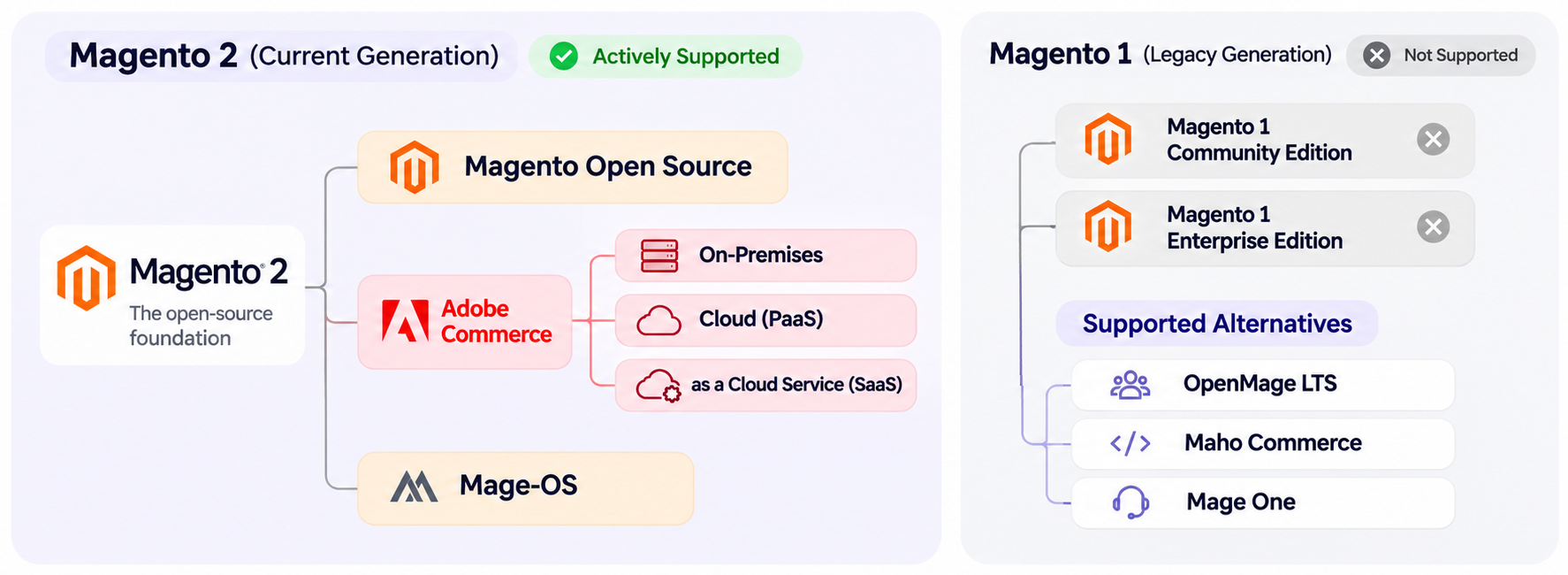
Now that we have explored the modern Magento 2 editions, Adobe Commerce deployment models, and Magento 1 alternatives, let’s bring everything together.
The following comparison shows how these platforms differ in licensing, hosting, maintenance, and extension compatibility.
| Platform or Edition | Generation | Licensing | Hosting and Updates | Traditional Magento PHP Extensions | Status |
| Magento Open Source | Magento 2 | Free, open source | Self-hosted; merchant-managed updates | Yes, compatible Magento 2 extensions | Actively developed |
| Adobe Commerce On-Premises | Magento 2 | Commercial | Merchant- or provider-hosted; merchant-managed updates | Yes, compatible Magento 2 extensions | Actively supported |
| Adobe Commerce Cloud (PaaS) | Magento 2 | Commercial | Adobe-managed infrastructure; shared application responsibility | Yes, subject to compatibility | Actively supported |
| Adobe Commerce as a Cloud Service (SaaS) | Adobe Commerce SaaS | Commercial | Adobe-managed hosting and core updates | No traditional in-process PHP modules | Actively supported |
| Mage-OS | Magento 2 fork | Free, open source | Self-hosted; merchant-managed updates | Many Magento 2 modules, subject to compatibility | Independently maintained |
| Magento 1 Community Edition | Magento 1 | Free, open source | Self-hosted | Legacy Magento 1 modules | Official support ended in 2020 |
| Magento 1 Enterprise Edition | Magento 1 | Legacy commercial | Self-hosted | Legacy Magento 1 modules | Official support ended in 2020 |
| OpenMage LTS | Magento 1 fork | Free, open source | Self-hosted; community updates | Many Magento 1 modules, subject to compatibility | Community maintained |
| Maho Commerce | Magento 1 fork | Free, open source | Self-hosted; project updates | Compatibility varies and requires testing | Independently maintained |
| Mage One | Magento 1 support service | Commercial subscription | Existing Magento 1 infrastructure | Supports maintaining the existing installation | Support committed through at least 2027 |
Note that among these Magento editions, Mage-OS, OpenMage, and Maho are independent projects, while Mage One is a maintenance service, not a software edition.
Which Magento Edition Should You Choose?
The best option depends primarily on your infrastructure requirements, technical resources, customization needs, and budget.
Magento Open Source is an appropriate starting point for businesses that want the flexibility of Magento 2 without enterprise licensing costs.
Adobe Commerce on-premises suits companies requiring commercial features and extensive control over their hosting infrastructure.
Adobe Commerce PaaS is a strong option for enterprises that want the traditional Magento 2 application and its extensibility while using Adobe-managed cloud infrastructure.
Adobe Commerce SaaS is worth considering when reducing infrastructure responsibilities and adopting API-first development are higher priorities than installing traditional PHP extensions.
Meanwhile, Mage-OS provides an independent Magento 2 alternative for businesses interested in community-led development. OpenMage, Mage One, and Maho primarily serve merchants maintaining or modernizing existing Magento 1 stores.
Remember that choosing an edition is not just about functionality. It also determines how you manage future upgrades, customizations, and third-party integrations.
Final Words: Choosing the Right Magento Edition in 2027
The Magento ecosystem has changed considerably since the days of Community and Enterprise Edition.
Today, Magento Open Source remains the free, open-source platform, while Adobe Commerce provides enterprise capabilities through on-premises, PaaS, and SaaS models. Independent projects such as Mage-OS continue developing the Magento 2 ecosystem, and OpenMage, Maho, and Mage One help merchants maintain legacy Magento 1 installations.
However, choosing the right Magento edition is only the beginning. Your store must also exchange data reliably with suppliers, marketplaces, ERP systems, and other business applications.
This is where Firebear Studio’s Improved Import & Export extension for Magento 2 comes in.
Our extension expands Magento’s default data transfer capabilities with additional file formats, configurable import and export jobs, automated schedules, attribute mapping, and support for numerous ecommerce entities.
Improved Import & Export supports the following platforms:
- Magento Open Source
- Adobe Commerce on-premises
- Adobe Commerce on Cloud Infrastructure (PaaS)
- Mage-OS, subject to compatibility with the installed distribution version
The latest documented Improved Import & Export release, version 3.8.9, supports Magento 2.4.9, Adobe Commerce 2.4.9, and PHP 8.5.
Please note that Adobe Commerce as a Cloud Service is not supported by the traditional Improved Import & Export installation because its SaaS architecture does not permit conventional Magento PHP extensions. The extension is also not intended for Magento 1, OpenMage, or Maho installations.
Whether you are upgrading Magento Open Source, managing an Adobe Commerce installation, or planning a migration, Improved Import & Export can simplify data operations across supported platforms.
Explore our Magento 2 import and export solution to discover how automated data transfers can improve your ecommerce workflows.
Magento 2 Editions FAQ
1. What Magento 2 editions are available in 2027?
The main Magento 2 offerings heading into 2027 are Magento Open Source, Adobe Commerce on-premises, and Adobe Commerce on Cloud Infrastructure (PaaS). Adobe Commerce as a Cloud Service (SaaS) provides an additional cloud-native offering based on Adobe’s Commerce technology. Mage-OS is an independent Magento 2–based distribution rather than an official Adobe edition.
2. Is Magento 2 Community Edition the same as Magento Open Source?
Yes. Magento Open Source is the successor to Magento Community Edition. Both refer to the free, open-source version of the Magento platform. Although the name has changed, Magento Open Source continues to provide the familiar Magento ecommerce architecture with ongoing updates and improvements.
3. What happened to Magento Enterprise Edition and Magento Commerce?
Magento Enterprise Edition evolved into Magento Commerce, which Adobe subsequently rebranded as Adobe Commerce in 2021. The commercial platform continues to exist, but it is now offered through several deployment models, including on-premises hosting, PaaS, and SaaS.
4. What is the difference between Magento Open Source and Adobe Commerce?
Magento Open Source is a free ecommerce platform that merchants host and maintain themselves. Adobe Commerce is a licensed enterprise platform with additional commercial features, services, and support arrangements. Depending on the offering, Adobe Commerce provides capabilities such as B2B company management, shared catalogs, advanced merchandising, and managed cloud infrastructure.
5. How many Adobe Commerce editions are available?
Adobe Commerce has three principal deployment models: Adobe Commerce on-premises, Adobe Commerce on Cloud Infrastructure (PaaS), and Adobe Commerce as a Cloud Service (SaaS). On-premises and PaaS use closely related application architectures, while SaaS provides a fully managed environment with different customization and maintenance requirements.
6. Is Adobe Commerce Cloud the same as Adobe Commerce as a Cloud Service?
No. Adobe Commerce Cloud generally refers to Adobe Commerce on Cloud Infrastructure, a PaaS offering where Adobe manages the hosting platform but merchants retain responsibility for application-level maintenance. Adobe Commerce as a Cloud Service is a fully managed SaaS solution where Adobe handles the core application and platform updates.
7. Can I install Magento 2 extensions on every Adobe Commerce edition?
No. Traditional Magento 2 PHP extensions can be installed on compatible Adobe Commerce on-premises and PaaS deployments. However, Adobe Commerce as a Cloud Service does not support installing conventional in-process PHP modules. SaaS integrations must use supported APIs and extensibility services.
8. Is Magento Open Source completely free?
Magento Open Source has no commercial platform license fee, but building and operating a store still involves expenses. Merchants must pay for hosting, development, maintenance, security, and potentially premium extensions. Consequently, Magento Open Source may have lower licensing costs than Adobe Commerce without necessarily having lower overall operating costs.
9. Is Magento 1 still supported in 2027?
Official Magento 1 support ended on June 30, 2020. However, independent projects continue supporting or modernizing the platform. OpenMage maintains an open-source Magento 1 fork, Mage One provides commercial security and compatibility patches, and Maho offers a modernized platform based on Magento 1 technology. Their support arrangements differ from official Adobe support.
10. Which Magento edition is best for a new ecommerce store?
Magento Open Source is suitable for merchants seeking a customizable ecommerce platform without commercial licensing fees. Adobe Commerce on-premises and PaaS are better suited to businesses requiring enterprise capabilities and commercial support while retaining PHP extensibility. Adobe Commerce SaaS is worth considering for organizations prioritizing managed infrastructure and API-first development. The final choice should reflect business requirements, integrations, budget, and available technical expertise.
Related posts
 Magento Open Source vs Adobe Commerce in 2027: Features, Costs & Alternatives
 Magento 2 System Requirements: Complete Guide for Adobe Commerce and Open Source
 How to Choose a Magento 2 Data Import Tool for Magento Open Source & Adobe Commerce in 2026
 Magento 2 (Adobe Commerce) Pricing Explained
 Magento 2 B2B Company Explained: A Complete Guide to Setup, Structure, Management & Import for Adobe Commerce
 Adobe Commerce Integrations Guide: Native Features, Third-Party Tools & Best Practices in 2026
 Magento 2 Release Notes: Adobe Commerce & Open Source Updates
 How to Import Customers & Customer Addresses to Magento 2 in 2026: Complete Tutorial & CSV Samples for Adobe Commerce & Magento Open Source