
Adobe Commerce Integrations Guide: Native Features, Third-Party Tools & Best Practices in 2026
Running an online store involves much more than managing products and processing orders. Inventory needs to stay accurate, customer information must reach your CRM, financial records belong in accounting software, and shipping providers need reliable order details. That’s where Adobe Commerce integrations come in handy, as they connect systems, automate data exchange, reduce manual work, and keep operations synchronized.
Adobe Commerce offers built-in integrations for payments, shipping, and analytics, along with additional services from the Adobe ecosystem. However, connecting external ERP, CRM, accounting, and other business applications often requires third-party tools or custom development.
In this guide, we explore native and third-party Adobe Commerce integrations, explain which solutions fit different business needs, and show how Firebear’s Improved Import & Export simplifies data synchronization. You’ll also learn how to prepare your store for new integrations and avoid common implementation challenges.

Table of contents
- What Are Adobe Commerce Integrations?
- What Integrations Does Adobe Commerce Support?
- Adobe Commerce Third-Party Integrations
- Which Adobe Commerce Integrations Does Your Business Need?
- How to Prepare Your Website for Adobe Commerce Third-Party Integrations
- Final Words: Build a Connected Adobe Commerce Ecosystem
- Adobe Commerce Integrations FAQ
What Are Adobe Commerce Integrations?
Adobe Commerce integrations connect your ecommerce store with external applications, business systems, and services to streamline operations, automate data exchange, and reduce manual work. They enable information such as products, inventory, orders, customer records, and financial data to move between Adobe Commerce and the tools your business relies on.
Depending on their purpose and implementation, Adobe Commerce’s Magento 2 integrations fall into three main categories:
- Native and built-in integrations: Features available through Adobe Commerce’s standard configuration or bundled components, including payment, shipping, and analytics functionality.
- Adobe ecosystem integrations: Connections to Adobe products and services, such as Live Search, Product Recommendations, and Adobe Experience Platform, which may require additional setup, licensing, or extensions.
- Third-party integrations: Connections to ERP, CRM, accounting, PIM, and other external systems using extensions, APIs, middleware, or automated import and export tools.
Together, these integrations help create a connected ecommerce environment where business data stays consistent across systems.
What Integrations Does Adobe Commerce Support?
Adobe Commerce supports a wide range of Magento 2 integrations for connecting your online store with payment providers, shipping carriers, marketing platforms, analytics tools, and other Adobe services. Some are available through the platform’s built-in configuration, while others require additional extensions, service subscriptions, API credentials, or onboarding.
The tables below cover Adobe Commerce integrations officially documented by Adobe, including their primary functions, configuration paths, and links to setup instructions. We’ve divided them into two categories to help you distinguish standard platform capabilities from additional Adobe ecosystem services.
Native and Built-In Adobe Commerce Integrations
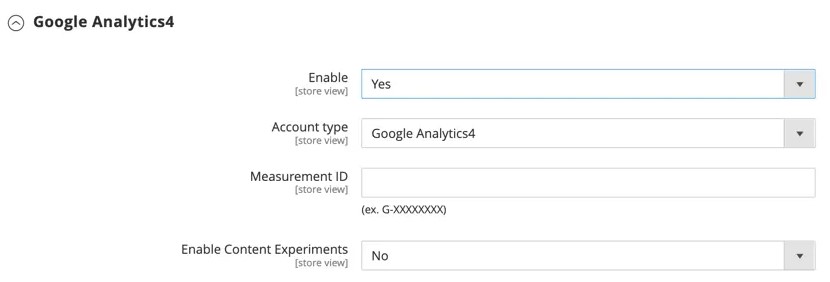
Adobe Commerce includes configuration options for several external services, allowing merchants to enable common ecommerce functionality without developing custom Magento 2 integrations from scratch. However, payment providers and shipping carriers still require valid merchant accounts and credentials.
| Integration | What It Does | Where to Configure It | Official Documentation |
| Google Analytics 4 | Tracks website traffic, customer behavior, and ecommerce performance. | Stores → Settings → Configuration → Sales → Google API | |
| Google Tag Manager | Manages tracking tags for analytics, advertising, and marketing campaigns. | Stores → Settings → Configuration → Sales → Google API | |
| Google Ads (AdWords) | Enables conversion tracking to measure sales generated by advertising campaigns. | Stores → Settings → Configuration → Sales → Google API | |
| Braintree | Processes online payments through credit cards, PayPal, digital wallets, and other supported methods. Available as a bundled payment integration. | Stores → Settings → Configuration → Sales → Payment Methods | |
| PayPal Express Checkout | Allows customers to complete purchases using their PayPal accounts. Available for supported PaaS installations. | Stores → Settings → Configuration → Sales → Payment Methods | |
| FedEx | Retrieves shipping rates and supports carrier-related delivery services. | Stores → Settings → Configuration → Sales → Delivery Methods | |
| UPS | Connects your store with UPS shipping services for rate calculation and shipment tracking. | Stores → Settings → Configuration → Sales → Delivery Methods | |
| USPS | Provides shipping rates and delivery services through United States Postal Service APIs. | Stores → Settings → Configuration → Sales → Delivery Methods | |
| DHL | Supports international shipping services, rate calculations, and shipment management. | Stores → Settings → Configuration → Sales → Delivery Methods | |
| Custom API Integrations | Registers external applications, manages API permissions, and authorizes connections using integration credentials. | System → Extensions → Integrations |
These integrations address essential storefront operations, from accepting payments and calculating delivery costs to tracking marketing performance. Their availability and setup requirements depend on the Adobe Commerce version, deployment model, and external provider.
Important: Shipping integrations require particular attention to API compatibility. UPS has moved to OAuth-based REST APIs, while USPS retired its legacy Web Tools APIs in January 2026. Merchants running older Adobe Commerce versions may need patches or upgrades to maintain working carrier connections.
Adobe Commerce Integrations With Adobe Services
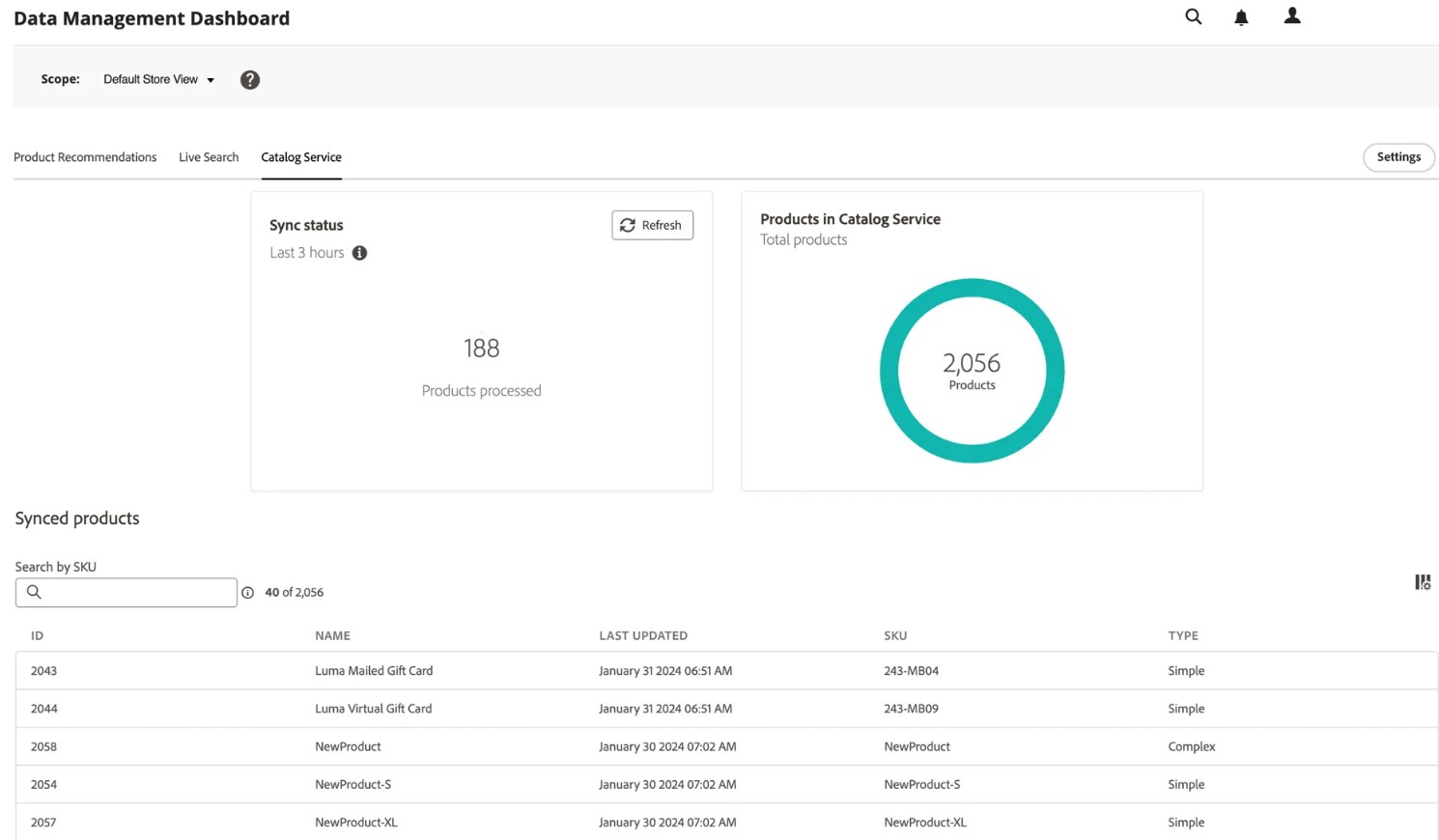
Beyond the standard Magento 2 integrations, Adobe Commerce connects with additional products and cloud-based services in the Adobe ecosystem. These solutions extend the platform with capabilities such as AI-powered search, product recommendations, digital asset management, and customer data activation.
Unlike most built-in integrations, Adobe Commerce services may require extension installation, Commerce Services Connector configuration, licensing, and additional setup before they become available.
| Integration | What It Does | Where to Configure It | Official Documentation |
| Adobe Payment Services | Provides payment processing, multiple payment options, and centralized transaction management. | Sales → Payment Services | |
| Adobe Live Search | Delivers AI-powered product search, intelligent filtering, synonyms, and merchandising capabilities. | Marketing → SEO & Search → Live Search | |
| Adobe Product Recommendations | Generates personalized product suggestions using shopper behavior and catalog data. | Marketing → Promotions → Product Recommendations | |
| Adobe Catalog Service | Provides high-performance access to synchronized product catalog data through GraphQL APIs. | System → Services → Commerce Services Connector; synchronization monitoring through System → Data Transfer → Data Management Dashboard | |
| Adobe Experience Platform (Data Connection) | Transfers Commerce event and back-office data to Adobe Experience Platform for analytics, personalization, and customer experience applications. | System → Services → Data Connection | |
| Adobe Experience Manager Assets | Synchronizes product images, videos, and other digital assets between Adobe Commerce and AEM Assets. | Stores → Settings → Configuration → Adobe Services → AEM Assets Integration | |
| Adobe App Management | Associates, configures, and manages Adobe App Builder applications connected to Commerce. | Apps → App Management | |
| Adobe Commerce Intelligence | Combines Commerce and external data sources for business intelligence, reporting, and performance analysis. | Commerce Intelligence workspace → Manage Data → Connections |
For Adobe Commerce on-premises and on cloud infrastructure (PaaS), the Commerce Services Connector is an important part of connecting the store to Adobe-hosted services. It manages API credentials and SaaS data spaces used by services such as Live Search, Product Recommendations, and Catalog Service.
Adobe Commerce as a Cloud Service (ACCS) follows a different managed-service architecture, so some installation procedures and configuration paths differ from those listed above.
Adobe Commerce Third-Party Integrations
While Adobe Commerce provides these built-in integrations and extensive API capabilities, connecting your store to an external business application isn’t always straightforward. Adobe Commerce third-party integrations often require additional extensions, custom development, or middleware to exchange data with ERP, CRM, accounting, and other business systems.
The challenge isn’t simply connecting two platforms — it’s ensuring that products, orders, inventory, customer records, and financial information move between them accurately and consistently. Different applications use different data structures, field names, and synchronization methods, making even routine data transfers difficult to maintain.
One way to simplify these workflows is to use Improved Import & Export for Adobe Commerce. The Firebear extension provides configurable import and export jobs, automated synchronization, and data transformation tools that help connect Adobe Commerce with external applications without developing every data exchange process from scratch.
Below, explore the most common third-party integration scenarios.
Adobe Commerce ERP Integrations
Adobe Commerce ERP integration connects your ecommerce operations with enterprise resource planning software, such as SAP, Oracle NetSuite, Microsoft Dynamics 365, or Odoo. These platforms typically manage inventory, procurement, financial operations, and order fulfillment.
An ERP integration can automatically transfer new orders from Adobe Commerce to the back-office system while sending updated inventory levels, prices, and product information back to the storefront. For B2B merchants, synchronization may also involve company accounts, shared catalogs, and customer-specific pricing.
The result is less manual data entry, fewer system discrepancies, and more reliable inventory and order management.
For integration methods, supported workflows, and implementation examples, see our Adobe Commerce and Magento 2 ERP Integration Guide.
Adobe Commerce CRM Integrations
Adobe Commerce CRM integrations connect your store with customer relationship management platforms such as Salesforce, HubSpot, Zoho CRM, and Microsoft Dynamics 365.
These connections help sales, marketing, and customer service teams work with consistent customer information. Depending on the integration, Adobe Commerce can exchange customer profiles, order histories, contact information, and other relevant data with a CRM.
For example, a B2B merchant can connect Adobe Commerce company accounts and purchasing activity with corresponding CRM records, giving sales representatives a better understanding of customer relationships. B2C businesses can use synchronized customer information to improve segmentation and personalized marketing.
Learn more about integration options and implementation methods in our Adobe Commerce and Magento 2 CRM Integration Guide.
Adobe Commerce Accounting Integrations
Adobe Commerce accounting integrations help synchronize ecommerce transactions with financial management software, including QuickBooks, Xero, Sage, and FreshBooks.
Instead of manually transferring sales records between applications, merchants can automate the exchange of orders, invoices, refunds, credit memos, tax details, and other supported financial data.
For example, an integration can export completed Adobe Commerce transactions into the format required by an accounting platform, helping finance teams maintain accurate records and simplify reconciliation. The exact workflow depends on the accounting system and its data requirements.
Our Magento 2 Accounting Integration Guide explains how to connect accounting software with Adobe Commerce and Magento Open Source using extensions, APIs, and other integration methods.
How Improved Import & Export Simplifies Adobe Commerce Third-Party Integrations
Building and maintaining separate connectors for every external application can become expensive and difficult to manage. Our Improved Import & Export extension offers a more flexible approach by allowing merchants to configure data exchange workflows directly in the Adobe Commerce Admin.
Instead of requiring every external system to follow Adobe Commerce’s default import and export structure, the extension lets you adapt incoming and outgoing data to the requirements of each application.
Its main integration capabilities include:
- Automated import and export jobs. Create dedicated jobs for products, customers, orders, categories, inventory, and other supported entities. Run transfers manually or automate them using flexible cron schedules.
- Advanced data mapping and transformations. Match external fields to Adobe Commerce attributes, map attribute values, apply default or static values, use filters, and transform XML data with XSLT.
- Multiple integration sources and destinations. Exchange data through FTP/SFTP, direct URLs, Google Sheets, Google Drive, Dropbox, OneDrive, and supported REST or SOAP API workflows.
- Extended file format support. Import and export data using CSV, XML, JSON, XLSX, and ODS instead of relying exclusively on standard CSV files.
For example, you can configure an export job to send Adobe Commerce orders to an ERP system, create a separate import job for inventory updates, and schedule both processes according to your operational requirements. Similarly, customer information can be exported to a CRM, while transaction records can be prepared for accounting software.
Because each job has its own configuration, different applications can use different formats, mapping rules, and synchronization schedules. More complex integrations may still require additional API configuration or custom development, but the extension reduces the amount of repetitive data-processing work involved.
Which Adobe Commerce Integrations Does Your Business Need?
Not every Adobe Commerce store needs an extensive network of connected applications. A small online retailer may operate efficiently with payment, shipping, and accounting integrations, while a large B2B company might depend on ERP, CRM, PIM, and warehouse management systems to coordinate complex operations.
The right Adobe Commerce integrations depend on your business model, sales volume, existing software, and the processes you want to automate. Rather than connecting as many applications as possible, focus on integrations that eliminate repetitive tasks, prevent data inconsistencies, and solve operational bottlenecks.
The following table highlights common business scenarios and the integration categories worth prioritizing.
| Business Scenario | Recommended Integrations | Main Benefits |
| Small ecommerce store | Payment gateways, shipping carriers, Google Analytics, accounting software | Simplify checkout, automate shipping calculations, track sales, and reduce manual bookkeeping. |
| Growing online retailer | ERP, CRM, accounting, inventory management | Keep customer, order, and inventory information synchronized as sales volumes increase. |
| Multichannel merchant | Marketplaces, ERP, order management systems (OMS), inventory management | Coordinate orders and stock across multiple sales channels while reducing overselling. |
| B2B and wholesale business | ERP, CRM, PIM, inventory management | Synchronize company accounts, customer-specific pricing, large product catalogs, and purchasing workflows. |
| Large enterprise | ERP, PIM, CRM, WMS, business intelligence platforms | Centralize business data, coordinate multiple departments, and automate complex operations across systems. |
| International ecommerce business | Payment providers, shipping and logistics platforms, ERP, tax and accounting software | Support cross-border transactions, regional fulfillment, and country-specific financial requirements. |
These recommendations are starting points rather than fixed requirements. For example, a small store managing thousands of SKUs from multiple suppliers may need an ERP integration earlier than a larger retailer with a simpler catalog. Similarly, a B2B merchant selling a limited range of products may benefit more from CRM synchronization than a dedicated PIM.
Before choosing an integration, drop us a message to identify where data originates, where it needs to go, and how frequently it must be updated. Inventory availability might require near-real-time synchronization, while accounting reports may only need daily transfers. We will help you consider whether information should move in one direction or both, and which system should be the authoritative source for each data type.
Together, we will evaluate the implementation and maintenance costs. Some Adobe Commerce integrations can be configured through default settings, while the others may require additional API transfers or custom development.
The goal isn’t to build the largest integration ecosystem — it’s to create a reliable flow of information between the systems your business actually uses. Start with the connections that address your most expensive or time-consuming problems, then expand your integration infrastructure as your requirements evolve.
How to Prepare Your Website for Adobe Commerce Third-Party Integrations
Before connecting Adobe Commerce to an ERP, CRM, accounting platform, or another external application, make sure your store and the systems involved are ready to exchange data. Poorly planned integrations can result in duplicate records, outdated inventory, conflicting updates, and unnecessary maintenance costs.
Follow these seven steps to prepare your website for Adobe Commerce third-party integrations and reduce the risk of synchronization errors.
- Check Adobe Commerce and Extension Compatibility.
Start by identifying your Adobe Commerce version, deployment model, PHP version, and installed extensions. Make sure your chosen integration solution supports your environment and doesn’t conflict with existing modules.
This is particularly important when choosing between Adobe Commerce on-premises, cloud infrastructure (PaaS), and Adobe Commerce as a Cloud Service (ACCS), as these platforms have different extensibility options. Traditional PHP extensions designed for PaaS cannot simply be installed on ACCS. - Define Your Data Synchronization Requirements.
Determine exactly which information needs to move between Adobe Commerce and external applications. This may include products, inventory, orders, customers, prices, invoices, or B2B entities.
For each data type, establish the transfer direction, update frequency, and source of truth — the system responsible for maintaining the authoritative record.
For example, if your ERP manages inventory, Adobe Commerce should receive stock updates from the ERP rather than overwrite them with outdated storefront quantities. Likewise, new orders may originate in Adobe Commerce before being transferred to the ERP for fulfillment. - Evaluate API Access and Integration Methods.
Check how the external application accepts and provides data. Some platforms offer REST or SOAP APIs, while others rely on CSV, XML, JSON, or scheduled file transfers.
Verify available API endpoints, authentication requirements, data access permissions, request limits, and supported operations. Also, consider whether synchronization should happen in real time, at scheduled intervals, or when specific events occur.
These requirements will help determine whether you need custom API development, middleware, or an import and export extension. - Prepare Data Mapping and Validate Existing Records.
Different applications rarely use identical data structures. An ERP might identify a product using item_code, while Adobe Commerce uses sku. Customer addresses, tax information, pricing fields, and order statuses may also follow different formats.
Before enabling synchronization, review the source data, identify required fields, establish mapping rules, and resolve duplicate or incomplete records.
Pay particular attention to unique identifiers, store scopes, currencies, and update behavior. Proper mapping prevents integrations from creating duplicate products or replacing valid information with incompatible values. - Configure Security and Access Permissions.
Create dedicated integration credentials and grant access only to the resources required for each connection. In traditional Adobe Commerce installations, API integrations can be managed through System → Extensions → Integrations, where you can configure access to specific API resources.
Use secure authentication, HTTPS connections, and protected credential storage. Avoid sharing administrator credentials with external applications, and establish procedures for rotating or revoking access when necessary.
Remember that ACCS uses a different authentication model, so follow the security requirements applicable to your deployment. - Test the Integration in a Staging Environment.
Never introduce a complex integration directly into your live store without testing it first. Use a staging environment that closely matches production and test with representative, preferably anonymized, data.
Verify that new records are created correctly, existing records are updated without unintended changes, and synchronization works in both directions where required.
Test edge cases such as missing attributes, duplicate records, unavailable APIs, and interrupted transfers. Also, check how the integration behaves when the same data is processed twice and whether failed operations can be retried safely. - Set Up Monitoring and Plan for Maintenance.
Once the integration is ready for production, establish a process for monitoring transfers and resolving errors. Depending on your solution, this may involve reviewing job histories, error logs, API responses, and synchronization reports.
Configure alerts for critical failures, such as interrupted inventory updates or unsuccessful order exports. Document recovery procedures and assign responsibility for investigating problems.
Finally, review integration compatibility whenever you upgrade Adobe Commerce, modify external systems, or install new extensions. Regular maintenance helps prevent otherwise functional connections from breaking after software updates.
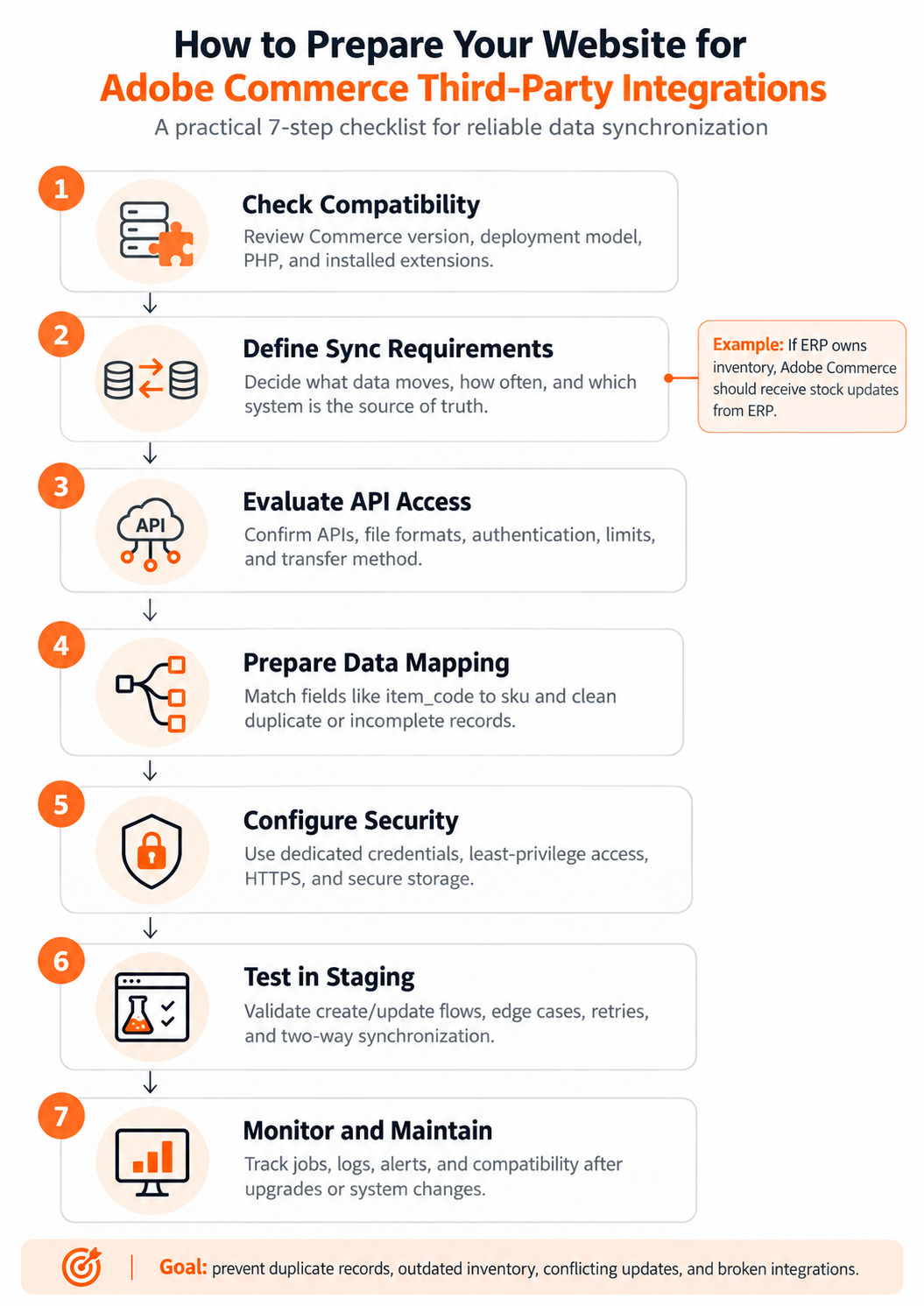
Following these steps provides a more reliable foundation for Adobe Commerce integrations of any complexity. Whether you’re implementing a single accounting connection or coordinating multiple ERP, CRM, and inventory systems, clear data ownership, proper testing, and ongoing monitoring are essential for keeping your ecommerce operations synchronized.
Final Words: Build a Connected Adobe Commerce Ecosystem
The right Adobe Commerce integrations can transform your online store from a standalone sales channel into a connected ecommerce ecosystem. Native integrations simplify essential operations such as payments, shipping, and analytics, while Adobe ecosystem services extend search, personalization, and data management capabilities. Third-party integrations take things further by connecting your store with ERP, CRM, accounting, inventory management, and other business applications.
However, successful Magento 2 integration isn’t about connecting every available service. It’s about choosing solutions that address your actual business needs, eliminate repetitive tasks, and keep information consistent across platforms.
If your workflows require more than Adobe Commerce’s built-in capabilities, our Improved Import & Export extension can help. It enables automated data transfers, scheduled import and export jobs, advanced mapping, and support for multiple file formats and external data sources. The extension is available for supported Adobe Commerce on-premises and cloud infrastructure (PaaS) environments.
Whether you’re connecting a single accounting application or building a complex integration infrastructure, we can help you simplify Adobe Commerce third-party integrations. Explore Improved Import & Export to automate your existing workflows, or contact our team to discuss your specific integration requirements and find the right solution for your business.
Adobe Commerce Integrations FAQ
What are Adobe Commerce integrations?
Adobe Commerce integrations connect an ecommerce store with external applications, services, and business systems to automate operations and exchange data. Common examples include payment gateways, shipping carriers, ERP software, CRM platforms, and accounting tools. Integrations help businesses synchronize products, inventory, orders, customer information, and financial records while reducing manual data entry.
Which integrations are available in Adobe Commerce by default?
Adobe Commerce provides built-in configuration options for services such as Google Analytics, Google Tag Manager, payment providers, and shipping carriers, including UPS, FedEx, DHL, and USPS. It also supports additional Adobe services such as Live Search, Product Recommendations, and Payment Services, although these may require separate installation, onboarding, or licensing. Availability depends on the Adobe Commerce version and deployment model.
How do I enable third-party integrations in Adobe Commerce?
In Adobe Commerce on-premises or PaaS, navigate to System → Extensions → Integrations in the Admin to register and authorize API-based integrations. You can configure access permissions and generate integration credentials for external applications. However, some services require dedicated extensions or separate configuration interfaces. Adobe Commerce as a Cloud Service uses a different API authentication and integration model.
Can Adobe Commerce integrate with ERP systems?
Yes. Adobe Commerce ERP integrations can connect your store with systems such as SAP, Oracle NetSuite, Microsoft Dynamics 365, and Odoo. Depending on the integration, they can synchronize inventory, product information, orders, prices, and other business data. Connections can be implemented using APIs, middleware, specialized connectors, or import and export tools such as Improved Import & Export.
Does Adobe Commerce support CRM integrations?
Yes. Adobe Commerce can exchange customer and sales information with CRM platforms such as Salesforce, HubSpot, and Zoho CRM through third-party connectors, APIs, or automated data transfers. Adobe Commerce CRM integrations help businesses synchronize customer profiles, purchasing activity, and other relevant records to support sales, marketing, and customer service workflows.
Can Adobe Commerce integrate with QuickBooks, Xero, and other accounting software?
Yes. Adobe Commerce accounting integrations can connect ecommerce transactions with platforms such as QuickBooks, Xero, Sage, and other financial management systems. Depending on the solution, merchants can automate transfers of orders, invoices, refunds, customer information, and tax-related data. These connections generally require third-party software, API development, or configurable import and export workflows rather than a standard built-in accounting connector.
Which APIs does Adobe Commerce support for integrations?
Adobe Commerce provides REST, GraphQL, and SOAP APIs for different integration scenarios. REST and SOAP support various backend data operations, while GraphQL is particularly useful for storefront applications and selective data retrieval. The available endpoints, authentication methods, and capabilities depend on the deployment model. Merchants can also use extensions or middleware when direct API development is unnecessary or impractical.
Can Adobe Commerce integrations synchronize data automatically?
Yes. Adobe Commerce data synchronization can be automated through APIs, event-driven processes, scheduled jobs, or third-party extensions. For example, Improved Import & Export supports scheduled import and export jobs for products, orders, customers, inventory, and other supported entities. The appropriate synchronization frequency depends on business requirements: inventory updates may need frequent transfers, while accounting data might be synchronized daily.
How do you secure Adobe Commerce third-party integrations?
Use encrypted connections, secure credential storage, and integration-specific access permissions. Grant each external application access only to the API resources it needs, and avoid sharing administrator credentials. Before launching an integration, test it in a staging environment, validate incoming data, and configure monitoring for failed transfers. Regularly review access permissions and compatibility after platform upgrades.
Do Adobe Commerce integrations work with both PaaS and Adobe Commerce as a Cloud Service?
Not necessarily. Adobe Commerce on-premises and on cloud infrastructure (PaaS) support traditional PHP extensions and API-based integrations. Adobe Commerce as a Cloud Service (ACCS) uses a SaaS architecture with API-based and out-of-process extensibility, so traditional PHP modules cannot be installed directly. For example, Improved Import & Export supports compatible Adobe Commerce on-premises and PaaS environments but does not currently support direct installation on ACCS. Always verify compatibility with your deployment model and Commerce version before selecting an integration solution.
Related posts
 How to Choose a Magento 2 Data Import Tool for Magento Open Source & Adobe Commerce in 2026
 Magento 2 B2B Company Explained: A Complete Guide to Setup, Structure, Management & Import for Adobe Commerce
 Magento 2 System Requirements: Complete Guide for Adobe Commerce and Open Source
 Magento 2 (Adobe Commerce) Pricing Explained
 How to Import Customers & Customer Addresses to Magento 2 in 2026: Complete Tutorial & CSV Samples for Adobe Commerce & Magento Open Source
 Magento 2.4.9 Upgrade: What’s New, Import & Export Improvements, and Third-Party Extension Compatibility
 Magento 2 Release Notes: Adobe Commerce & Open Source Updates
 Shopify Product Import Behavior Explained: Take Full Control of Your Product Data