
Adobe Commerce Versions: Latest Releases, Supported Magento Versions, and Upgrade Paths
Keeping your ecommerce platform up to date is essential for maintaining security, performance, and compatibility with third-party software. However, with multiple Adobe Commerce versions, different support periods, monthly security updates, and several deployment models, determining whether your store runs a supported release is not always straightforward.
As of November 2026, Adobe Commerce 2.4.9 is the latest stable version of the platform, while several earlier Magento 2 versions remain supported or receive limited security fixes. Meanwhile, Adobe Commerce as a Cloud Service follows a different, continuously updated release model.
In this guide, we explore the latest Adobe Commerce and Magento versions, explain their support lifecycles, and highlight the differences between regular releases and security updates. You will also discover what to do if your current version is no longer supported, whether you use Magento Open Source, Adobe Commerce on-premises, or one of Adobe’s cloud offerings.

Table of contents
- What Versions of Adobe Commerce Are Available?
- Adobe Commerce Latest Version: What Is the Most Recent Stable Release?
- Supported Adobe Commerce Versions: Release Dates and End of Support
- Magento 2 Versions: Which Magento Open Source Releases Are Supported?
- Understanding Adobe Commerce Version Numbers and Security Updates
- Adobe Commerce as a Cloud Service: A Different Versioning Model
- How to Check Your Current Adobe Commerce or Magento Version
- What Happens If Your Adobe Commerce Version Is No Longer Supported?
- What to Do If Your Current Adobe Commerce Version Is Not Supported
- Which Adobe Commerce Version Should You Upgrade To?
- Adobe Commerce Version Upgrade Checklist
- Magento Version Compatibility and Data Migration with Firebear
- Final Words: Keep Your Adobe Commerce Version Secure and Supported
- Adobe Commerce Versions FAQ
What Versions of Adobe Commerce Are Available?
Adobe Commerce is currently available across several release lines, ranging from the latest stable version, 2.4.9, to older versions receiving transitional security fixes.
However, it is important to distinguish between Adobe Commerce versions and editions. While an edition determines the platform’s functionality, licensing, deployment model, and maintenance responsibilities, a version identifies a particular software release.
The following table illustrates how different Magento and Adobe Commerce editions approach versioning.
| Platform or Edition | Versioning Model | Who Manages Application Upgrades? |
| Magento Open Source | Numbered Magento 2 releases | Merchant or development partner |
| Adobe Commerce On-Premises | Numbered Adobe Commerce 2.x releases | Merchant or development partner |
| Adobe Commerce on Cloud Infrastructure (PaaS) | Numbered Adobe Commerce 2.x releases | Merchant or development partner, with Adobe-managed infrastructure |
| Adobe Commerce as a Cloud Service (SaaS) | Continuous cloud service releases | Adobe, with merchants responsible for their integrations and customizations |
| Magento 1 | Legacy 1.x releases | No longer officially supported |
Magento Open Source and the traditional Adobe Commerce editions share a common technological foundation and corresponding release numbers. However, their functionality and support coverage differ.
Adobe Commerce as a Cloud Service, in contrast, does not require merchants to perform traditional Magento 2 application upgrades.
For a detailed explanation of these differences, read our dedicated guide to Magento 2 Editions: Magento Open Source, Adobe Commerce & Legacy Alternatives.
Adobe Commerce Latest Version: What Is the Most Recent Stable Release?
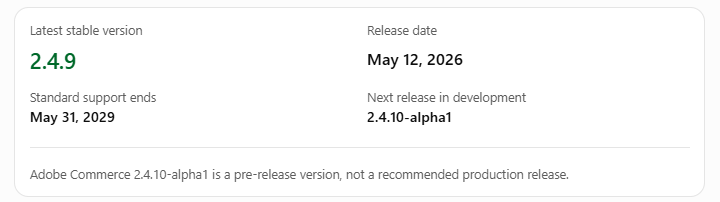
Adobe Commerce 2.4.9, released on May 12, 2026, is the latest stable version of Adobe Commerce. Magento Open Source 2.4.9 is its open-source counterpart.
Adobe Commerce 2.4.9 is scheduled to receive standard support until May 31, 2029, providing the longest confirmed standard support window among currently available production releases.
The latest Adobe Commerce version provides a more modern technological foundation, updated software dependencies, security improvements, and platform enhancements.
Nevertheless, installing the base 2.4.9 release does not automatically mean that your store is fully up to date. Merchants must also install subsequent security updates and any applicable hotfixes.
Adobe has already released the first alpha version of Adobe Commerce 2.4.10 on October 13, 2026. However, development releases are intended for compatibility testing and preparation rather than live ecommerce environments.
For more information about the latest stable release, its improvements, and third-party extension compatibility, explore our Magento 2.4.9 upgrade guide.
Supported Adobe Commerce Versions: Release Dates and End of Support
Adobe Commerce follows a structured software lifecycle policy. Each release line has a defined maintenance period, allowing businesses to plan upgrades and allocate development resources in advance.
As of November 2026, Adobe Commerce 2.4.7, 2.4.8, and 2.4.9 receive standard support. Adobe Commerce 2.4.6 receives extended support, while versions 2.4.4 and 2.4.5 receive limited security fixes under transitional arrangements.
Adobe Commerce Versions and Support Lifecycle
| Adobe Commerce Version | Release Date | Standard Support Ends | Extended Support Ends | Security-Only Period Ends | Current Status |
| 2.4.10-alpha1 | Oct. 13, 2026 | TBD | TBD | — | Pre-release |
| 2.4.9 | May 12, 2026 | May 31, 2029 | TBD | — | Standard support |
| 2.4.8 | Apr. 8, 2025 | May 31, 2028 | TBD | — | Standard support |
| 2.4.7 | Apr. 9, 2024 | May 31, 2027 | May 31, 2028 | — | Standard support |
| 2.4.6 | Mar. 14, 2023 | Aug. 11, 2026 | Aug. 31, 2027 | May 31, 2028 | Extended support |
| 2.4.5 | Aug. 9, 2022 | Aug. 12, 2025 | Aug. 11, 2026 | May 31, 2027 | Security only |
| 2.4.4 | Apr. 12, 2022 | Apr. 12, 2025 | Apr. 14, 2026 | May 31, 2027 | Security only |
| 2.4.3 and earlier | 2021 and earlier | Expired | — | — | Unsupported |
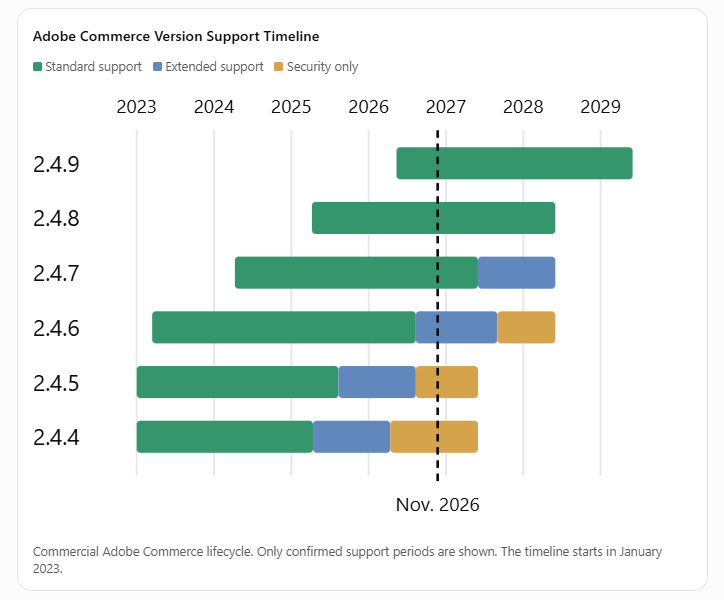
Note that these dates apply to commercial Adobe Commerce releases. Magento Open Source does not automatically benefit from Adobe Commerce’s extended support arrangements. Cloud infrastructure customers are also subject to additional security and upgrade requirements.
Standard Support vs. Extended Support vs. Security-Only Maintenance
Not all supported Adobe Commerce versions receive the same level of maintenance. Understanding the differences between lifecycle stages is essential when evaluating the risks associated with an older installation.
| Support Stage | What It Means | Recommended Action |
| Standard support | Regular maintenance, security updates, and eligible fixes | Stay current with security updates |
| Extended support | Continued maintenance under Adobe’s extended lifecycle arrangements, subject to applicable limitations | Prepare and schedule an upgrade |
| Security-only maintenance | Restricted security fixes without comprehensive application and dependency maintenance | Prioritize an upgrade or migration |
| End of support (EOS) | Official maintenance has ended | Move to a supported version as soon as possible |
Furthermore, Adobe Commerce support does not automatically extend the lifecycle of PHP, databases, search engines, or other third-party software. These components have their own maintenance schedules.
Consequently, even an Adobe Commerce version within its official support period may rely on outdated infrastructure components that require separate updates.
Magento 2 Versions: Which Magento Open Source Releases Are Supported?
Although Magento Open Source and Adobe Commerce share version numbers, their software maintenance policies are not identical.
Magento Open Source merchants should distinguish between actively maintained releases, older versions that may receive exceptional security fixes, and releases that are no longer maintained.
Supported Magento Open Source Versions
| Magento Version | Current Status | End of Standard Maintenance |
| Magento 2.4.9 | Latest stable release | May 31, 2029 |
| Magento 2.4.8 | Actively maintained | May 31, 2028 |
| Magento 2.4.7 | Actively maintained | May 31, 2027 |
| Magento 2.4.6 | Outside standard maintenance | Aug. 11, 2026 |
| Magento 2.4.5 | Outside standard maintenance | Aug. 12, 2025 |
| Magento 2.4.4 | Outside standard maintenance | Apr. 12, 2025 |
| Magento 2.4.0–2.4.3 | Unsupported | Expired |
| Magento 2.3.x and earlier | Unsupported | Expired |
| Magento 1.x | Unsupported | June 30, 2020 |
Magento Open Source 2.4.9 is the preferred long-term upgrade target for most merchants, provided that their infrastructure, extensions, and customizations are compatible with the release.
While individual security fixes may occasionally become available for older Magento versions, their availability should not be interpreted as a renewed standard support period.
For example, a security hotfix addressing a critical vulnerability in Magento 2.4.6 does not guarantee that this version will receive comprehensive maintenance or subsequent security updates.
You can explore the evolution of Magento versions, including their historical improvements, in our comprehensive Magento 2 Release Notes.
Understanding Adobe Commerce Version Numbers and Security Updates
Adobe Commerce and Magento version numbers indicate different types of software releases. However, a version number alone no longer provides a complete picture of an installation’s security status.
Consider the following examples:
| Version or Update Identifier | Release Type | Description |
| 2.x | Major version | The Magento 2 platform generation |
| 2.4 | Minor version | A release family within Magento 2 |
| 2.4.9 | Patch release | A stable platform release containing improvements and fixes |
| 2.4.8-p5 | Security patch release | A security-focused update for an existing release line |
| 2.4.9-2026-oct | Monthly security update identifier | Indicates a monthly security update level |
| 2.4.10-alpha1 | Development release | An early release intended for testing |
Although releases such as 2.4.8 and 2.4.9 introduce substantial platform changes, Adobe officially classifies them as patch releases within the 2.4 release family.
Monthly Adobe Commerce Security Patches
Adobe introduced a monthly isolated security patching approach in 2026, enabling merchants to address vulnerabilities without performing a complete platform upgrade every time a security update becomes available.
These updates are scheduled for the second Tuesday of each month, commonly known as Patch Tuesday. Monthly isolated patches may depend on previous updates and must be installed according to Adobe’s instructions.
This introduces an important distinction between:
- Platform version. Identifies the installed Adobe Commerce or Magento release.
- Security patch level. Identifies the security updates applied to that release.
- Hotfix status. Indicates whether additional fixes for specific vulnerabilities or critical issues have been installed.
- Dependency versions. Determines whether underlying software components remain secure and compatible.
For instance, two ecommerce stores may both run Adobe Commerce 2.4.9 but have significantly different security profiles because one has installed subsequent security patches and the other has not.
Therefore, checking your Magento version should always be accompanied by a review of your installed security updates.
Consult the official and to determine which updates apply to your installation.
Adobe Commerce as a Cloud Service: A Different Versioning Model
Unlike traditional Adobe Commerce and Magento Open Source deployments, Adobe Commerce as a Cloud Service (ACCS) follows a continuous delivery model.
Adobe manages the underlying application updates, security maintenance, and infrastructure. Merchants do not need to manually upgrade their core ecommerce application from one Magento 2 version to another.
In September 2026, Adobe incorporated the changes from Adobe Commerce 2.4.9 into its SaaS platform. However, ACCS continues to receive independent enhancements and fixes. As of November 24, 2026, Adobe’s latest documented production release was deployed on November 18, 2026.
The SaaS model changes the focus of platform maintenance:
| Maintenance Area | Traditional Adobe Commerce | Adobe Commerce as a Cloud Service |
| Core application upgrades | Merchant-managed | Adobe-managed |
| Core security patches | Merchant-managed | Adobe-managed |
| Infrastructure dependencies | Merchant or hosting provider responsibility | Adobe-managed |
| Custom integrations | Merchant-managed | Merchant-managed |
| Extension compatibility | PHP modules and external integrations | Supported APIs and out-of-process extensibility |
| Release monitoring | Numbered versions and patches | Continuous service updates |
While ACCS reduces the operational burden associated with Adobe Commerce version upgrades, businesses must still maintain their integrations, custom storefronts, external applications, and API compatibility.
For the latest changes, consult the official.
How to Check Your Current Adobe Commerce or Magento Version
Before planning an upgrade, identify your exact platform version, installed security patches, and software dependencies. There are several ways to retrieve this information.
Check Your Magento Version in the Admin Panel
Log in to your Magento Open Source or Adobe Commerce Admin. Scroll to the bottom of the page and locate the version number in the footer, if displayed by your installation.
This is the simplest approach for merchants without direct server access. However, it does not necessarily reveal all installed isolated security patches.
Check Your Adobe Commerce Version via the Command Line
Navigate to the root directory of your Magento installation and execute the following command:
php bin/magento --version
The output identifies your installed platform version, for example:
Magento CLI 2.4.9
You can also retrieve package information through Composer.
For Magento Open Source:
composer show magento/product-community-edition
For Adobe Commerce:
composer show magento/product-enterprise-edition
For Adobe Commerce on Cloud Infrastructure:
composer show magento/magento-cloud-metapackage
Check Your Security Patch Status with the Commerce Version Tool
Adobe’s Commerce Version Tool provides a more detailed assessment of your installation’s security status.
It helps identify installed and missing security patches, as well as vulnerabilities against which your installation is protected or remains exposed.
This utility is particularly useful following the introduction of monthly isolated security patches, since traditional version-checking methods may not reflect every security fix applied to your store.
Adobe Commerce
What Happens If Your Adobe Commerce Version Is No Longer Supported?
An unsupported Magento or Adobe Commerce version does not necessarily stop functioning when it reaches its end-of-support date. However, continuing to operate an outdated ecommerce platform introduces increasingly significant business and technical risks.
- Security vulnerabilities. Newly discovered vulnerabilities may remain unpatched, exposing customer information and business operations.
- Compliance risks. Unsupported software can complicate compliance with PCI DSS and other applicable security requirements.
- Extension incompatibility. Third-party developers may discontinue support for older Magento versions.
- Infrastructure limitations. Outdated PHP, database, and search engine versions can prevent infrastructure modernization.
- Integration failures. External applications may introduce API changes that older integrations cannot accommodate.
- Increasing technical debt. Delaying upgrades can make future platform modernization more expensive and complicated.
- Cloud service enforcement. Adobe Commerce on Cloud Infrastructure customers may face service restrictions if they fail to meet mandatory upgrade deadlines.
The longer a business operates an unsupported Adobe Commerce version, the more challenging its eventual upgrade may become.
What to Do If Your Current Adobe Commerce Version Is Not Supported
Your upgrade strategy depends on your current platform edition, deployment model, customizations, and long-term business objectives.
While Magento Open Source merchants can independently determine their upgrade schedule, Adobe Commerce cloud customers must also comply with Adobe’s infrastructure and application maintenance requirements.
1. Magento Open Source: Upgrade to an Actively Maintained Magento 2 Version
If your Magento Open Source store runs version 2.4.6 or earlier, you should prioritize moving to an actively maintained release.
Magento Open Source does not automatically receive the extended commercial support available to Adobe Commerce customers. Therefore, relying on Adobe Commerce lifecycle extensions when planning a Magento Open Source upgrade may expose your business to unnecessary risks.
Follow these steps:
- Select your target Magento version. Consider Magento 2.4.9 as your primary upgrade target unless critical compatibility constraints require an intermediate release.
- Audit your hosting environment. Verify PHP, Composer, database, search engine, and other infrastructure requirements.
- Review third-party extensions. Identify incompatible modules and obtain updated versions or suitable replacements.
- Evaluate customizations. Review custom PHP code, themes, integrations, and database modifications.
- Perform a staging upgrade. Create a production-like environment and test the complete upgrade process.
- Deploy and verify. Back up your store, deploy the upgraded application, install applicable security patches, and validate critical functionality.
If your store runs a significantly outdated Magento 2 version, such as 2.3.x, an intermediate upgrade or a clean installation followed by data migration may be more practical than a direct upgrade.
Businesses still operating Magento 1 should treat the transition as a migration rather than a conventional software update.
2. Adobe Commerce On-Premises: Plan an Application and Infrastructure Upgrade
Adobe Commerce on-premises customers retain control over their infrastructure and application deployment. However, this flexibility also makes them responsible for maintaining the entire technology stack.
If your current Adobe Commerce version reaches the end of its standard support period, first determine whether extended support or transitional security fixes remain available.
These arrangements can provide additional time to prepare an upgrade, but they should not become a permanent maintenance strategy.
A recommended approach includes:
- Confirm your support eligibility. Review the Adobe Commerce lifecycle policy for your installed release.
- Apply available security fixes. Address existing vulnerabilities while preparing your upgrade.
- Run the Upgrade Compatibility Tool. Identify potential incompatibilities in custom modules and application code.
- Modernize your infrastructure. Upgrade third-party software according to the requirements of your target Adobe Commerce version.
- Update commercial extensions. Review Adobe Commerce B2B, payment integrations, merchandising services, and other independently maintained components.
- Test and deploy the upgrade. Validate application functionality, performance, security, and data integrity before switching production environments.
Adobe’s is particularly valuable for heavily customized enterprise installations.
You can also consider migrating to Adobe Commerce on Cloud Infrastructure or Adobe Commerce as a Cloud Service if maintaining your own infrastructure no longer aligns with your business strategy.
3. Adobe Commerce on Cloud Infrastructure (PaaS): Meet Mandatory Upgrade Deadlines
Adobe Commerce on Cloud Infrastructure customers face additional requirements beyond the standard Adobe Commerce software lifecycle.
Although Adobe manages the cloud infrastructure, merchants remain responsible for application upgrades, extension compatibility, custom code, and applicable security maintenance.
Adobe has introduced mandatory upgrade requirements for customers operating older versions of its PaaS platform.
Adobe Commerce Cloud Mandatory Upgrade Deadlines
| Current Adobe Commerce Version | Mandatory Application Upgrade Deadline | Required Action |
| 2.4.4 | June 1, 2027 | Upgrade or migrate to ACCS |
| 2.4.5 | June 1, 2027 | Upgrade or migrate to ACCS |
| 2.4.6 | June 1, 2028 | Upgrade or migrate to ACCS |
| 2.4.7 | June 1, 2028 | Upgrade or migrate to ACCS |
| 2.4.8 | Not yet established | Maintain application and dependency security |
| 2.4.9 | Not yet established | Maintain application and dependency security |
Source: .
Separate third-party software upgrade deadlines also apply, including October 30, 2026, and May 31, 2027, depending on the installed components and application version.
Failing to meet Adobe’s mandatory requirements may result in traffic suspension, taking the affected storefront offline.
Adobe Commerce Cloud merchants have two primary options.
Option A: Upgrade to the Latest Adobe Commerce Cloud Version
This approach allows businesses to retain their existing deployment model, traditional PHP extensions, and compatible customizations.
The upgrade process involves reviewing application dependencies, updating cloud configuration files, validating Composer packages, upgrading cloud tooling, and testing the changes across integration and staging environments.
For technical instructions, refer to Adobe’s official documentation.
Option B: Migrate to Adobe Commerce as a Cloud Service
Businesses looking to reduce infrastructure maintenance and eliminate traditional core application upgrades can consider transitioning to Adobe Commerce as a Cloud Service.
However, this is an architectural migration rather than a conventional version upgrade.
Traditional PHP extensions, custom backend functionality, storefront implementations, and integrations may require redevelopment using supported APIs, Adobe App Builder, webhooks, events, and other out-of-process extensibility mechanisms.
Consequently, merchants should evaluate both migration costs and long-term operational benefits before selecting this path.
4. Adobe Commerce as a Cloud Service (SaaS): Maintain Integration Compatibility
Adobe Commerce as a Cloud Service customers do not face the conventional end-of-support problem associated with numbered Magento 2 versions.
Since Adobe manages core application updates, merchants do not need to independently upgrade their SaaS installation to Adobe Commerce 2.4.9 or subsequent numbered releases.
Nevertheless, individual components of their ecommerce ecosystem can become outdated or unsupported.
These may include:
- Custom applications built with Adobe App Builder;
- Third-party ERP, CRM, PIM, and other integrations;
- Deprecated API endpoints and functionality;
- Custom storefront components;
- External middleware and data synchronization tools.
If a component becomes unsupported, merchants should review Adobe’s latest release notes, identify deprecated functionality, update affected integrations, and test changes in sandbox environments.
In other words, Adobe Commerce as a Cloud Service shifts maintenance responsibilities from the core ecommerce application toward the surrounding integration and extensibility ecosystem.
5. Magento 1 and Other Legacy Magento Versions: Consider a Full Migration
Magento 1 reached its official end of support on June 30, 2020. Magento 2.0, 2.1, 2.2, and 2.3 release families are also no longer officially maintained.
For businesses still operating these platforms, a conventional upgrade may be insufficient or impractical.
Depending on the existing implementation, merchants can consider migrating to Magento Open Source 2.4.9, Adobe Commerce on-premises, Adobe Commerce Cloud, or Adobe Commerce as a Cloud Service.
A legacy Magento migration typically involves transferring business data, rebuilding or replacing extensions, modernizing storefronts, and reconnecting external systems.
Community-maintained Magento forks may offer alternative modernization paths. However, they have independent development and maintenance policies and should not be confused with officially supported Adobe Commerce versions.
Which Adobe Commerce Version Should You Upgrade To?
The latest stable Adobe Commerce version is generally the most attractive long-term upgrade target because it offers the longest confirmed standard support period.
However, the optimal decision also depends on your existing technology stack and business requirements.
| Your Current Situation | Recommended Upgrade Strategy |
| Launching a new Magento Open Source store | Start with Magento 2.4.9 and applicable security updates |
| Running Magento 2.4.9 | Maintain the current security patch level |
| Running Magento 2.4.8 | Stay fully patched and schedule your next upgrade |
| Running Magento 2.4.7 | Prepare an upgrade before standard maintenance expires |
| Running Adobe Commerce 2.4.6 | Use extended support as a temporary upgrade window |
| Running Adobe Commerce 2.4.4 or 2.4.5 | Prioritize application modernization |
| Running Magento Open Source 2.4.6 or earlier | Upgrade to an actively maintained version as soon as practical |
| Running Magento 2.3.x or earlier | Evaluate intermediate upgrades or a clean migration |
| Running Magento 1 | Plan a full platform migration |
| Running Adobe Commerce as a Cloud Service | Maintain integration and extensibility compatibility |
For most existing Magento 2 stores, upgrading to version 2.4.9 represents a logical balance between platform modernization and long-term maintainability.
Meanwhile, stores already running a fully patched version of Magento 2.4.8 do not necessarily need to upgrade immediately, particularly if essential extensions or customizations require additional compatibility work.
Avoid choosing an alpha or beta release for a production environment solely because it has a higher version number.
Adobe Commerce Version Upgrade Checklist
Regardless of your current edition, a successful Adobe Commerce upgrade requires more than updating the core application. Follow these ten steps to prepare, test, and deploy your Adobe Commerce or Magento 2 upgrade.
- Document the application release, installed security patches, and hotfixes.
- Review Adobe Commerce lifecycle dates and applicable cloud upgrade deadlines.
- Verify PHP, Composer, database, search engine, cache, and messaging service compatibility.
- Confirm compatibility with the target version or identify suitable replacements.
- Test ERP, CRM, PIM, payment, shipping, and data synchronization workflows.
- Protect your database, media files, configuration, and application code.
- Reproduce your production environment and resolve compatibility issues before deployment.
- Validate checkout, orders, inventory, pricing, customer accounts, and scheduled processes.
- Coordinate application updates, minimize downtime, and prevent disruption to business operations.
- Check security patch status, application logs, integrations, indexing, and background processes.
Always review the official and before beginning your upgrade.
Magento Version Compatibility and Data Migration with Firebear
Platform upgrades often require more than application-level changes. Businesses may also need to restructure product information, transfer historical records, reconnect external systems, or move data between separate Magento installations.
This is where Firebear Studio’s Improved Import & Export extension comes in.
The extension supports Magento Open Source and traditional Adobe Commerce deployments, including on-premises and cloud infrastructure environments. Its functionality can assist with several upgrade and migration-related tasks:
- Flexible data migration. Transfer products, customers, orders, categories, and other supported entities between Magento environments.
- Multiple file formats. Work with CSV, XML, JSON, XLSX, and ODS files without relying exclusively on Magento’s default CSV-based workflows.
- Attribute mapping. Adapt external and legacy data structures to the requirements of your upgraded Magento installation.
- Automated data synchronization. Restore and automate recurring data exchanges with suppliers, marketplaces, ERP systems, and other applications.
- Multiple data sources. Connect Magento to FTP/SFTP servers, cloud storage, Google Sheets, and other supported sources.
- Scheduled import and export jobs. Maintain automated data workflows following an upgrade or migration.
Firebear Improved Import & Export v3.8.9 supports Magento Open Source and Adobe Commerce 2.4.9, including PHP 8.5 compatibility. You can review the latest improvements in the Firebear Improved Import & Export Changelog.
Note that the extension facilitates data transfers and integrations rather than replacing the core Magento application upgrade process. It is not compatible with Adobe Commerce as a Cloud Service.
Final Words: Keep Your Adobe Commerce Version Secure and Supported
Understanding Adobe Commerce versions is essential for maintaining a secure, reliable, and scalable ecommerce environment. While Adobe Commerce and Magento Open Source 2.4.9 represent the latest stable numbered releases, several earlier versions remain within different maintenance periods.
However, staying on a supported version is only part of the equation. Monthly security patches, third-party software lifecycles, extension compatibility, and mandatory cloud upgrade deadlines all influence the long-term stability of your store.
Rather than treating upgrades as occasional emergency projects, incorporate them into your ongoing ecommerce maintenance strategy. Monitor Adobe’s release schedule, address compatibility issues early, and plan platform modernization before your current version reaches its end of support.
If your next Magento upgrade involves complex data transfers, migration workflows, or third-party integrations, Firebear Studio’s Improved Import & Export extension can help simplify the transition and maintain data continuity across your ecommerce ecosystem.
Adobe Commerce Versions FAQ
What versions of Adobe Commerce are available?
As of November 2026, Adobe Commerce 2.4.9, 2.4.8, and 2.4.7 receive standard support. Version 2.4.6 receives extended support, while versions 2.4.4 and 2.4.5 receive limited transitional security fixes. Adobe Commerce 2.4.10-alpha1 is available as a development release.
What is the latest version of Adobe Commerce?
Adobe Commerce 2.4.9, released on May 12, 2026, is the latest stable numbered version of Adobe Commerce. Its standard support period is scheduled to end on May 31, 2029. Merchants should also install all applicable security updates released after the initial version.
What is the latest Magento 2 version?
Magento Open Source 2.4.9 is the latest stable Magento 2 version as of November 2026. It shares its release number and technological foundation with Adobe Commerce 2.4.9, although the two platforms differ in functionality, licensing, and support coverage.
Which Magento versions are still supported?
Magento Open Source 2.4.7, 2.4.8, and 2.4.9 remain within their standard maintenance periods. Older Magento versions may receive exceptional security fixes but should not be considered actively maintained based on Adobe Commerce’s commercial extended support arrangements.
Is Adobe Commerce 2.4.6 still supported?
Yes. Adobe Commerce 2.4.6 receives extended commercial support until August 31, 2027, followed by limited security fixes until May 31, 2028. However, Magento Open Source 2.4.6 is already outside its standard maintenance period.
Is Adobe Commerce 2.4.10 available?
Adobe released Adobe Commerce 2.4.10-alpha1 on October 13, 2026. It is a development release intended for testing and compatibility preparation, not a stable production version. Adobe Commerce 2.4.9 remains the latest generally available stable release.
How do I check my current Adobe Commerce version?
You can check your installed version by running php bin/magento --version from the application root directory or reviewing the relevant Composer package. To identify installed and missing monthly security patches, use Adobe’s Commerce Version Tool.
What happens when an Adobe Commerce version reaches its end of support?
The application may continue functioning, but official maintenance becomes restricted or unavailable. This increases security, compatibility, and compliance risks. Adobe Commerce on Cloud Infrastructure customers may also face traffic suspension if they fail to comply with mandatory upgrade requirements.
Do I need to upgrade Adobe Commerce as a Cloud Service?
No traditional core application upgrade is required. Adobe manages application updates and infrastructure maintenance for its SaaS platform. Merchants remain responsible for maintaining compatible custom applications, integrations, and storefront components.
Can I upgrade directly from an older Magento version to Magento 2.4.9?
It depends on your current release, infrastructure, extensions, and customizations. Recent Magento 2 installations may support a direct upgrade after completing the necessary prerequisites. Significantly outdated installations may require intermediate upgrades or a clean migration. Magento 1 requires a separate migration process.
Related posts
 Adobe Commerce Integrations Guide: Native Features, Third-Party Tools & Best Practices in 2026
 Adobe Commerce Security: Best Practices, Patches, Bulletins, and Tools in 2026
 Magento Open Source vs Adobe Commerce in 2027: Features, Costs & Alternatives
 Magento 2 System Requirements: Complete Guide for Adobe Commerce and Open Source
 Magento 2 (Adobe Commerce) Pricing Explained
 Magento 2 B2B Company Explained: A Complete Guide to Setup, Structure, Management & Import for Adobe Commerce
 Magento 2 Editions in 2027: Magento Open Source, Adobe Commerce & Legacy Alternatives
 How to Choose a Magento 2 Data Import Tool for Magento Open Source & Adobe Commerce in 2026