

How to Choose a Magento 2 Data Import Tool for Magento Open Source & Adobe Commerce in 2026
Choosing the right Magento 2 data import tool does not always mean installing another extension. Depending on your store, the best option may be the built-in Magento 2 importer, the additional data-transfer capabilities available in Adobe Commerce, a purpose-built third-party solution, custom development, or a more comprehensive Magento 2 import/export tool. But before you even proceed to evaluating the existing options, try to answer this simple question: how much import functionality does your Magento store actually need?
For a smaller Magento Open Source website that occasionally performs a CSV import of products or customers, the native tools may already cover the entire workflow. There is little reason to introduce extra software if your files already follow Magento requirements and imports are infrequent.
The situation changes when data transfer becomes part of daily store operations. If you need to synchronize supplier catalogs, inventory, prices, customers, orders, B2B entities, or data from ERP, PIM, CRM, and other external systems, these workflows often require automated import, field mapping, scheduled jobs, additional file formats, external data sources, or continuous data synchronization, which are not available by default. Furthermore, not every third-party option can offer them. So, how to choose a Magento 2 data import tool for Magento Open Source and Adobe Commerce in 2026?
In this guide, we compare the main Magento import approaches available for Magento Open Source and Adobe Commerce, explain where each one works best, and highlight the limitations that may eventually require a more advanced solution. Whether you are planning a one-time data migration or building an ongoing integration workflow, the goal is to help you choose a Magento 2 data import tool that matches your actual requirements without adding unnecessary complexity.

Table of contents
- Magento 2 Data Import Tool: Available Options Compared
- How to Choose a Magento 2 Data Import Tool: 7 Questions to Answer Before You Begin
- Native Magento 2 Importer: When the Built-In Tool Is Enough
- Adobe Commerce Import Tool: What Changes?
- Magento 2 Custom Import Development: Maximum Flexibility at a Cost
- Specialized Magento 2 Import Extensions: When One Tool for One Job Makes Sense
- When You Need an Advanced Import Solution for Magento 2
- Final Words: Choose the Magento 2 Data Import Tool That Matches Your Workflow
- Magento 2 Data Import Tool FAQ
Magento 2 Data Import Tool: Available Options Compared
So, let’s emphasize this one more time: No single Magento 2 data import tool fits every store. The right choice depends on what you import, how often the process runs, where the data comes from, and how much preparation or transformation is required before Magento can use it. The table below summarizes the main options.
| Magento 2 Data Import Tool | Best For | Main Advantages | Main Limitations | Cost / Complexity |
| Magento Open Source native importer | Occasional standard imports | Built into Magento, no additional software required, straightforward CSV-based workflow | Limited entities, formats, external sources, automation, and data transformation capabilities | Low |
| Adobe Commerce native tools | Adobe Commerce merchants with recurring standard data transfers | Includes the standard Magento importer plus scheduled import and export functionality | Still depends on supported Magento entities, structures, formats, and native workflows | Low–Medium |
| Custom Magento import development | Highly specific business logic or proprietary integrations | Can be built around unique entities, APIs, transformations, and workflows | High development cost, ongoing maintenance, testing, and upgrade responsibility | High |
| Specialized third-party module | Solving one particular import or export requirement | Focused functionality and often relatively simple implementation | Multiple requirements may require several separate extensions | Medium |
| Advanced Import Solution | Broad, recurring, or integration-oriented data-management workflows | Supports multiple entities, formats, sources, mapping, automation, import, and export workflows | Requires an additional extension to install, configure, update, and maintain | Medium |
The native Magento import workflow is built around selecting an entity type, preparing compatible import data, choosing the import behavior, validating the file, and then running the import. For simple, occasional imports, this is usually enough.
Adobe Commerce extends this approach with Scheduled Import/Export. Scheduled jobs can run daily, weekly, or monthly, and, as an administrator, you can define import behavior and decide how the process should react to validation errors.
As for specialized modules and custom development, they can address narrower or highly specific requirements.
However, don’t treat these options as a ranking from basic to best. A more advanced tool isn’t automatically a better choice if your store doesn’t need its extra capabilities. Instead, the decision should reflect the actual requirements of your data workflow.
How to Choose a Magento 2 Data Import Tool: 7 Questions to Answer Before You Begin
Before selecting a Magento 2 data import tool, consider these questions:
- What entities do you need to import? Products and customers may be sufficient for one store, while another may need orders, pricing, categories, inventory, B2B data, or custom entities.
- How frequently do imports run? An import performed twice a year has very different requirements from hourly inventory synchronization.
- Is CSV sufficient? If all incoming data already arrives in a Magento-compatible CSV structure, native functionality may be enough. XML, JSON, XLSX, spreadsheets, APIs, or remote feeds may require additional tooling.
- Does incoming data already follow Magento’s structure? If column names, attribute values, and entity structures differ, you may need mapping or transformation before the data can be imported.
- Do you need automated data transformation? Regularly changing field names, values, formats, or relationships manually can quickly make even a simple import workflow difficult to maintain.
- Where does the data come from? Local files are the simplest case. Supplier servers, FTP/SFTP locations, Google Sheets, ERP systems, PIM platforms, and APIs introduce additional integration requirements.
- Do you need import only, or a complete Magento 2 import/export workflow? If information must continuously move both into and out of Magento, it may be more practical to evaluate the whole data exchange process rather than choosing separate tools for individual operations.
These questions provide a useful starting point for the rest of this guide. The following sections look at each option in more detail, beginning with the native Magento 2 importer and the situations where it may already be all you need.
Native Magento 2 Importer: When the Built-In Tool Is Enough
Before looking for a third-party Magento 2 data import tool, it makes sense to understand what Magento already provides out of the box. For many stores, especially those with straightforward and infrequent data-transfer needs, the native importer can handle the job without additional software, development, or maintenance.
Both Magento Open Source and Adobe Commerce include a built-in import workflow in the Admin. It is designed primarily around structured CSV files and works well when the incoming data already follows Magento requirements.
What the Magento 2 Importer Can Do
You can access the standard import interface under:
System → Data Transfer → Import
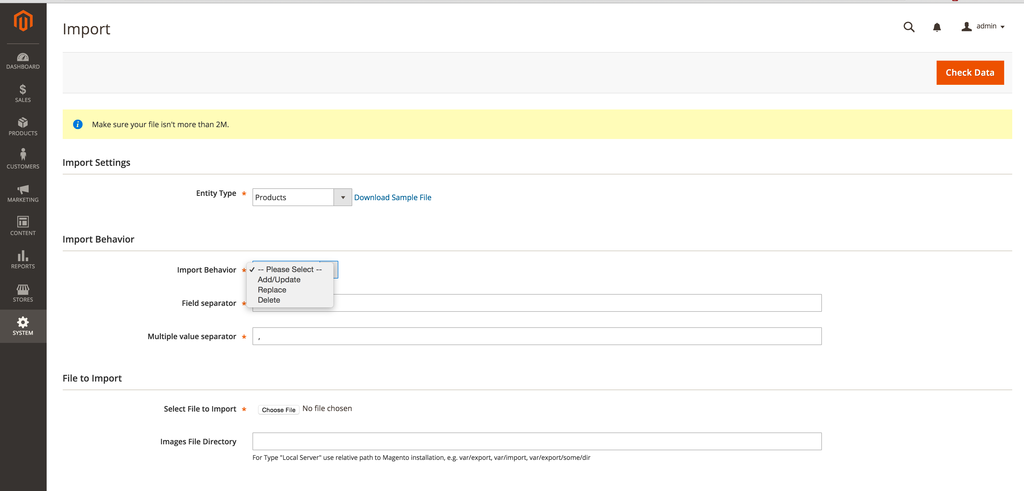
From there, the typical workflow is relatively simple:
- Select the Entity Type you want to import.
- Download a sample file if you need a reference for the expected structure.
- Prepare your CSV according to Magento requirements.
- Choose an Import Behavior.
- Configure error-handling settings.
- Upload the file.
- Click Check Data to validate it.
- Fix any validation errors if necessary.
- Run the import.
Adobe currently provides three primary import behaviors: Add/Update, Replace, and Delete. Before Magento processes the file, the Check Data step validates the uploaded data against the selected entity and import requirements. If validation fails, the errors need to be corrected before the import can proceed.
Sample files are especially useful when preparing a new import because they show the expected column names and general structure. Adobe recommends examining the sample file and preserving the required column headings when preparing your own CSV.
The native importer supports common Magento data-transfer scenarios, including product- and customer-related imports where the corresponding entity is available. Product imports can also include images. Image paths or URLs are referenced from the CSV, while Magento can retrieve the actual files from the local import directory, an external server, or remote storage depending on the setup. Multiple product images can also be associated with a single SKU.
For product-specific requirements — including configurable products, product images, stock, prices, custom options, and other product data — see our complete Magento 2 product import and export guide. It explains the native CSV structure and common product-import scenarios in detail.
When You Probably Don’t Need Another Magento 2 Data Import Tool
The presence of more advanced import solutions does not mean every Magento store needs one.
Imagine a merchant who updates a catalog only twice a year. The supplier already provides a CSV that closely follows Magento’s required structure. The store contains a few thousand products, there is no ERP or PIM integration, and someone on the team can review the file manually before uploading it.
In this case, adding another Magento 2 data import tool may introduce more complexity than value. Thus, the native importer is often sufficient when:
- imports are occasional rather than continuous;
- your data is already available in a Magento-compatible CSV;
- only standard supported entities need to be transferred;
- the files are small or manageable enough to prepare manually;
- field names and values do not require extensive transformation;
- there is no need to pull data automatically from ERP, PIM, supplier, or other external systems;
- no recurring schedule is required.
A similar situation applies to one-time or infrequent data migrations. If the source data can be converted into Magento’s expected CSV structure without much effort, using the native importer may be the simplest route.
If your requirements look like this, the default Magento 2 importer may be the most practical solution.
There is little benefit in deploying a more complex platform when the built-in functionality already solves the actual business problem.
Where the Native Magento Import Workflow Becomes Restrictive
The limitations of the default importer usually become noticeable when the surrounding data-management process becomes more complex. And manual file preparation is often the first challenge you encounter.
Magento expects incoming data to follow specific entity structures and column requirements. When a supplier, ERP system, marketplace, or another platform uses different field names and values, the data may need to be reorganized before every import.
This is manageable once or twice. It becomes less attractive when the same preparation needs to happen every day.
The native workflow is also centered primarily around structured CSV data. If your operation relies on XML, JSON, spreadsheets, remote feeds, or data delivered directly through APIs, an additional processing or integration layer may be required before Magento can consume the information.
The same applies to data sources. A manual upload from a local computer is simple. Managing data that continuously arrives from FTP/SFTP servers, shared spreadsheets, supplier URLs, ERP platforms, or PIM systems is a different type of workflow.
Entity coverage can also become important. A basic merchant may only need products and customers, while a more complex business may need to move orders, inventory, pricing, categories, B2B entities, custom data, and other information between Magento and external platforms.
Eventually, the challenge becomes less about the individual import itself and more about repetitive administration:
preparing files,
renaming columns,
changing values,
uploading files,
validating them,
running imports,
checking results,
and repeating the same process.
That is usually the point at which merchants start evaluating automation, custom integrations, or a more advanced Magento 2 import/export workflow.
For Magento Open Source merchants, that may mean looking at third-party or custom solutions. Adobe Commerce users, however, have another native option to consider first: Scheduled Import/Export, which adds automation to the standard data-transfer workflow.
For a broader overview of individual entities, formats, troubleshooting scenarios, APIs, and data-transfer methods, see our Full Magento 2 Import & Export Guide for 2026. It serves as a hub for Magento product, customer, order, external-system, and other import/export tutorials.
Adobe Commerce Import Tool: What Changes?
Adobe Commerce does not replace the standard Magento import model with a completely different system. Merchants still work with structured import files, supported entities, import behaviors, and validation rules. The main difference is that Adobe Commerce adds native scheduling capabilities on top of the regular import/export workflow.
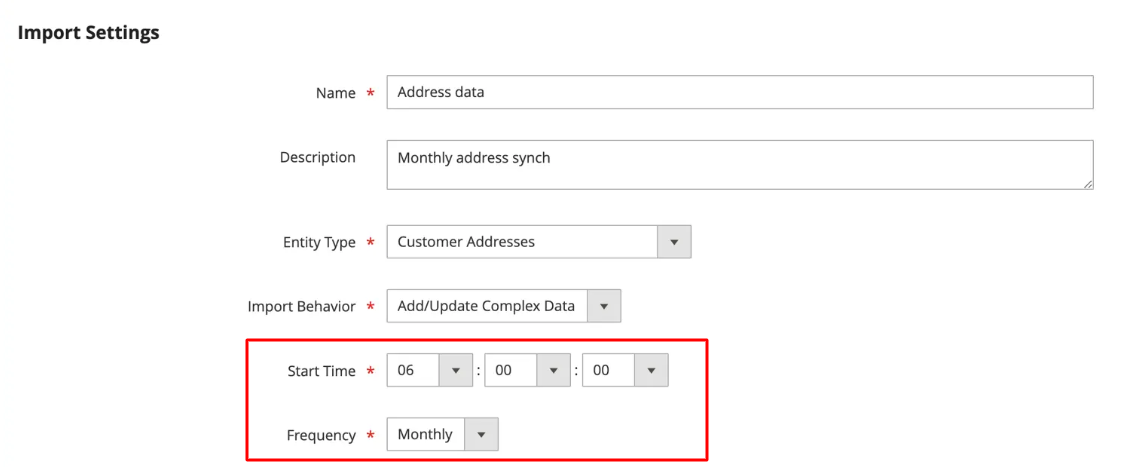
When Adobe Commerce Native Import Is Enough
For some Commerce merchants, scheduled import/export addresses the biggest limitation of the basic Magento workflow: having to initiate the same operation manually every time.
Consider a store that receives a Magento-compatible product file from a supplier every week. The file structure remains consistent, the imported entity is already supported, and no complicated data conversion is necessary. Instead of asking an administrator to upload the file every, let’s say, Monday, Adobe Commerce can execute the import according to a predefined schedule.
The native Adobe Commerce approach can therefore work well when:
- you need recurring rather than one-time imports;
- incoming files already follow Magento’s expected structure;
- CSV is sufficient for the workflow;
- the required entity is supported;
- little or no field transformation is required;
- the source file can be stored in a supported location.
Scheduled imports can work with files stored on the local Adobe Commerce server or a remote FTP server, which covers many traditional supplier-feed scenarios without additional software.
This can make the Adobe Commerce native functionality a sensible middle ground between manual Magento imports and a more extensive Magento 2 advanced import solution.
If all you need is to take a correctly structured CSV from a known location and process it every night, week, or month, there may be little reason to introduce another tool.
What Adobe Commerce Scheduled Import/Export Still Doesn’t Solve
Although Adobe Commerce solves the scheduling problem very effectively, it does not automatically solve every other part of a data-integration workflow.
Let’s suppose a supplier sends product data in a structure that looks nothing like Magento’s expected CSV. The supplier may use its own column names, category hierarchy, attribute values, price conventions, or product relationships. Running that file automatically every night does not eliminate the need to transform it into something Magento can understand.
These are the main situations when scheduling alone may not address your Magento 2 import/export demands:
- Different data structures. Supplier fields may need to be mapped to Magento attributes before import.
- Value transformation. Incoming category names, attribute options, prices, identifiers, or other values may need to be converted automatically.
- Unsupported formats. The source system may provide XML, JSON, spreadsheet files, or API responses instead of CSV.
- Additional data sources. Data may live in Google Sheets, SFTP storage, direct URLs, ERP platforms, PIM systems, or other applications rather than a local or FTP-accessible CSV.
- Broader entity requirements. A business may need to transfer information beyond the entities covered by the standard scheduled workflow.
- Two-way synchronization. Some integrations require data not only to enter Magento but also to be exported back to ERP, PIM, CRM, marketplaces, or other systems.
This is why the question should not simply be whether Adobe Commerce has a better importer than Magento Open Source. It actually does. The more useful question, however, is whether scheduling is the main problem you need to solve.
If the answer is yes, the native Adobe Commerce tools may already be sufficient. If the challenge involves incompatible structures, multiple file formats, numerous external sources, custom entities, transformations, or more complex synchronization, then the search for a different Magento 2 data import tool becomes more relevant.
We examine some of these differences in more detail in our guide to improving Adobe Commerce import and export procedures. Once requirements extend beyond what either Magento Open Source or Adobe Commerce provides natively, merchants generally face two directions: build the missing functionality specifically for their business or install third-party software. The next question, therefore, is whether a Magento 2 custom import is worth developing.
Magento 2 Custom Import Development: Maximum Flexibility at a Cost
Sometimes the right Magento 2 data import tool does not exist off the shelf. A business may have a proprietary ERP, a legacy backend, an unusual API, custom Magento entities, or import rules that are too specific for a standard module. In these cases, Magento 2 custom import development can be the most sensible approach because the integration is designed around the actual workflow instead of forcing the workflow to fit an existing tool. Typical cases include:
- proprietary ERP or warehouse systems;
- unusual or undocumented APIs;
- custom Magento entities and database structures;
- complex pricing, inventory, or product-assignment rules;
- highly specialized data transformations;
- event-driven or near-real-time synchronization;
- workflows involving several internal systems with unique dependencies.
In these situations, a custom integration can be cleaner than trying to combine several extensions and workarounds.
It also gives your developers full control over the architecture. They can decide how authentication works, how requests are queued, what happens when an import fails, how data is transformed, and how the system should respond to specific business events. For highly specialized environments, it may be exactly the right architecture.
The Hidden Cost of a Magento 2 Custom Import
If custom development is so powerful, why doesn’t everyone rely on it? The problem is cost — and not just the price of building the solution itself. The code that transfers data is usually only one part of the project.
Before development begins, someone needs to document source fields, Magento destinations, validation rules, dependencies, edge cases, and failure scenarios. The implementation also requires testing, logging, error handling, scheduling or queue management, authentication, and security controls.
After launch, the integration becomes part of your technical infrastructure.
Magento upgrades may change APIs or internal behavior. PHP versions and Composer dependencies evolve. An external ERP or supplier API may change its response format. Credentials expire. Business rules change. New fields need to be added. Failed imports need investigation.
The last point is easy to underestimate. A custom integration can work perfectly for years, but someone still needs to understand it when an urgent problem appears.
That is why the main question is: Do you want to own this integration for the next five years?
If the answer is yes — custom development may be justified.
If the requirements are relatively common, such as mapping supplier fields, importing additional file formats, scheduling jobs, or connecting Magento with standard external systems, it is usually worth checking whether those capabilities already exist in a maintained third-party solution before committing to a custom codebase.
Specialized Magento 2 Import Extensions: When One Tool for One Job Makes Sense
Not every missing import feature requires a broad platform or custom development. Sometimes you only need one specific capability that Magento does not provide natively. That is where a specialized Magento 2 data import tool can make sense.
You may need a dedicated tool for product import, orders, customers, categories, stock updates, XML files, tracking data, or a specific external system. For one clearly defined requirement, a focused module can be cheaper and easier to implement than a larger solution.
The Advantage of Purpose-Built Import Modules
The main appeal here is focus. For example, Commerce Extensions offers separate Magento 2 modules for import/export of products, categories, orders, invoices, shipments, etc. XTENTO, in turn, follows a similar approach with dedicated tools such as Order Import, Tracking Import, and Stock Import.
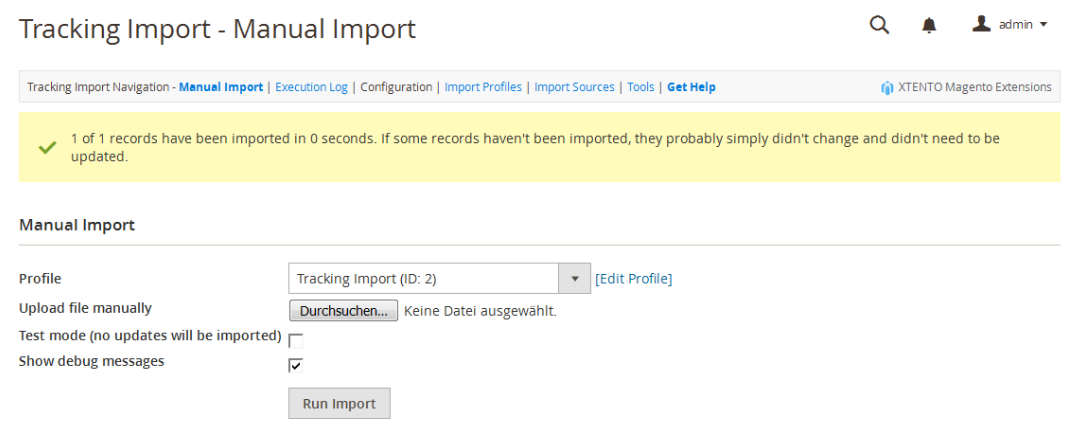
You can also find narrowly focused category tools on Adobe Commerce Marketplace, such as Category Import Export by MageComp, which is designed specifically for bulk category and subcategory transfers via CSV. If the lack of category import is your only problem, a dedicated category module may be all you need. There is little reason to deploy a much broader tool just to close this gap.
The Problem With Building an Import Stack From Multiple Extensions
The approach becomes less convenient when one requirement turns into several.
You might start with a product importer, then add another module for categories, one for orders, another for stock, and a separate tool for tracking or external feeds (Commerce Extensions’ catalog illustrates this model particularly well).
At that point, you are no longer managing one extension but a small import stack, which can mean:
- separate purchases and renewals;
- different interfaces and configuration logic;
- overlapping functionality;
- separate schedules and logs;
- more compatibility and upgrade testing;
- multiple support channels.
The basic calculation is simple:
One requirement → one specialized module may make sense.
Six import/export requirements → six separate modules may no longer make sense.
When that happens, it is worth comparing the combined cost and maintenance effort with a broader Magento 2 import/export solution that handles several workflows in one place.
When You Need an Advanced Import Solution for Magento 2
Typical signs that you may need an advanced Magento 2 data import tool include:
- suppliers use column names and data structures that do not match Magento;
- imports need to run daily, hourly, or on another recurring schedule;
- files arrive through FTP/SFTP, direct URLs, spreadsheets, or APIs;
- you regularly work with XML, JSON, XLSX, or other formats besides CSV;
- incoming values need mapping, replacement, or transformation;
- data must move both into and out of Magento;
- Magento needs to exchange information with ERP, CRM, PIM, accounting, marketplace, or other systems;
- your team repeatedly performs the same manual preparation before every import.
At this point, you are no longer looking only for a CSV uploader for Magento 2. You need an import-management layer that can standardize different incoming datasets and automate the recurring work around them.
Improved Import & Export as an Advanced Magento 2 Data Import Tool
Our Improved Import & Export extension is designed for this type of workflow. Rather than focusing on one isolated entity or file type, it brings multiple import and export processes into the same system.
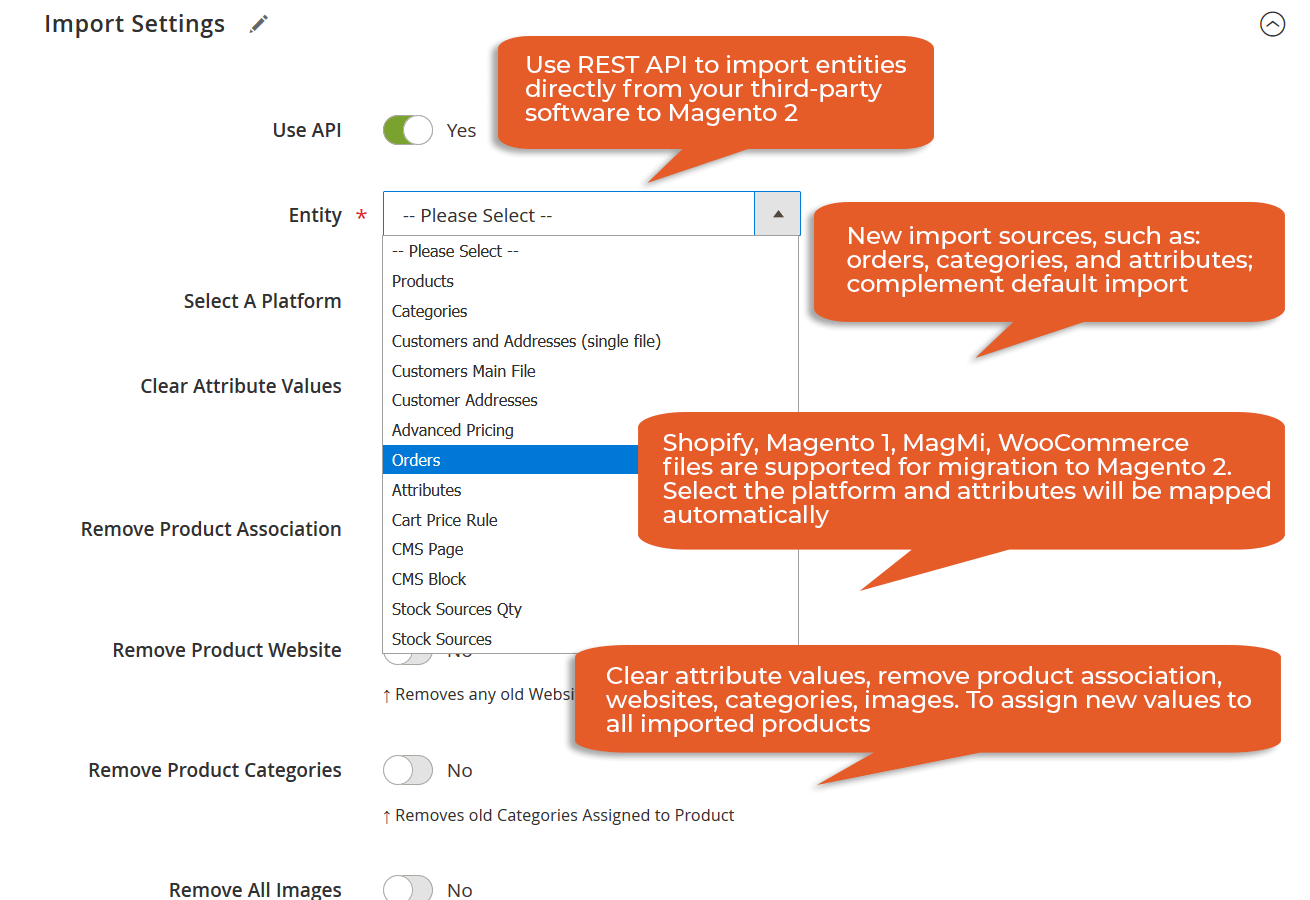
The easiest way to understand it is by looking at the problems it addresses:
- Different file structures → mapping. Incoming columns can be mapped to Magento attributes, so supplier files do not always need to be rebuilt manually.
- Different formats → broader format support. Along with CSV, the extension supports XML, JSON, XLSX, and ODS, while XSLT templates can be used to transform XML data.
- Recurring work → scheduled jobs. Built-in cron support lets you automate imports for products, categories, customers, stock, attributes, and other supported entities.
- Remote data → multiple import sources. Files can be imported from sources such as FTP/SFTP, direct URLs, Google Sheets, Dropbox, and REST or SOAP APIs.
- More business data → expanded entity coverage. The extension covers products, categories, customers, orders, pricing, CMS content, attributes, inventory-related data, and other entities beyond the narrowest native workflows.
- Repeated configurations → reusable jobs. Instead of recreating the same setup for every transfer, import and export jobs store the source, behavior, mapping, scheduling, and other settings for repeated use.
This makes the extension particularly practical for supplier feeds, large recurring catalog updates, price and inventory synchronization, Google Sheets workflows, B2B data exchange, and ERP/PIM/CRM integrations.
For the complete list of supported features, entities, sources, formats, and configuration, explore Improved Import & Export or contact Firebear to discuss whether your requirements call for an advanced solution or can still be handled with Magento’s native tools.
Final Words: Choose the Magento 2 Data Import Tool That Matches Your Workflow
The easiest way to choose a Magento 2 data import tool is to match the solution to your actual needs. Use this framework as a starting point:
| Your Requirement | Start With |
| Occasional Magento-ready CSV import | Native Magento importer |
| Standard recurring imports on Adobe Commerce | Adobe Commerce Scheduled Import/Export |
| One missing import capability | Specialized third-party module |
| Unique proprietary business workflow | Custom development |
| Multiple sources, formats, entities, and recurring workflows | Improved Import & Export or another advanced import/export solution |
| ERP, PIM, CRM, or supplier synchronization | Improved Import & Export or another integration-oriented import/export solution |
For occasional, well-structured CSV imports, the native Magento importer may be all you need. Adobe Commerce adds scheduled import/export for recurring transfers. Specialized modules can solve individual gaps efficiently, while custom development remains a sensible choice for highly specific business logic and proprietary integrations.
As data operations grow, however, import stops being a standalone Admin task and becomes part of a wider ecommerce infrastructure. Supplier feeds, ERP and PIM systems, inventory updates, customer data, marketplaces, and other applications may all need to exchange information with Magento on a regular basis.
That is where a broader solution can become useful. Improved Import & Export, for instance, brings multiple import and export workflows into one Magento environment, helping merchants manage recurring transfers, different data structures, external sources, and integration scenarios without assembling a separate tool for every task.
If you are not sure which approach fits your store, contact Firebear. We can review your import/export workflow and help determine whether Magento’s native functionality, a focused solution, or a more advanced setup makes the most sense.
Magento 2 Data Import Tool FAQ
What is a Magento 2 data import tool?
A Magento 2 data import tool is any native, third-party, or custom solution used to transfer data into Magento Open Source or Adobe Commerce. Depending on the tool, it may handle products, customers, pricing, inventory, categories, orders, images, and other entities. More advanced solutions can also add automation, mapping, additional file formats, external sources, and integrations with ERP, PIM, CRM, or supplier systems.
Does Magento 2 have a built-in data importer?
Yes. Magento Open Source and Adobe Commerce include a native importer under System → Data Transfer → Import. It supports CSV-based data transfer for products, advanced pricing, customers, customer addresses, product images, and other supported data. The importer can add or update records, replace existing data, or delete entities.
Is the Magento 2 native importer enough for product imports?
It can be. If you occasionally import Magento-ready CSV files, work with standard product structures, and do not need complex mapping, additional formats, or external integrations, the native Magento 2 importer may be sufficient. Magento supports product imports, including product images, through the standard data-transfer workflow.
What is the difference between Magento Open Source and Adobe Commerce import tools?
Both platforms include the standard Admin importer, but Adobe Commerce additionally provides Scheduled Import/Export. This feature lets merchants automate recurring data transfers and run them daily, weekly, or monthly. Scheduled Import/Export is available in Adobe Commerce but not in Magento Open Source.
Can Adobe Commerce schedule data imports automatically?
Yes. Adobe Commerce can schedule imports to run daily, weekly, or monthly through Scheduled Import/Export. Scheduled jobs can use files stored on the local Commerce server or a remote FTP server, and the file is validated before each import runs.
When do I need a third-party Magento 2 import extension?
A third-party Magento 2 import extension becomes useful when the native tools do not cover an important part of your workflow. Common reasons include additional file formats, more data sources, field mapping, automated transformations, broader entity support, more flexible scheduling, or integrations with external business systems. If you only need one missing capability, a specialized extension may be enough. If several requirements overlap, a broader import/export solution may be easier to manage.
What is Magento 2 advanced import?
Magento 2 advanced import generally refers to data-transfer workflows that go beyond manually uploading a standard CSV. This may include scheduled imports, attribute and value mapping, XML or JSON processing, remote data sources, APIs, reusable import jobs, additional entities, and synchronization with external platforms. Improved Import & Export, for example, supports multiple formats, mapping, scheduled jobs, REST and SOAP APIs, and various remote data sources.
Should I build a Magento 2 custom import or use an extension?
Use Magento 2 custom import development when the workflow contains proprietary business logic, unusual APIs, custom entities, or requirements that existing tools cannot reasonably support. For common needs such as file-format support, field mapping, recurring imports, or standard ERP/PIM integration, an established extension may reduce development and long-term maintenance. Consider not only the initial cost but also testing, upgrades, monitoring, external API changes, and future developer support.
Can Magento 2 import data from XML, JSON, Excel, Google Sheets, or an API?
The native Magento import workflow is primarily based on CSV files. Additional formats and sources generally require another processing layer or a third-party tool. Improved Import & Export, for example, supports CSV, XML, JSON, XLSX, and ODS, along with Google Sheets, FTP/SFTP, direct URLs, cloud storage, and REST/SOAP API connections.
How do I choose the right Magento 2 data import tool for ERP, PIM, or supplier integration?
Start by checking how the external system delivers data: file format, structure, transfer method, update frequency, and entities involved. Then determine whether Magento data must only be imported or synchronized in both directions. If the source already provides Magento-compatible CSV files, native tools may be enough. If the integration requires mapping, transformations, API connections, frequent automation, multiple entities, or two-way synchronization, an integration-oriented import/export solution or custom development is usually more appropriate.
Related posts
 Magento 2 System Requirements: Complete Guide for Adobe Commerce and Open Source
 Magento 2 (Adobe Commerce) Pricing Explained
 Magento 2 B2B Company Explained: A Complete Guide to Setup, Structure, Management & Import for Adobe Commerce
 How to Import Customers & Customer Addresses to Magento 2 in 2026: Complete Tutorial & CSV Samples for Adobe Commerce & Magento Open Source
 Magento 2.4.9 Upgrade: What’s New, Import & Export Improvements, and Third-Party Extension Compatibility
 Magento 2 Release Notes: Adobe Commerce & Open Source Updates
 Magento to Shopify Product Migration: Complete 2026 Guide to Import & Export
 Shopify Product Import Behavior Explained: Take Full Control of Your Product Data